This time we’re going bigger than ever. Fabric, Power BI, SQL, AI and more. We're covering it all. You won't want to miss it.
Learn moreDid you hear? There's a new SQL AI Developer certification (DP-800). Start preparing now and be one of the first to get certified. Register now
Hello,
I hav
Hello,
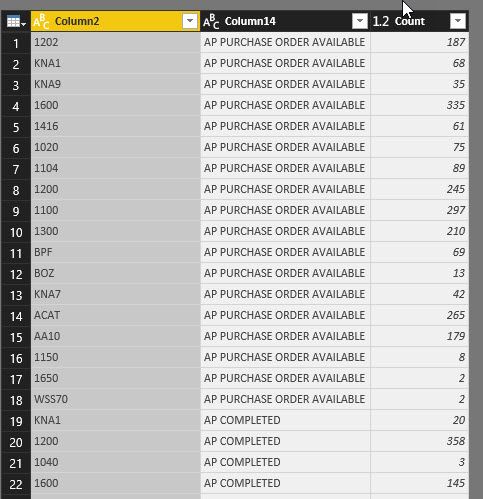
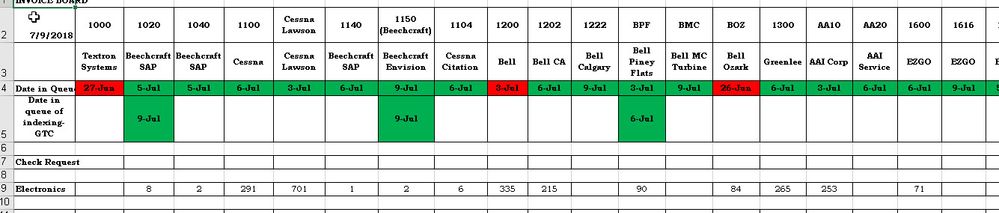
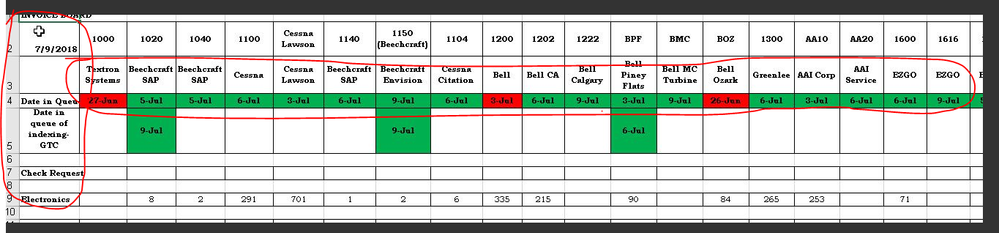
I need my report to look like the 2nd screen shot from the 1st screen shot. Basically, column 2 should be listed horizontally and column14 vertically only in the 1st column along with its counts. Has anyone created a report like this?
Thanks in advance.
Hormuzd
Hi @Anonymous,
I tried but no luck. Is there a step by step tutorial?
Thanks
HB
A simple google search will bring you hundreds of guides 🙂 here is the one for ex:
https://docs.microsoft.com/en-us/power-bi/desktop-matrix-visual
Thanks
Raj
Yes. I saw this earlier. It is not exactly what I need.
Hi @hbirdie,
It is not possible to get the expected result completely. As there are only three columns in 1st screenshot, while the highlighted data does not exist in sample data.
So, what is your desired output with the provided sample table? Is any calculation needed to get required result?
Regards,
Yuliana Gu
Check out the April 2026 Power BI update to learn about new features.
Sign up to receive a private message when registration opens and key events begin.
If you have recently started exploring Fabric, we'd love to hear how it's going. Your feedback can help with product improvements.
| User | Count |
|---|---|
| 34 | |
| 31 | |
| 25 | |
| 20 | |
| 16 |
| User | Count |
|---|---|
| 60 | |
| 48 | |
| 29 | |
| 23 | |
| 23 |