Join us at FabCon Atlanta from March 16 - 20, 2026, for the ultimate Fabric, Power BI, AI and SQL community-led event. Save $200 with code FABCOMM.
Register now!The Power BI Data Visualization World Championships is back! Get ahead of the game and start preparing now! Learn more
Hello,
I have two tables, table A and Tablt B, join by truck number, it is a one to many relationship
A:
| Truck Number | # Checks | # Dispatch |
| 1001 | 1 | 2 |
B:
| Truck Number | Chekin Time | Dispach Time |
| 1001 | 1:30 | 9:00 |
| 1001 | 9:00 |
Idally, it will give the 2 in diaptach column in table A(even if the record in table B, it is the same tim), and give me 1 times for chckin in time, because there is null record in table B. curretly i am using the following formula, but it gives both for 2. does anyone know I can I make it not count this blank record, and still count 2 for even I have the same dispatch time.
DISPATCHS = IF(ISBLANK( COUNT(DISPATCH[DISPATCH_TIME])),0,COUNT(DISPATCH[DISPATCH_TIME]))
Thanks
Frank
Solved! Go to Solution.
Hi @NoobAnalyst01,
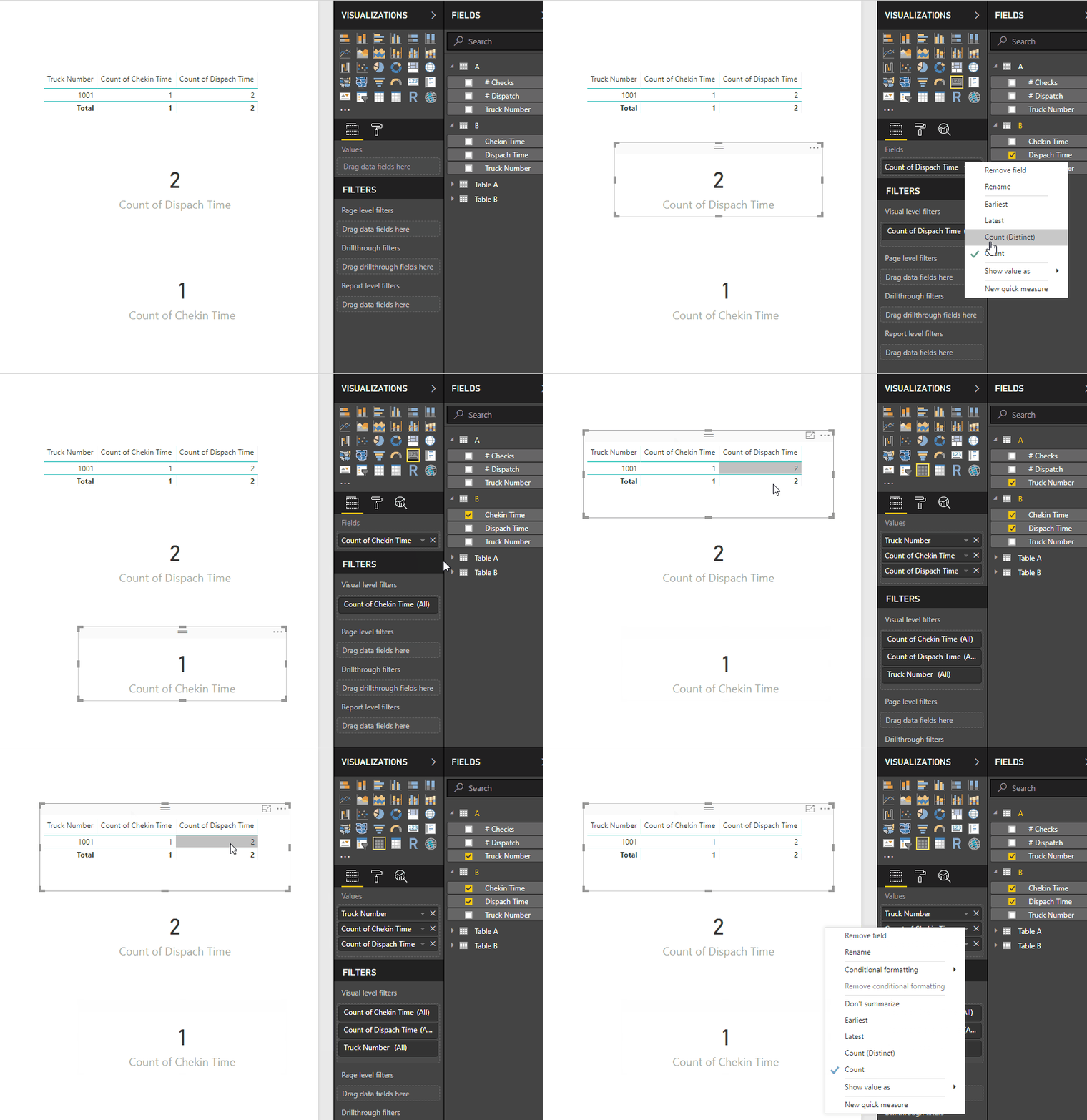
How are you setting up the visuals? I have made a mockup of your information and just by choosing count on the dispatch and check in it gives me 2 and 1.
Not really sure what you want to achieve, can you please ellaborate better and give a more extendend sample data and expected result.
Normally blanks or null aren't consider in the count and sum.
Regards,
MFelix
Regards
Miguel Félix
Proud to be a Super User!
Check out my blog: Power BI em PortuguêsHi @NoobAnalyst01,
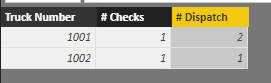
In TableA, please create below calculated columns:
# Checks =
CALCULATE (
COUNTROWS ( FILTER ( TableB, TableB[Chekin Time] <> BLANK () ) ),
USERELATIONSHIP ( TableA[Truck Number], TableB[Truck Number] )
)
# Dispatch =
CALCULATE (
COUNT ( TableB[Dispach Time] ),
ALLEXCEPT ( TableA, TableA[Truck Number] )
)
Best regards,
Yuliana Gu
Hi @NoobAnalyst01,
How are you setting up the visuals? I have made a mockup of your information and just by choosing count on the dispatch and check in it gives me 2 and 1.
Not really sure what you want to achieve, can you please ellaborate better and give a more extendend sample data and expected result.
Normally blanks or null aren't consider in the count and sum.
Regards,
MFelix
Regards
Miguel Félix
Proud to be a Super User!
Check out my blog: Power BI em PortuguêsThe Power BI Data Visualization World Championships is back! Get ahead of the game and start preparing now!
| User | Count |
|---|---|
| 68 | |
| 45 | |
| 43 | |
| 36 | |
| 23 |
| User | Count |
|---|---|
| 196 | |
| 126 | |
| 106 | |
| 78 | |
| 55 |