cancel
Showing results for 
Search instead for 
Did you mean: 

The Power BI Data Visualization World Championships is back! Get ahead of the game and start preparing now! Learn more

Reply
prakash11440278
Post Prodigy
Post Prodigy

How to control subtotal labels?

Hi All,


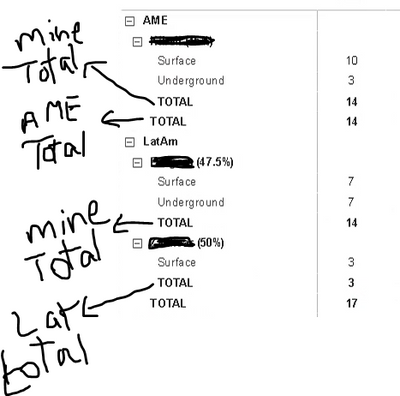
Is it possible to control the labels of the subtotals so that not just "Total" will be shown, i want to show as category wise like below. Please help here.


prakash11440278_0-1605615869662.png


4 REPLIES 4
mahoneypat
Microsoft Employee
Microsoft Employee

In the Format options for your matrix, there is a field to put whatever text you want for the subtotal.


mahoneypat_0-1605619145239.png


Regards,

Pat


Did I answer your question? Mark my post as a solution! Kudos are also appreciated!

To learn more about Power BI, follow me on Twitter or subscribe on YouTube.


@mahoneypa HoosierBI on YouTube


Hi @mahoneypat ,

Thanks for your reply. That is not helpful.

If we change the Row subtotal label all the total labels will change. My ask is here, it should change category wise labels. Not all the total labels.

Anonymous
Not applicable

Hi @prakash11440278 ,


I'm afraid it is not supported currently.

You may submit this as an idea through below link.

https://ideas.powerbi.com/ideas/ 


Best Regards,

Jay

Hi All, Can you have a solution for this issue?

Helpful resources

Announcements
November Power BI Update Carousel

Power BI Monthly Update - November 2025

Check out the November 2025 Power BI update to learn about new features.

Fabric Data Days Carousel

Fabric Data Days

Advance your Data & AI career with 50 days of live learning, contests, hands-on challenges, study groups & certifications and more!

FabCon Atlanta 2026 carousel

FabCon Atlanta 2026

Join us at FabCon Atlanta, March 16-20, for the ultimate Fabric, Power BI, AI and SQL community-led event. Save $200 with code FABCOMM.

Top Solution Authors
Top Kudoed Authors