cancel
Showing results for 
Search instead for 
Did you mean: 

Data Days is here! Join us now for 60+ days of learning, challenges, and connection. Learn more

Reply
Saloni_Gupta
Helper I
Helper I

How to compare the values in two Summarize tables

Hi All,

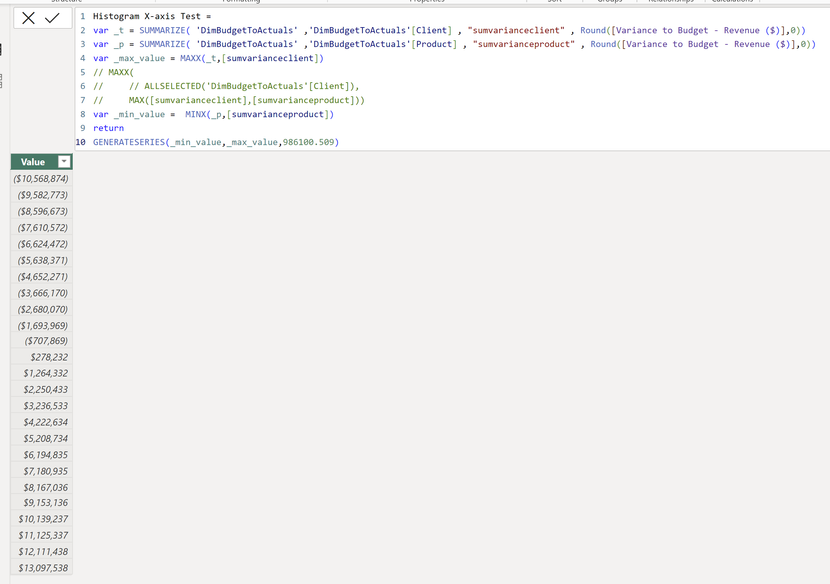
I have a requirement to create histograms and this is the dax that I am using to create the x-axis in a table.

var _t = SUMMARIZE( 'DimTable' ,'DimTable'[Client] , "sumvarianceclient" , Round([Variance to Budget - Revenue ($)],0))
var _p = SUMMARIZE( 'DimTable' ,'DimTable'[Product] , "sumvarianceproduct" , Round([Variance to Budget - Revenue ($)],0))
var _max_value = MAXX(_t,[sumvarianceclient])
var _min_value =  MINX(_p,[sumvarianceproduct])
return
GENERATESERIES(_min_value,_max_value,986100.509)
Saloni_Gupta_0-1712096449541.png


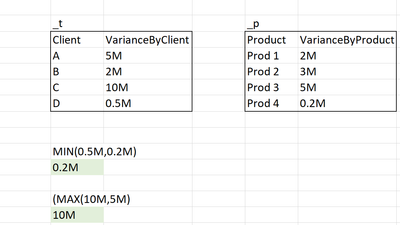
But I want to first compare the max and min values from both the tables (_t and _p) and then generateseriesaccordingly. For e.g.
Saloni_Gupta_1-1712095597513.png

I basically want to create this series in one table/dax so that I dont have to show different x-axis (one when Group By Client and when one Grouped by Product.) and I can show the same x-axis to create bins for both Client and Product.

Can you please help me change the var _max_value and var _min_value to compare the values from both the tables and then give the min or max value? Or if there is any other way to achieve this requirement?
Let me know if you require more information.

Thanks in Advance!

1 ACCEPTED SOLUTION
Anonymous
Not applicable

Hi @Saloni_Gupta ,


Try to modify your formula like below:

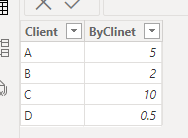
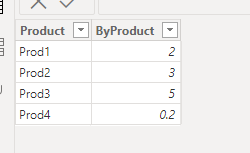
vkongfanfmsft_1-1712111575981.pngvkongfanfmsft_2-1712111589616.png

result_ = 
VAR _max_value_t =
    MAXX ( _t, [ByClinet] )
VAR _max_value_p =
    MAXX ( _p, [ByProduct] )
VAR _max_value =
    MAX ( _max_value_t, _max_value_p )
VAR _min_value_t =
    MINX ( _t, [ByClinet] )
VAR _min_value_p =
    MINX ( _p, [ByProduct] )
VAR _min_value =
    MIN ( _min_value_t, _min_value_p )
RETURN
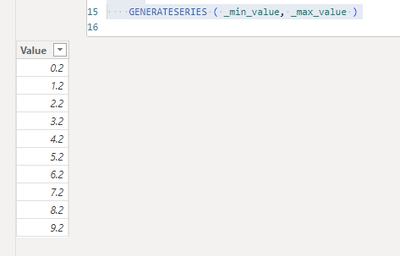
    GENERATESERIES ( _min_value, _max_value )

vkongfanfmsft_0-1712111554101.png


Best Regards,
Adamk Kong


If this post helps, then please consider Accept it as the solution to help the other members find it more quickly.

View solution in original post

1 REPLY 1
Anonymous
Not applicable

Hi @Saloni_Gupta ,


Try to modify your formula like below:

vkongfanfmsft_1-1712111575981.pngvkongfanfmsft_2-1712111589616.png

result_ = 
VAR _max_value_t =
    MAXX ( _t, [ByClinet] )
VAR _max_value_p =
    MAXX ( _p, [ByProduct] )
VAR _max_value =
    MAX ( _max_value_t, _max_value_p )
VAR _min_value_t =
    MINX ( _t, [ByClinet] )
VAR _min_value_p =
    MINX ( _p, [ByProduct] )
VAR _min_value =
    MIN ( _min_value_t, _min_value_p )
RETURN
    GENERATESERIES ( _min_value, _max_value )

vkongfanfmsft_0-1712111554101.png


Best Regards,
Adamk Kong


If this post helps, then please consider Accept it as the solution to help the other members find it more quickly.

Helpful resources

Announcements
Fabric Data Days is here Carousel

Fabric Data Days 2026

Don't miss out on Data Days, June 15 through August 7. Learn Fabric, Power BI, SQL, AI and more.

May Power BI Update Carousel

Power BI Monthly Update - May 2026

Check out the May 2026 Power BI update to learn about new features.

Power BI DataViz World Championships carousel

Power BI DataViz World Championships - June 2026

A new Power BI DataViz World Championship is coming this June! Don't miss out on submitting your entry.