Get certified for free when you join Fabric Data Days 2026 and dive into Fabric, Power BI, SQL, AI, and other essential data skills.
Join nowData Days is here! Join us now for 60+ days of learning, challenges, and connection. Learn more
Hello,
I am still very new to Power BI and was playing around with some sample data today.
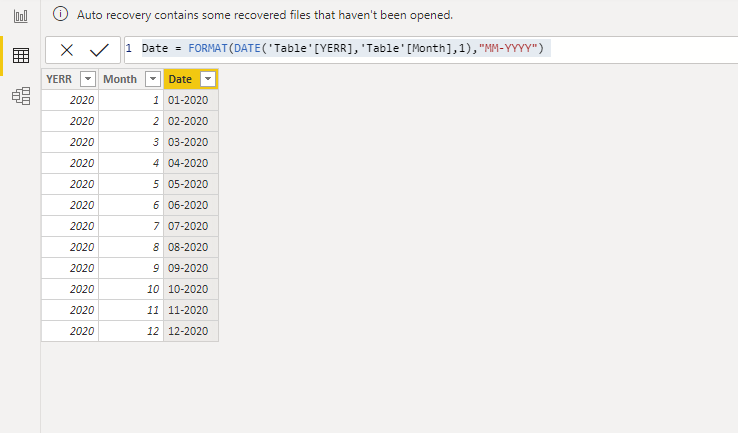
I have a Year column in YYYY format, and Date Number column (1= January, 12 = December).
Could someone help me with the formula I would use to combine these two columns to get a MM-YYYY date column?
Thanks!
Solved! Go to Solution.
Hi @Analytics4Life1 ,
Would you please try the following calculated column:
Date = FORMAT(DATE('Table'[YERR],'Table'[Month],1),"MM-YYYY")
If this post helps, then please consider Accept it as the solution to help the other members find it more quickly.
Best Regards,
Dedmon Dai
Hello, and if additional to that I would like to add a day even if this table does not exist. How could I do it?
Hi @Analytics4Life1 ,
Would you please try the following calculated column:
Date = FORMAT(DATE('Table'[YERR],'Table'[Month],1),"MM-YYYY")
If this post helps, then please consider Accept it as the solution to help the other members find it more quickly.
Best Regards,
Dedmon Dai
What if the Month column is not numbers but names of the months??
Thanks for the above information.
But how can I combine Date, Month, Year at the same time?
I am getting error while doing.
Please help!
@Analytics4Life1 , You need year and month for this . Assume both are in number format
format(Date([year],[month],1),"MM-YYYY") //where year and month are columns
format([Date],"MM-YYYY") //Date is a column
format(today(),"MM-YYYY")
Don't miss out on Data Days, June 15 through August 7. Learn Fabric, Power BI, SQL, AI and more.
Check out the May 2026 Power BI update to learn about new features.
| User | Count |
|---|---|
| 23 | |
| 23 | |
| 21 | |
| 20 | |
| 15 |
| User | Count |
|---|---|
| 58 | |
| 54 | |
| 42 | |
| 30 | |
| 24 |