cancel
Showing results for 
Search instead for 
Did you mean: 

The Power BI Data Visualization World Championships is back! Get ahead of the game and start preparing now! Learn more

Reply
JBDelvaux
Helper I
Helper I

How to clear loaded data

Greetings,

I'm trying to empty all the loaded data. I don't have much space on my computer, and it keeps telling me I don't have enough space. At the beginning, I had ~10gb of data available. Since it's too much to upload, I switched some of my queries to direct query. The problem is, that when I look I only have 3gb of data remaining, and it now says that I don't have enough.

I feel like it's trying to load data before discarding the old ones.

As such, I would like ot know, how do I clear all the loaded data so I can load new one? Or, how can I change the repertory it's stored in? I got another hard drave that's almost empty, but I don't know how to change where the imported data are stored. Thanks for the help.

1 ACCEPTED SOLUTION
v-easonf-msft
Community Support
Community Support

Hi , @JBDelvaux 

Maybe you could try to clear the report cache or change the cache settings here.

file>options and settings>options>data load>clear cache

2019.png


2020.png

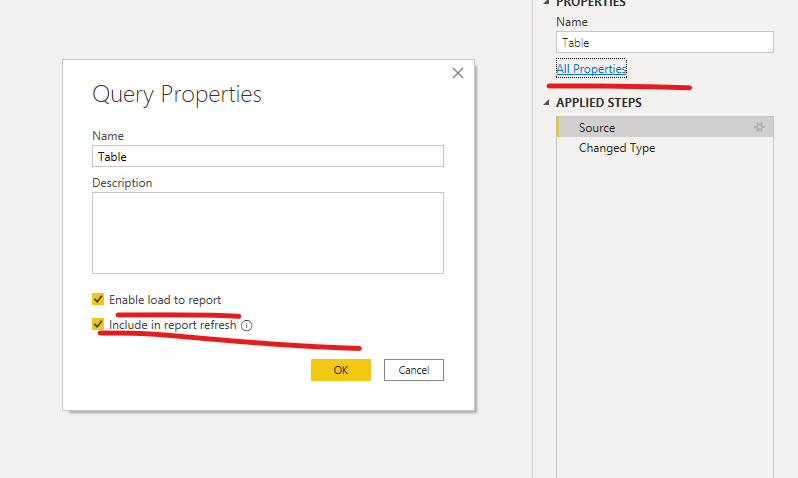
"Include In Report Refresh" means query is automatically refreshed when you press "Refresh" button on the ribbon.

"Enable Load" means query results are available for report builder. Otherwise you may use it in your other queries (for example to merge data), but it is not shown in the report builder.(Refer to this)


Best Regards,
Community Support Team _ Eason
If this post helps, then please consider Accept it as the solution to help the other members find it more quickly.

View solution in original post

4 REPLIES 4
v-easonf-msft
Community Support
Community Support

Hi , @JBDelvaux 

Maybe you could try to clear the report cache or change the cache settings here.

file>options and settings>options>data load>clear cache

2019.png


2020.png

"Include In Report Refresh" means query is automatically refreshed when you press "Refresh" button on the ribbon.

"Enable Load" means query results are available for report builder. Otherwise you may use it in your other queries (for example to merge data), but it is not shown in the report builder.(Refer to this)


Best Regards,
Community Support Team _ Eason
If this post helps, then please consider Accept it as the solution to help the other members find it more quickly.

Thank you. It appear it was indeed the way to go. It didn't solve my problem, but at least now I can tell where it is.

Apparently, for some reasons, my powerbi file is massive (3+ Gb). I assumed at first that it was loaded data, which still might be, but I believe the problem is bigger than that. As I couldn't figure out where all that data was (as I passed the biggest tables in direct query to avoid loading it all), I learned about Dax studio and ran a little query over all my data.

Here's the query:

SELECT dimension_name AS tablename,
    
    attribute_name AS columnname,
    
    datatype,(dictionary_size/1024) AS size_kb
    
    FROM $system.discover_storage_table_columns
    
    WHERE dictionary_size > 0

Funnily enough, the result is that apparently, I shouldn't have that massive file. When extracting the result under Excel and summing the total size, I get 13602 kb. Barely about 13Mb. I feel like my file has simply become bloated and for some reason has lost track of the some of the  data. They're saved, but it doesn't know how to access them anymore, bloating the file but the as it can't find them, it doesn't see them.

If my assumption is wrong, please correct me, but I'm going to try and make a new file with the same things in it and see the results.

If my assumpltion is correct, I'll try and place a bug report with my file, and retrace my steps as precisely as I remember.

Thanks for the help

Greg_Deckler
Community Champion
Community Champion

In Query Editor, right click a query and uncheck Enable Load?


Follow on LinkedIn
@ me in replies or I'll lose your thread!!!
Instead of a Kudo, please vote for this idea
Become an expert!: Enterprise DNA
External Tools: MSHGQM
YouTube Channel!: Microsoft Hates Greg
Latest book!:
DAX For Humans

DAX is easy, CALCULATE makes DAX hard...

If I unchekc Enable load, it won't load the data, right? But will it unload what is already there? Also, is there any way to see how much is loaded per queries?

Helpful resources

Announcements
Power BI DataViz World Championships

Power BI Dataviz World Championships

The Power BI Data Visualization World Championships is back! Get ahead of the game and start preparing now!

December 2025 Power BI Update Carousel

Power BI Monthly Update - December 2025

Check out the December 2025 Power BI Holiday Recap!

FabCon Atlanta 2026 carousel

FabCon Atlanta 2026

Join us at FabCon Atlanta, March 16-20, for the ultimate Fabric, Power BI, AI and SQL community-led event. Save $200 with code FABCOMM.