Join us at FabCon Atlanta from March 16 - 20, 2026, for the ultimate Fabric, Power BI, AI and SQL community-led event. Save $200 with code FABCOMM.
Register now!The Power BI Data Visualization World Championships is back! Get ahead of the game and start preparing now! Learn more
Hello All,
Anyone who could help me on how to change the number of decimals in Percent in Show Value As grand total in power bi as it's defaulted to two decimal places. I want to have it whole number.
I based my number of total thru perfomance level meaning counting off numbers of performance either Threshold, excellence or target. Then need to get percent as whole number. I am using line and clustered column chart.
Please advise.
Solved! Go to Solution.
Hi @Anonymous ,
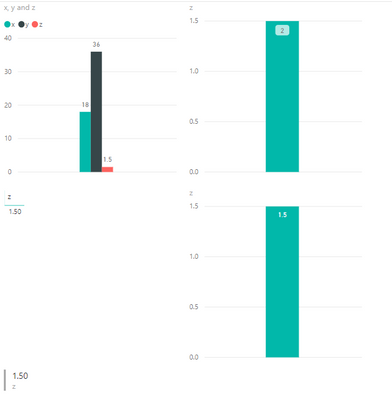
Is this what your are looking forward to seeing? PBI puts it in as 1.5 and on the upper chart, I changed it to 2.
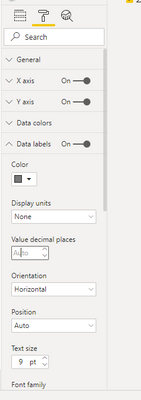
It turns out that if you set the Display Units to "None" and put your cursor in the "Value decimal places" (even though it is grayed out) and type "0" the display changes.
If this solves your issue, please mark this as the solution.
Proud to be a Super User!
1. Select the Table
2. Goto Formatting Options -> Field formatting -> Dropdown (Select the variable) -> Value decimal Places.
Hi @Anonymous ,
Is this what your are looking forward to seeing? PBI puts it in as 1.5 and on the upper chart, I changed it to 2.
It turns out that if you set the Display Units to "None" and put your cursor in the "Value decimal places" (even though it is grayed out) and type "0" the display changes.
If this solves your issue, please mark this as the solution.
Proud to be a Super User!
The Power BI Data Visualization World Championships is back! Get ahead of the game and start preparing now!
Check out the November 2025 Power BI update to learn about new features.
| User | Count |
|---|---|
| 59 | |
| 43 | |
| 42 | |
| 23 | |
| 17 |
| User | Count |
|---|---|
| 190 | |
| 122 | |
| 96 | |
| 66 | |
| 47 |