cancel
Showing results for 
Search instead for 
Did you mean: 

The Power BI Data Visualization World Championships is back! Get ahead of the game and start preparing now! Learn more

Reply
ssantone
New Member

How to change the colour value for negative number in the Matrix visualization?

hello!!!


I am working whit Matrix visualization

The negatives numbers appears in color black

How to change the colour value for negative number in the Matrix visualization?


thanks!!! best regards

7 REPLIES 7
garythomann_vac
Advocate III
Advocate III

More up votes    (#,#;[Red](#,#);"-" add color to custom formula)

https://ideas.powerbi.com/ideas/idea/?ideaid=c08e3e42-2b77-4cae-9fd9-a51c599e2cbb

https://ideas.powerbi.com/ideas/idea/?ideaid=c26285eb-e1ed-4b7d-986c-2bcb7cc351d9


Note that one needs to select Values and totals for the Apply to option for this to work now

mpandita
Advocate II
Advocate II

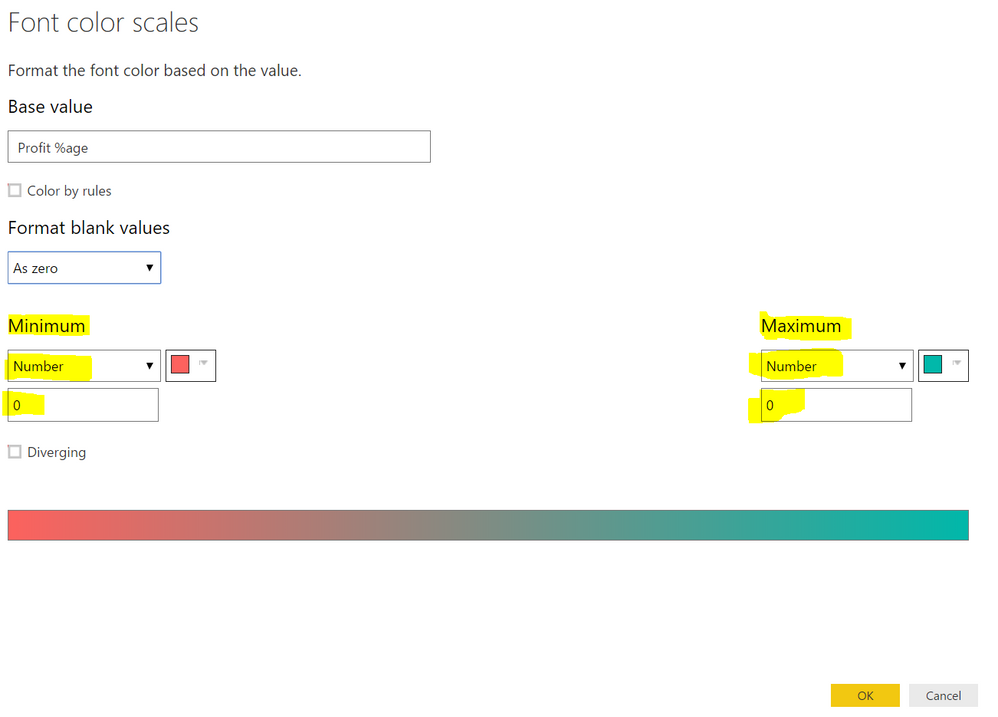
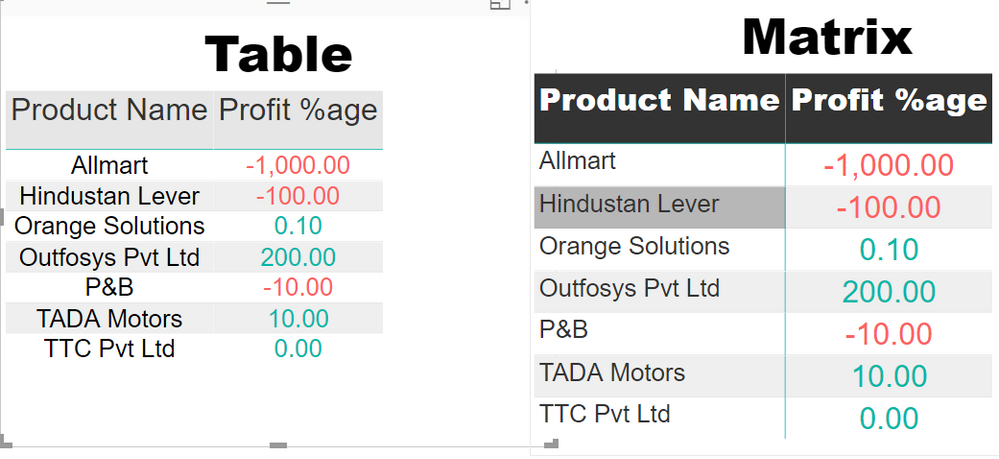
I was able to solve this issue by using a small hack.


Just select the value of minimum and maximum  to "Number".

Set the value for both minimum and maximum to "0" (zero).


It will work 🙂snap1.PNGsnap2.PNG

Anonymous
Not applicable

This helps

Hi mpandita,


This worked for me. Thank you.


Regards,

Raviteja 


@mpandita That is a smooth move dude! Thanks!!

MEhrenmueller
Most Valuable Professional

I guess, not exactly what you are looking for, but maybe a way to simulate what you are looking for in the best way currently available.


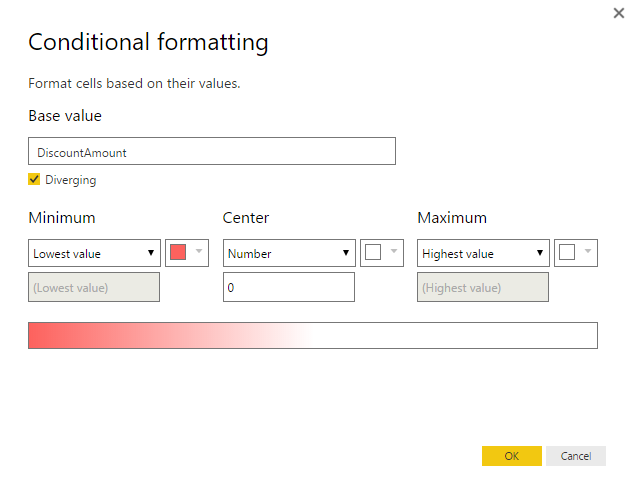
In the current version of PowerBI Desktop there is a simple version of Excel's "Conditional Formatting". You could leverage this, to make the background (not the font!) red(ish) by applying the following paramters:


Conditional Formatting negative values only.png


You might be not happy with the following differences compared to your expectations:

- formats the background (and not the font)

- uses shades of red depending on the actual value (and not just only one color intensitiy for all negative values)


Markus Ehrenmueller-Jensen
@MEhrenmueller
v-huizhn-msft
Microsoft Employee
Microsoft Employee

Hi @ssantone,

In Power BI Desktop, we are not able to specify the color of negative number. For this feature, you can vote it and add comments in the following ideas.

https://ideas.powerbi.com/forums/265200-power-bi-ideas/suggestions/15310341-conditional-formatting-i...
https://ideas.powerbi.com/forums/265200-power-bi-ideas/suggestions/9588453-conditional-formatting-th...

If you have any question, please feel free to ask.


Best Regards,
Angelia

Helpful resources

Announcements
November Power BI Update Carousel

Power BI Monthly Update - November 2025

Check out the November 2025 Power BI update to learn about new features.

Fabric Data Days Carousel

Fabric Data Days

Advance your Data & AI career with 50 days of live learning, contests, hands-on challenges, study groups & certifications and more!

FabCon Atlanta 2026 carousel

FabCon Atlanta 2026

Join us at FabCon Atlanta, March 16-20, for the ultimate Fabric, Power BI, AI and SQL community-led event. Save $200 with code FABCOMM.

Top Kudoed Authors