Don't miss your chance to take the Fabric Data Engineer (DP-600) exam for FREE! Find out how by watching the DP-600 session on-demand now through April 28th.
Learn moreJoin the FabCon + SQLCon recap series. Up next: Power BI, Real-Time Intelligence, IQ and AI, and Data Factory take center stage. All sessions are available on-demand after the live show. Register now
Good afternoon
I had to migrate the sql to another server and I changed the path. As I do to change the sql server in powe bi without losing the dax formulas and reports.
Thank you.
Solved! Go to Solution.
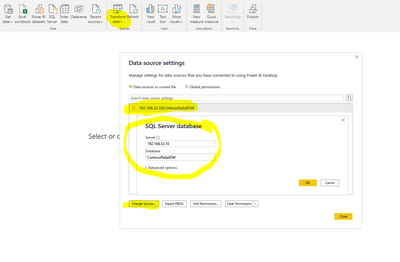
@joacoabeleira You can change the SQL Server data source from the Data Source Settings under Transform Data option in the Home tab of the ribbon.
Refer the snapshot below:
** If you liked my solution, please give it a thumbs up. And if I did answer your question, please mark this post as a solution, so that it comes in top of the search and help others. Thank you ! Good Luck 👍 |
Hi @Syndicate_Admin ,
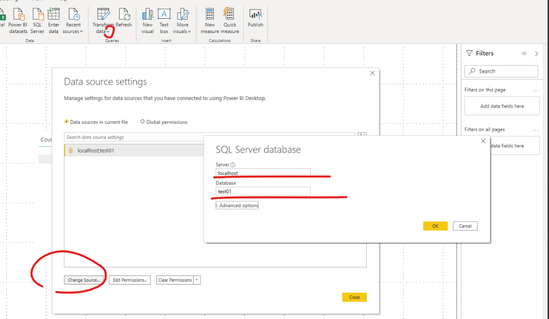
If you want to change the source of datasource in service ,you must modify datasource of original pbix file on desktop and then republish it first. So that the source in your model will match the source in the gateway .
Please follow these steps:
1.Copy a new original desktop pbix file and modify theDataSource Settings
Transform Data ->Datasource Settings ->change source ,then enter new servername:portname and database name.
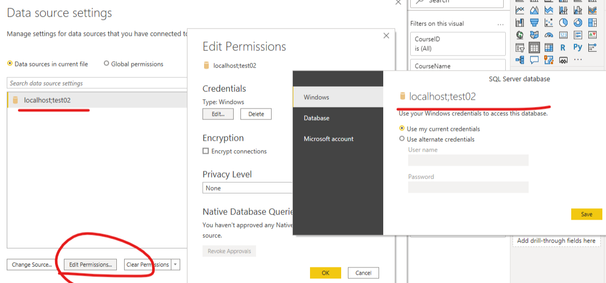
2. Edit the new datasource credentials and apply changes.
You will refresh the report with the new data source data if the data source is successfully switched.
Otherwise, please compare whether the table structure has been changed in the newdata source, which may cause conflicts between the original fields in the model and the fields in the new data source.
Best Regards,
Liu Yang
If this post helps, then please consider Accept it as the solution to help the other members find it more quickly.
As this migration is done but massive to another server if you lose the reports and users, we have more than 40 published reports and folders but we have not managed to move them to the new server.
@joacoabeleira You can change the SQL Server data source from the Data Source Settings under Transform Data option in the Home tab of the ribbon.
Refer the snapshot below:
** If you liked my solution, please give it a thumbs up. And if I did answer your question, please mark this post as a solution, so that it comes in top of the search and help others. Thank you ! Good Luck 👍 |
Check out the April 2026 Power BI update to learn about new features.
If you have recently started exploring Fabric, we'd love to hear how it's going. Your feedback can help with product improvements.
A new Power BI DataViz World Championship is coming this June! Don't miss out on submitting your entry.
| User | Count |
|---|---|
| 41 | |
| 37 | |
| 34 | |
| 21 | |
| 16 |
| User | Count |
|---|---|
| 65 | |
| 59 | |
| 31 | |
| 26 | |
| 25 |