FabCon is coming to Atlanta
Join us at FabCon Atlanta from March 16 - 20, 2026, for the ultimate Fabric, Power BI, AI and SQL community-led event. Save $200 with code FABCOMM.
Register now!- Power BI forums
- Get Help with Power BI
- Desktop
- Service
- Report Server
- Power Query
- Mobile Apps
- Developer
- DAX Commands and Tips
- Custom Visuals Development Discussion
- Health and Life Sciences
- Power BI Spanish forums
- Translated Spanish Desktop
- Training and Consulting
- Instructor Led Training
- Dashboard in a Day for Women, by Women
- Galleries
- Data Stories Gallery
- Themes Gallery
- Contests Gallery
- Quick Measures Gallery
- Notebook Gallery
- Translytical Task Flow Gallery
- TMDL Gallery
- R Script Showcase
- Webinars and Video Gallery
- Ideas
- Custom Visuals Ideas (read-only)
- Issues
- Issues
- Events
- Upcoming Events
Join the Fabric FabCon Global Hackathon—running virtually through Nov 3. Open to all skill levels. $10,000 in prizes! Register now.
- Power BI forums
- Forums
- Get Help with Power BI
- Desktop
- Re: How to change data type to number and show "un...
- Subscribe to RSS Feed
- Mark Topic as New
- Mark Topic as Read
- Float this Topic for Current User
- Bookmark
- Subscribe
- Printer Friendly Page


- Mark as New
- Bookmark
- Subscribe
- Mute
- Subscribe to RSS Feed
- Permalink
- Report Inappropriate Content
How to change data type to number and show "unknown" for anything that isn't a number
Hi - I have a zip code column in my data that has things in it that are not standard US zip codes. Some of those non standard items are other countries post codes and user entry typos that include letters. Because of this, the data type is text instead of number. When I try to change the data type to whole number it has errors. I don't want it to completely ignore those errors, instead I want them to show up as "unknown".
What is the best way to go about telling it to change my data type to whole number and anything that isn't a number kick back "unknown"?
thank you 🙂
Solved! Go to Solution.

- Mark as New
- Bookmark
- Subscribe
- Mute
- Subscribe to RSS Feed
- Permalink
- Report Inappropriate Content
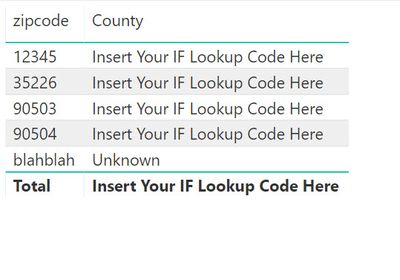
Is your IF statement in DAX or done in the query editor? If you are doing it in DAX this may work:
County =
IF(
    ISERROR( VALUE( SELECTEDVALUE( Zipcodes[zipcode] ))),
    "Unknown",
    "Insert Your IF Lookup Code Here"
)


- Mark as New
- Bookmark
- Subscribe
- Mute
- Subscribe to RSS Feed
- Permalink
- Report Inappropriate Content
In query editor, use the following statement to add a new custom column to your table.
= if Value.Is(Value.FromText([Column1]), Text.Type) then "Unknown" else [Column1]
This will atleast replace all non-text values with "Unknown". The resulting column will still not be whole number because of text values ("Unknown") in it.
- Mark as New
- Bookmark
- Subscribe
- Mute
- Subscribe to RSS Feed
- Permalink
- Report Inappropriate Content
Thank you - I'll give this a try. I think I still need to have them converted to numbers though, because I need to group the zip codes into counties and the way I've got that set up is with an IF statement that basically says if the zip code number is between x and y then return county name.


- Mark as New
- Bookmark
- Subscribe
- Mute
- Subscribe to RSS Feed
- Permalink
- Report Inappropriate Content
I would say rather than putting in "Unknown", put in 0. You cannot have a column that looks like this:
21565
31268
Unknown
91282
And tell powerbi it is a number. "Unknown" will always throw the error so put in a 0 instead if you need the column to be a number.
- Mark as New
- Bookmark
- Subscribe
- Mute
- Subscribe to RSS Feed
- Permalink
- Report Inappropriate Content
Do you mean to change the formula given above
= if Value.Is(Value.FromText([Column1]), Text.Type) then "Unknown" else [Column1]
to kick back "0" instead of "unknown"?
- Mark as New
- Bookmark
- Subscribe
- Mute
- Subscribe to RSS Feed
- Permalink
- Report Inappropriate Content
Is your IF statement in DAX or done in the query editor? If you are doing it in DAX this may work:
County =
IF(
    ISERROR( VALUE( SELECTEDVALUE( Zipcodes[zipcode] ))),
    "Unknown",
    "Insert Your IF Lookup Code Here"
)- Mark as New
- Bookmark
- Subscribe
- Mute
- Subscribe to RSS Feed
- Permalink
- Report Inappropriate Content
It is in DAX so I will give this a try. I'm new to PBI and DAX so I really appreciate everyone's help 
- Mark as New
- Bookmark
- Subscribe
- Mute
- Subscribe to RSS Feed
- Permalink
- Report Inappropriate Content
In powerquery change your data type to whole number then replace errors with 0.
- Mark as New
- Bookmark
- Subscribe
- Mute
- Subscribe to RSS Feed
- Permalink
- Report Inappropriate Content
thank you 🙂

Helpful resources

FabCon Global Hackathon
Join the Fabric FabCon Global Hackathon—running virtually through Nov 3. Open to all skill levels. $10,000 in prizes!

Power BI Monthly Update - September 2025
Check out the September 2025 Power BI update to learn about new features.

FabCon Atlanta 2026
Join us at FabCon Atlanta, March 16-20, for the ultimate Fabric, Power BI, AI and SQL community-led event. Save $200 with code FABCOMM.


