cancel
Showing results for 
Search instead for 
Did you mean: 

Get Fabric Certified for FREE during Fabric Data Days. Don't miss your chance! Request now

Reply
tvaishnav
Helper IV
Helper IV

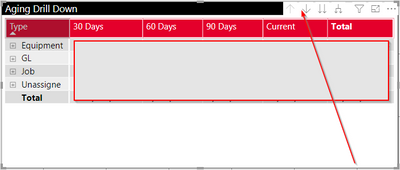
How to change color of drill down buttons?

How to change backgroud color and arrow colors in drill down tool tip?


tvaishnav_1-1597334896703.png


3 REPLIES 3
Pragati11
Super User
Super User

Hi @tvaishnav ,


Click on your visual, under format options as shown below --> Go to VISUAL HEADER --> ICON COLOUR

Pragati11_0-1597335323283.png


There are other options as well which you can explore like BACKGROUND colour, BORDER, etc.

For your case use ICON COLOR.


Thanks,

Pragati


Best Regards,

Pragati Jain


MVP logo


LinkedIn | Twitter | Blog YouTube 

Did I answer your question? Mark my post as a solution! This will help others on the forum!

Appreciate your Kudos!!

Proud to be a Super User!!

@Pragati11 That certainly helped. Thanks! I have a follow up question though.

Is there a way to get rid of white gaps between those icons?


Hi @tvaishnav ,


No you can't remove spacing between these icons. This is by default.


Thanks,

Pragati

Best Regards,

Pragati Jain


MVP logo


LinkedIn | Twitter | Blog YouTube 

Did I answer your question? Mark my post as a solution! This will help others on the forum!

Appreciate your Kudos!!

Proud to be a Super User!!

Helpful resources

Announcements
November Power BI Update Carousel

Power BI Monthly Update - November 2025

Check out the November 2025 Power BI update to learn about new features.

Fabric Data Days Carousel

Fabric Data Days

Advance your Data & AI career with 50 days of live learning, contests, hands-on challenges, study groups & certifications and more!

FabCon Atlanta 2026 carousel

FabCon Atlanta 2026

Join us at FabCon Atlanta, March 16-20, for the ultimate Fabric, Power BI, AI and SQL community-led event. Save $200 with code FABCOMM.

Top Solution Authors
Top Kudoed Authors