Join us at FabCon Atlanta from March 16 - 20, 2026, for the ultimate Fabric, Power BI, AI and SQL community-led event. Save $200 with code FABCOMM.
Register now!View all the Fabric Data Days sessions on demand. View schedule
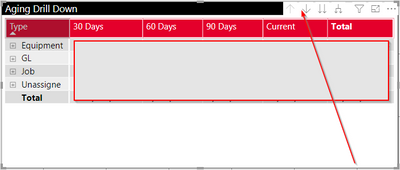
How to change backgroud color and arrow colors in drill down tool tip?
Hi @tvaishnav ,
Click on your visual, under format options as shown below --> Go to VISUAL HEADER --> ICON COLOUR
There are other options as well which you can explore like BACKGROUND colour, BORDER, etc.
For your case use ICON COLOR.
Thanks,
Pragati
@Pragati11 That certainly helped. Thanks! I have a follow up question though.
Is there a way to get rid of white gaps between those icons?
Hi @tvaishnav ,
No you can't remove spacing between these icons. This is by default.
Thanks,
Pragati
Check out the November 2025 Power BI update to learn about new features.
Advance your Data & AI career with 50 days of live learning, contests, hands-on challenges, study groups & certifications and more!