Join us at FabCon Atlanta from March 16 - 20, 2026, for the ultimate Fabric, Power BI, AI and SQL community-led event. Save $200 with code FABCOMM.
Register now!Get Fabric Certified for FREE during Fabric Data Days. Don't miss your chance! Request now
I'm trying to calculate the number of sessions in my data. Sessions = a unique combination of Day + Cluster + User.
My data resembles this:
| Date | Cluster | User |
| Nov 1 | 111 | AAA |
| Nov 2 | 222 | AAA |
| Nov 2 | 333 | BBB |
| Nov 2 | 333 | BBB |
| Nov 3 | 444 | CCC |
| Nov 3 | 333 | AAA |
In the above example, I want a calculation that results in this:
Ultimately, I want to know how many sessions per day, which I'd show in a table or chart.
Any help is appreciated.
Solved! Go to Solution.
Hi @rlongden ,
You may create a calculated column to concatenate those fields if you have other fields in your table:
UniqueID =
Table[Date] & Table[Cluster] & Table[User]
Then create a measure to count the distinct values:
Unique Count =
DISTINCTCOUNT ( Table[UniqueID] )
Hi @rlongden ,
You may create a calculated column to concatenate those fields if you have other fields in your table:
UniqueID =
Table[Date] & Table[Cluster] & Table[User]
Then create a measure to count the distinct values:
Unique Count =
DISTINCTCOUNT ( Table[UniqueID] )
Thanks to both of you. This gives me what I need. To danextian, you guessed right that my actual data has some other columns that I didn't want in the calculation. I was able to use your example to get it working.
Hi,
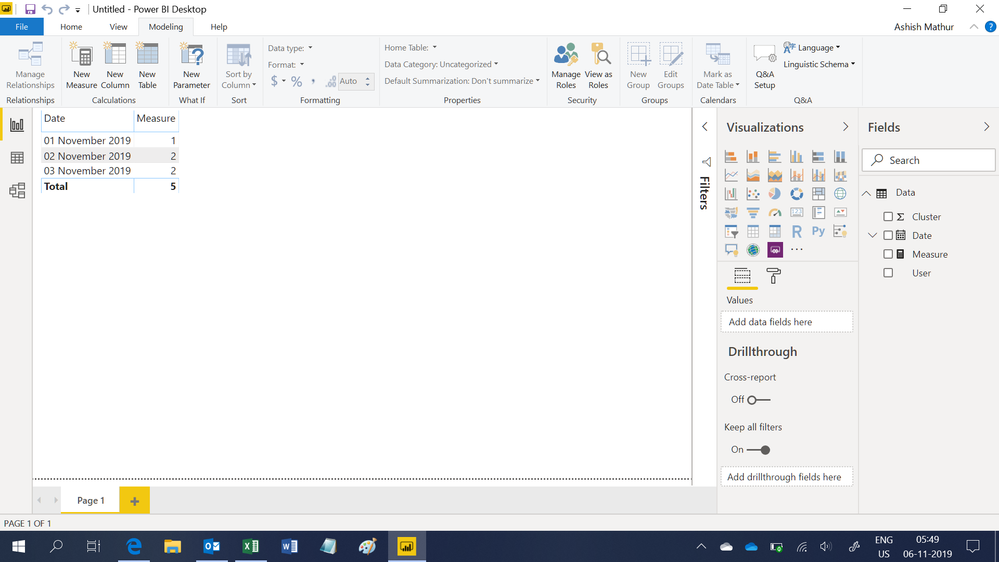
Drag Date to the Table visual. This measure works
Measure = COUNTROWS(DISTINCT(Data))
Check out the November 2025 Power BI update to learn about new features.
Advance your Data & AI career with 50 days of live learning, contests, hands-on challenges, study groups & certifications and more!