Join us at FabCon Atlanta from March 16 - 20, 2026, for the ultimate Fabric, Power BI, AI and SQL community-led event. Save $200 with code FABCOMM.
Register now!The Power BI Data Visualization World Championships is back! Get ahead of the game and start preparing now! Learn more
i have some data and i want to show in graph form to show the number of customers and how many different products they have purchased
example data below
ID | Product Purchased |
1 | A |
2 | A |
2 | B |
3 | A |
3 | B |
3 | C |
4 | A |
5 | B |
5 | C |
|
|
Results | 2 bought 1 product |
| 2 bought 2 products |
| 1 bought 3 products |
thanks
Solved! Go to Solution.
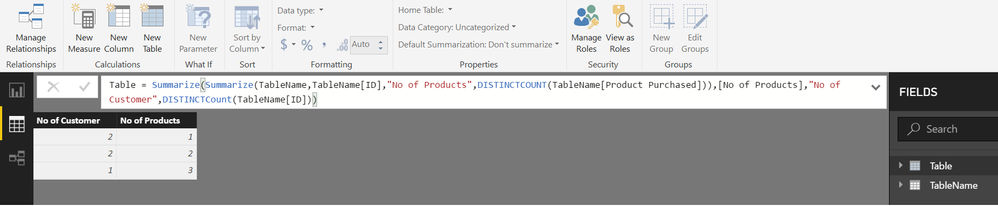
Try this calculated TABLE
From the Modelling Tab>>>NEW TABLE
Table =
SUMMARIZE (
SUMMARIZE (
TableName,
TableName[ID],
"No of Products", DISTINCTCOUNT ( TableName[Product Purchased] )
),
[No of Products],
"No of Customer", DISTINCTCOUNT ( TableName[ID] )
)
Hi @UM4R,
You can use either DISTINCTCOUNT formula to calculate distinct products bought per customers or the quick measure COUNT (Distinct) by clicking on the arrow after drop the field on "Value".
If I understood what you wanna show, it's a dynamic segmentation, Marco Russo and Alberto Ferrari have a article about it:
https://www.daxpatterns.com/dynamic-segmentation/
Thanks,
Ricardo
Try this calculated TABLE
From the Modelling Tab>>>NEW TABLE
Table =
SUMMARIZE (
SUMMARIZE (
TableName,
TableName[ID],
"No of Products", DISTINCTCOUNT ( TableName[Product Purchased] )
),
[No of Products],
"No of Customer", DISTINCTCOUNT ( TableName[ID] )
)
thanks @Zubair_Muhammad it has seemed to have done the trick
@ricardocamargos thanks for the link, it has a lot of useful information will look in more detail when i have some free time
The Power BI Data Visualization World Championships is back! Get ahead of the game and start preparing now!
| User | Count |
|---|---|
| 39 | |
| 38 | |
| 38 | |
| 28 | |
| 27 |
| User | Count |
|---|---|
| 124 | |
| 88 | |
| 73 | |
| 66 | |
| 65 |