Join us at FabCon Atlanta from March 16 - 20, 2026, for the ultimate Fabric, Power BI, AI and SQL community-led event. Save $200 with code FABCOMM.
Register now!Get Fabric Certified for FREE during Fabric Data Days. Don't miss your chance! Request now
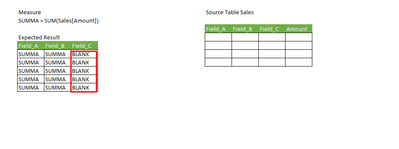
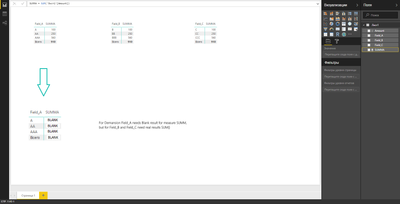
How to make measure SUMMA = BLUNK only for dimension "Field_C"?
Not enough information, please post sample data and more detail.
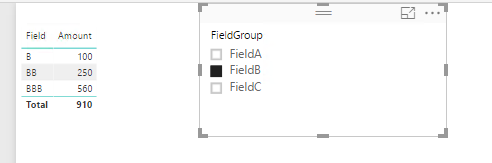
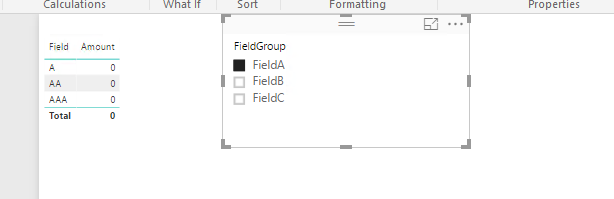
May I know why you'd like to show the data that way, For me, I will create a calculated table as below.
Table =
UNION (
SELECTCOLUMNS (
'Лист1',
"FieldGroup", "FieldA",
"Field", 'Лист1'[Field_A],
"Amount", 0
),
SELECTCOLUMNS (
'Лист1',
"FieldGroup", "FieldB",
"Field", 'Лист1'[Field_B],
"Amount", 'Лист1'[Amount]
),
SELECTCOLUMNS (
'Лист1',
"FieldGroup", "FieldC",
"Field", 'Лист1'[Field_C],
"Amount", 'Лист1'[Amount]
)
)
@Eric_Zhang, thanks, it works
but maybe is way to realise it in SUMM measure?
creating second table have some problem because there are many columns and measures in original project
@googlogmob wrote:
@Eric_Zhang, thanks, it works
but maybe is way to realise it in SUMM measure?
creating second table have some problem because there are many columns and measures in original project
Could you post the whole picture of your scenario, displaying data as in your original post is not usually a best practice way.
Main sense is that measure SUMM must show result only for another dimansions Field_B and Field_C, and NULL for Field_A, because the calculation of the measure SUMM can not be performed for Field_A from economic rules
i.e. such logic: IF dimention = Field_A THEN null ELSE SUMM
Check out the November 2025 Power BI update to learn about new features.
Advance your Data & AI career with 50 days of live learning, contests, hands-on challenges, study groups & certifications and more!