cancel
Showing results for 
Search instead for 
Did you mean: 

Get Fabric Certified for FREE during Fabric Data Days. Don't miss your chance! Request now

Reply
Anonymous
Not applicable

How to calculate difference between two rows in a table?

Hi everyone,


I need your help. I want to calculate the difference of Montant of C and D. Supposingly, I would like to subtract montant of C from montant of D. I want to display Difference i.e- 0.10  instead of total value displayed in third row. 

Capture.PNG


Thanks in advance. 


Best Regards,

Diksha Gupta

1 ACCEPTED SOLUTION
selimovd
Super User
Super User

Hey @Anonymous ,


you can subtract one from the other:

Difference Montant C to D =
CALCULATE(
    SUM( myTable[Montant] ),
    myTable[Sens] = "D"
)
- CALCULATE(
    SUM( myTable[Montant] ),
    myTable[Sens] = "C"
)


If you need any help please let me know.
If I answered your question I would be happy if you could mark my post as a solution ✔️ and give it a thumbs up 👍
 
Best regards
Denis


View solution in original post

5 REPLIES 5
FrankAT
Community Champion
Community Champion

Hi @Anonymous ,

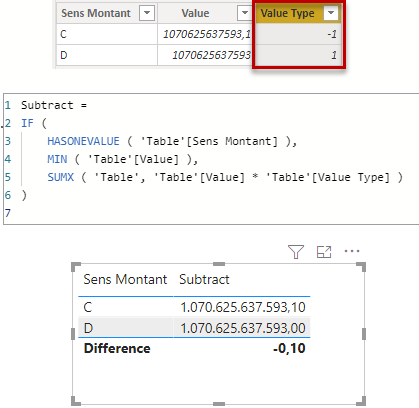
Your two numbers exceed the computational accuracy of Power BI Desktop. I have therefore shortened it a little and added a calculated column for calculation.


16-05-_2021_14-08-36.png


Subtract = 
IF (
    HASONEVALUE ( 'Table'[Sens Montant] ),
    MIN ( 'Table'[Value] ),
    SUMX ( 'Table', 'Table'[Value] * 'Table'[Value Type] )
)


With kind regards from the town where the legend of the 'Pied Piper of Hamelin' is at home
FrankAT (Proud to be a Datanaut)

Anonymous
Not applicable

Hi Frank,


Thank you for replying. How did you calculate value type column? Could you pls tell it?


Regards

selimovd
Super User
Super User

Hey @Anonymous ,


you can subtract one from the other:

Difference Montant C to D =
CALCULATE(
    SUM( myTable[Montant] ),
    myTable[Sens] = "D"
)
- CALCULATE(
    SUM( myTable[Montant] ),
    myTable[Sens] = "C"
)


If you need any help please let me know.
If I answered your question I would be happy if you could mark my post as a solution ✔️ and give it a thumbs up 👍
 
Best regards
Denis


Anonymous
Not applicable

Capture.PNG

Hey It worked but why is It 0.13 instead of 0.10?


Thank you

Anonymous
Not applicable

Hi , Thank you for replying.


The formula suggested by you is not working fine. Could you please suggest something else instead?

Helpful resources

Announcements
November Power BI Update Carousel

Power BI Monthly Update - November 2025

Check out the November 2025 Power BI update to learn about new features.

Fabric Data Days Carousel

Fabric Data Days

Advance your Data & AI career with 50 days of live learning, contests, hands-on challenges, study groups & certifications and more!

FabCon Atlanta 2026 carousel

FabCon Atlanta 2026

Join us at FabCon Atlanta, March 16-20, for the ultimate Fabric, Power BI, AI and SQL community-led event. Save $200 with code FABCOMM.

Top Solution Authors
Top Kudoed Authors