FabCon is coming to Atlanta
Join us at FabCon Atlanta from March 16 - 20, 2026, for the ultimate Fabric, Power BI, AI and SQL community-led event. Save $200 with code FABCOMM.
Register now!- Power BI forums
- Get Help with Power BI
- Desktop
- Service
- Report Server
- Power Query
- Mobile Apps
- Developer
- DAX Commands and Tips
- Custom Visuals Development Discussion
- Health and Life Sciences
- Power BI Spanish forums
- Translated Spanish Desktop
- Training and Consulting
- Instructor Led Training
- Dashboard in a Day for Women, by Women
- Galleries
- Data Stories Gallery
- Themes Gallery
- Contests Gallery
- QuickViz Gallery
- Quick Measures Gallery
- Visual Calculations Gallery
- Notebook Gallery
- Translytical Task Flow Gallery
- TMDL Gallery
- R Script Showcase
- Webinars and Video Gallery
- Ideas
- Custom Visuals Ideas (read-only)
- Issues
- Issues
- Events
- Upcoming Events
Get Fabric Certified for FREE during Fabric Data Days. Don't miss your chance! Request now
- Power BI forums
- Forums
- Get Help with Power BI
- Desktop
- Re: How to calculate cumulative total category wis...
- Subscribe to RSS Feed
- Mark Topic as New
- Mark Topic as Read
- Float this Topic for Current User
- Bookmark
- Subscribe
- Printer Friendly Page

- Mark as New
- Bookmark
- Subscribe
- Mute
- Subscribe to RSS Feed
- Permalink
- Report Inappropriate Content
How to calculate cumulative total category wise with blanks in values
| Region | Plan_Date | Target | Cummulative Total |
| East | 01/05/2021 | 0 | |
| East | 02/05/2021 | 0 | |
| East | 03/05/2021 | 20 | |
| East | 04/05/2021 | 25 | |
| East | 05/05/2021 | 30 | |
| East | 06/05/2021 | 35 | |
| East | 07/05/2021 | 40 | |
| East | 08/05/2021 | 0 | |
| East | 09/05/2021 | 0 | |
| East | 10/05/2021 | 55 | |
| East | 11/05/2021 | 60 | |
| West | 01/05/2021 | 0 | |
| West | 02/05/2021 | 0 | |
| West | 03/05/2021 | 75 | |
| West | 04/05/2021 | 80 | |
| West | 05/05/2021 | 85 | |
| West | 06/05/2021 | 90 | |
| West | 07/05/2021 | 95 | |
| West | 08/05/2021 | 0 | |
| West | 09/05/2021 | 0 | |
| West | 10/05/2021 | 110 | |
| West | 11/05/2021 | 115 |
Expected Output :-
| Region | Plan_Date | Target | Cummulative Total |
| East | 01/05/2021 | 0 | 0 |
| East | 02/05/2021 | 0 | 0 |
| East | 03/05/2021 | 20 | 20 |
| East | 04/05/2021 | 25 | 45 |
| East | 05/05/2021 | 30 | 75 |
| East | 06/05/2021 | 35 | 110 |
| East | 07/05/2021 | 40 | 150 |
| East | 08/05/2021 | 0 | 150 |
| East | 09/05/2021 | 0 | 150 |
| East | 10/05/2021 | 55 | 205 |
| East | 11/05/2021 | 60 | 265 |
| West | 01/05/2021 | 0 | 0 |
| West | 02/05/2021 | 0 | 0 |
| West | 03/05/2021 | 75 | 75 |
| West | 04/05/2021 | 80 | 155 |
| West | 05/05/2021 | 85 | 240 |
| West | 06/05/2021 | 90 | 330 |
| West | 07/05/2021 | 95 | 425 |
| West | 08/05/2021 | 0 | 425 |
| West | 09/05/2021 | 0 | 425 |
| West | 10/05/2021 | 110 | 535 |
| West | 11/05/2021 | 115 | 650 |
| North | 01/05/2021 | 0 | 0 |
| North | 02/05/2021 | 0 | 0 |
| North | 03/05/2021 | 130 | 130 |
| North | 04/05/2021 | 135 | 265 |
| North | 05/05/2021 | 140 | 405 |
| North | 06/05/2021 | 145 | 550 |
| North | 07/05/2021 | 150 | 700 |
| North | 08/05/2021 | 0 | 700 |
| North | 09/05/2021 | 0 | 700 |
| North | 10/05/2021 | 165 | 865 |
| North | 11/05/2021 | 170 | 1035 |
| South | 01/05/2021 | 0 | 0 |
| South | 02/05/2021 | 0 | 0 |
| South | 03/05/2021 | 185 | 185 |
| South | 04/05/2021 | 190 | 375 |
| South | 05/05/2021 | 195 | 570 |
| South | 06/05/2021 | 200 | 770 |
| South | 07/05/2021 | 205 | 975 |
| South | 08/05/2021 | 0 | 975 |
| South | 09/05/2021 | 0 | 975 |
| South | 10/05/2021 | 220 | 1195 |
| South | 11/05/2021 | 225 | 1420 |
Solved! Go to Solution.


- Mark as New
- Bookmark
- Subscribe
- Mute
- Subscribe to RSS Feed
- Permalink
- Report Inappropriate Content
@Anonymous
ok try this

Regards
Amine Jerbi
If I answered your question, please mark this thread as accepted
and you can follow me on
My Website, LinkedIn and Facebook

- Mark as New
- Bookmark
- Subscribe
- Mute
- Subscribe to RSS Feed
- Permalink
- Report Inappropriate Content
Hi @Anonymous ,
here is my solution:

Running Total =
CALCULATE (
    SUM ( 'Table'[Target] ),
    FILTER (
        ALLEXCEPT ( 'Table', 'Table'[Region] ),
        'Table'[Plan_Date] <= MAX ( 'Table'[Plan_Date])
    )
)
With kind regards from the town where the legend of the 'Pied Piper of Hamelin' is at home
FrankAT (Proud to be a Datanaut)


- Mark as New
- Bookmark
- Subscribe
- Mute
- Subscribe to RSS Feed
- Permalink
- Report Inappropriate Content
Hi,
You may download my PBI file from here.
Hope this helps.
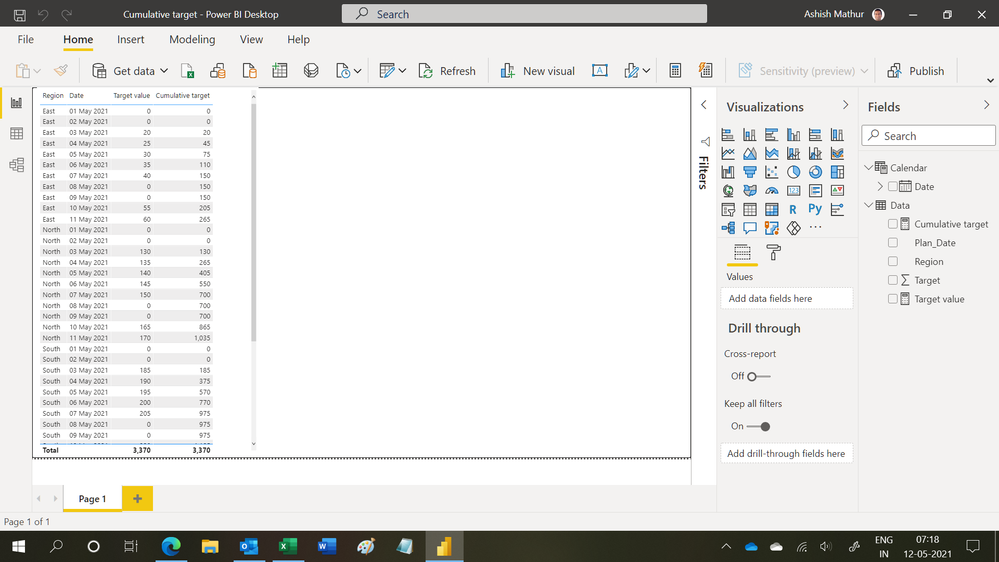
Regards,
Ashish Mathur
http://www.ashishmathur.com
https://www.linkedin.com/in/excelenthusiasts/

- Mark as New
- Bookmark
- Subscribe
- Mute
- Subscribe to RSS Feed
- Permalink
- Report Inappropriate Content
- Mark as New
- Bookmark
- Subscribe
- Mute
- Subscribe to RSS Feed
- Permalink
- Report Inappropriate Content
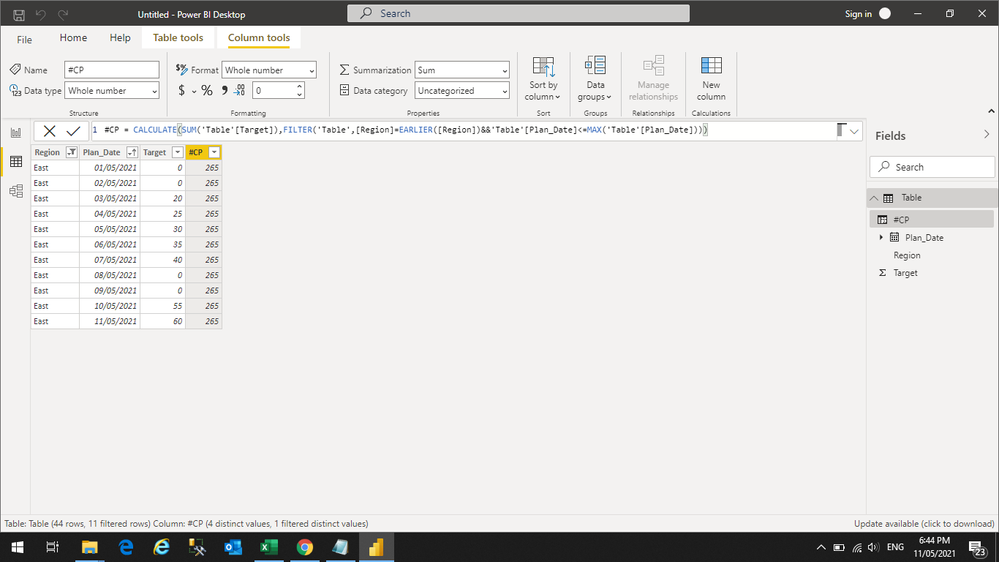
Thank you for the reply amit, but i am getting the total value for all the rows, please find the below photos,


- Mark as New
- Bookmark
- Subscribe
- Mute
- Subscribe to RSS Feed
- Permalink
- Report Inappropriate Content
Hi @Anonymous
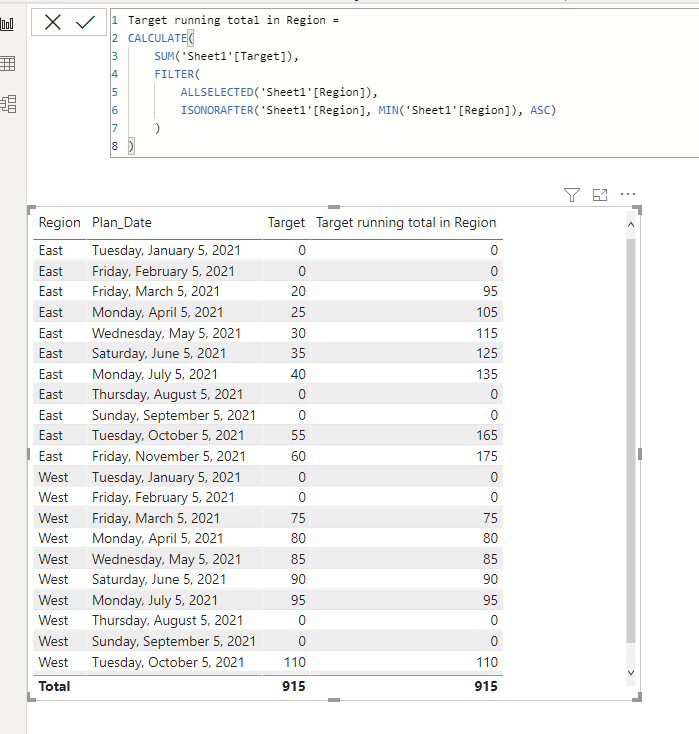
here is the formula
Regards
Amine Jerbi
If I answered your question, please mark this thread as accepted
and you can follow me on
My Website, LinkedIn and Facebook
- Mark as New
- Bookmark
- Subscribe
- Mute
- Subscribe to RSS Feed
- Permalink
- Report Inappropriate Content
Thank you jer bi, but this is not my expected output, cummulated we should add the earlier value with 0, i have attached the image for your reference, Advance thanks

- Mark as New
- Bookmark
- Subscribe
- Mute
- Subscribe to RSS Feed
- Permalink
- Report Inappropriate Content
@Anonymous

Change Sheet1 by the name of your table
Regards
Amine Jerbi
If I answered your question, please mark this thread as accepted
and you can follow me on
My Website, LinkedIn and Facebook
- Mark as New
- Bookmark
- Subscribe
- Mute
- Subscribe to RSS Feed
- Permalink
- Report Inappropriate Content
Thank you Jerbi, now East region came perfect, but for west region the cummulative totals are mismatch, West March 5th Vale is 75 but in cummulative total it is showing as 95 and the missmatch follows, Thank you in advance.🙂
- Mark as New
- Bookmark
- Subscribe
- Mute
- Subscribe to RSS Feed
- Permalink
- Report Inappropriate Content
@Anonymous
Yes myy bad sorry,
Just delete the "<" before _region

Regards
Amine Jerbi
If I answered your question, please mark this thread as accepted
and you can follow me on
My Website, LinkedIn and Facebook
- Mark as New
- Bookmark
- Subscribe
- Mute
- Subscribe to RSS Feed
- Permalink
- Report Inappropriate Content
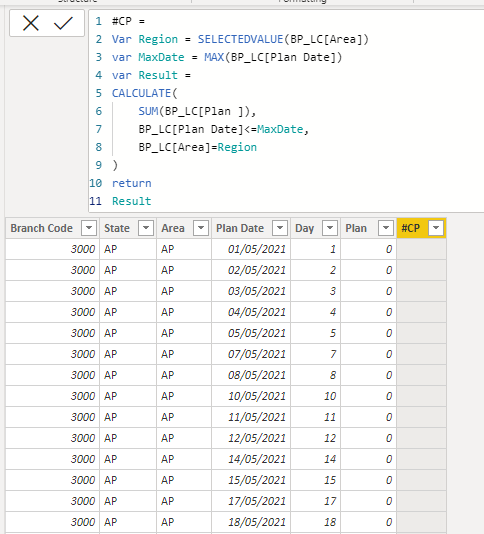
Thank you jerbi, i tried with your code, but i am getting blank, please find the below screenshot
- Mark as New
- Bookmark
- Subscribe
- Mute
- Subscribe to RSS Feed
- Permalink
- Report Inappropriate Content
@Anonymous
Indeed, it's a measure for a Table visual. It doesn't work for an added column.
Why do you need to add a column to your model? it takes space and performance, and we add Columns in order to use it as a slicer when necessary.
Regards
Amine Jerbi
If I answered your question, please mark this thread as accepted
and you can follow me on
My Website, LinkedIn and Facebook
- Mark as New
- Bookmark
- Subscribe
- Mute
- Subscribe to RSS Feed
- Permalink
- Report Inappropriate Content
Ok jerbi, understood, i have in table also, though it is not workings, please find the below screenshot

- Mark as New
- Bookmark
- Subscribe
- Mute
- Subscribe to RSS Feed
- Permalink
- Report Inappropriate Content
@Anonymous
ok try this
Regards
Amine Jerbi
If I answered your question, please mark this thread as accepted
and you can follow me on
My Website, LinkedIn and Facebook
- Mark as New
- Bookmark
- Subscribe
- Mute
- Subscribe to RSS Feed
- Permalink
- Report Inappropriate Content
Thank you so much jerbi, it is working now perfect, thank you again for your help, 😊😊😊🙏
- Mark as New
- Bookmark
- Subscribe
- Mute
- Subscribe to RSS Feed
- Permalink
- Report Inappropriate Content
@Anonymous
You are welcome, eventhough i don't recommend adding new columns into your model espcially when you are not using it as a slicer.
Regards
Amine Jerbi
If I answered your question, please mark this thread as accepted
and you can follow me on
My Website, LinkedIn and Facebook
Helpful resources

Power BI Monthly Update - November 2025
Check out the November 2025 Power BI update to learn about new features.

Fabric Data Days
Advance your Data & AI career with 50 days of live learning, contests, hands-on challenges, study groups & certifications and more!

FabCon Atlanta 2026
Join us at FabCon Atlanta, March 16-20, for the ultimate Fabric, Power BI, AI and SQL community-led event. Save $200 with code FABCOMM.


