Join us at FabCon Atlanta from March 16 - 20, 2026, for the ultimate Fabric, Power BI, AI and SQL community-led event. Save $200 with code FABCOMM.
Register now!Get Fabric Certified for FREE during Fabric Data Days. Don't miss your chance! Request now
Hi @rajasekar_o ,
I created a sample pbix file(see the attachment), please find the details in it.
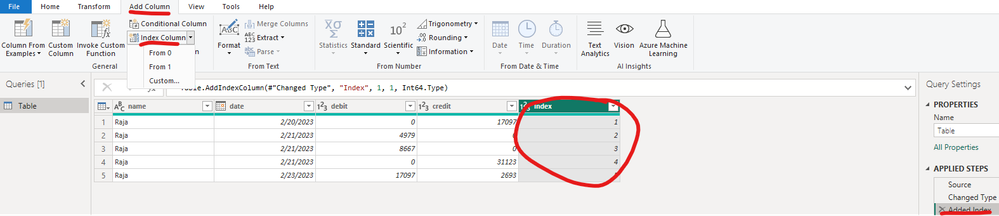
1. Add a index column in Power Query Editor
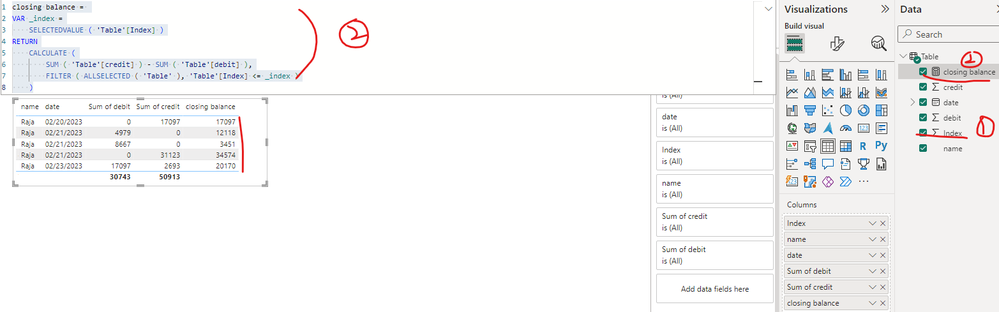
2. Create a measure as below to get the closing balance
closing balance =
VAR _index =
SELECTEDVALUE ( 'Table'[Index] )
RETURN
CALCULATE (
SUM ( 'Table'[credit] ) - SUM ( 'Table'[debit] ),
FILTER ( ALLSELECTED ( 'Table' ), 'Table'[Index] <= _index )
)
Best Regards
Hi @rajasekar_o ,
I created a sample pbix file(see the attachment), please find the details in it.
1. Add a index column in Power Query Editor
2. Create a measure as below to get the closing balance
closing balance =
VAR _index =
SELECTEDVALUE ( 'Table'[Index] )
RETURN
CALCULATE (
SUM ( 'Table'[credit] ) - SUM ( 'Table'[debit] ),
FILTER ( ALLSELECTED ( 'Table' ), 'Table'[Index] <= _index )
)
Best Regards
Share sample pbix file to help you.
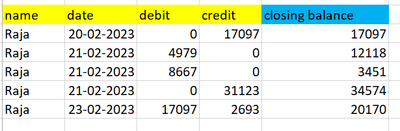
I have debit credit data only i want to calculate closing balance
Check out the November 2025 Power BI update to learn about new features.
Advance your Data & AI career with 50 days of live learning, contests, hands-on challenges, study groups & certifications and more!