Don't miss your chance to take exam DP-600 or DP-700 on us!
Request nowLearn from the best! Meet the four finalists headed to the FINALS of the Power BI Dataviz World Championships! Register now
Hi guys,
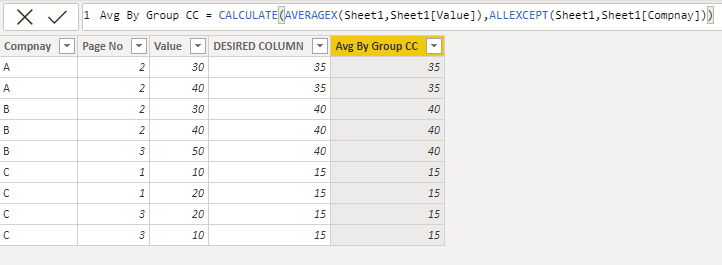
If I have a data table like below,
How can I create a new column (below DESIRED COLUMN) which is calculated by Value grouped by Company's page no as an average. for each row.
How can get Average of Value for each page. returning value must be in every its row.
I wrote this dax but It returned average of Page no?!
But it returns same value for all rows.
| Compnay | Page No | Value | DESIRED COLUMN |
| A | 2 | 30 | 35 |
| A | 2 | 40 | 35 |
| B | 2 | 30 | 40 |
| B | 2 | 40 | 40 |
| B | 3 | 50 | 40 |
| C | 1 | 10 | 15 |
| C | 1 | 20 | 15 |
| C | 3 | 20 | 15 |
| C | 3 | 10 | 15 |
Solved! Go to Solution.
Make Calculated Column I hope this will resolve the issue
Did I answer your question? If so, please mark my post as a solution!
Proud to be a Super User!
Did I answer your question? If so, please mark my post as a solution!
Proud to be a Super User!
Did I answer your question? If so, please mark my post as a solution!
Proud to be a Super User!
Thank you four you answer @mh2587 ,
I need these average value in all rows as a new column.
And also I have more than 70 company names, so I need more simple DAX.
Kind regards...
Make Calculated Column I hope this will resolve the issue
Did I answer your question? If so, please mark my post as a solution!
Proud to be a Super User!
Share feedback directly with Fabric product managers, participate in targeted research studies and influence the Fabric roadmap.
Check out the February 2026 Power BI update to learn about new features.
| User | Count |
|---|---|
| 50 | |
| 40 | |
| 37 | |
| 14 | |
| 14 |
| User | Count |
|---|---|
| 85 | |
| 69 | |
| 38 | |
| 29 | |
| 27 |