Join us at FabCon Atlanta from March 16 - 20, 2026, for the ultimate Fabric, Power BI, AI and SQL community-led event. Save $200 with code FABCOMM.
Register now!The Power BI Data Visualization World Championships is back! Get ahead of the game and start preparing now! Learn more
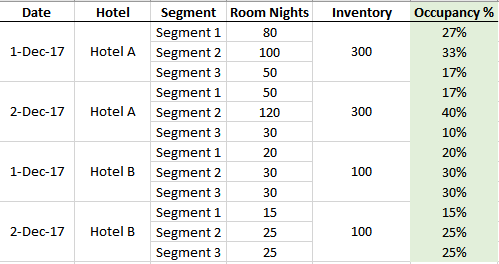
Here's a sample of what I am looking at:
1. I have several hotels. In this case, Hotel A and Hotel B.
2. In each hotel, I have (i) a daily breakdown, and (ii) the segment breakdown contributing to the sales
3. I have a fixed room inventory for each hotel : hotel A (300 rooms a day) and hotel B (100 rooms a day)
Problem :
1. I need to build a robust measure for occupancy, which is (Room Nights / Inventory).
2. The measure will stand whether I remove the segment and/or remove the dates
Here's how it will look like. I am trying to calculate the green colum Occupancy %.
1. The measure can be broken down by day/by segment/by hotel, etc
2. But I should also be able to aggregate it for e.g. if I removed the segment, Hotel A will be 77% on 1 Dec (i.e. (80+100+50)/300)), or even if I remove the dates, Hotel A will be 71% on 1Dec and 2Dec aggregated (i.e. (80+100+50+50+120+30) / (300+300).
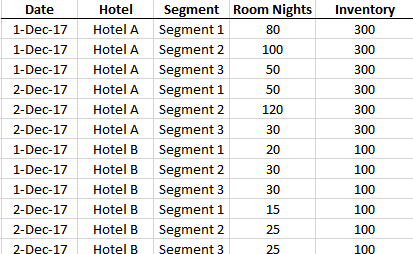
Here is how my data table actually looks like and I'm having difficulties in building the measure that I need:
Any help will be much appreciated!
Solved! Go to Solution.
@MalcolmLeong,
In your table, create the following measure.
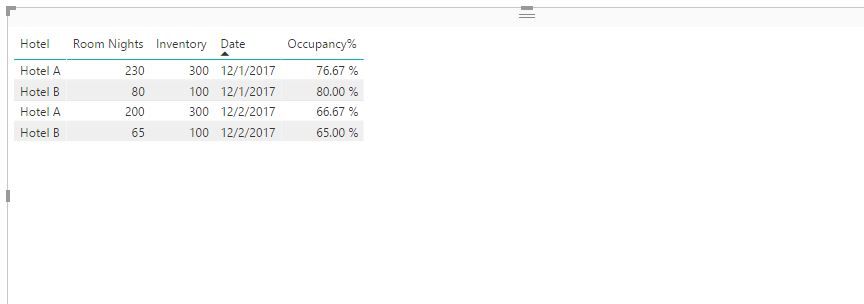
Occupancy% = SUM(Table[Room Nights])/MAX(Table[Inventory])
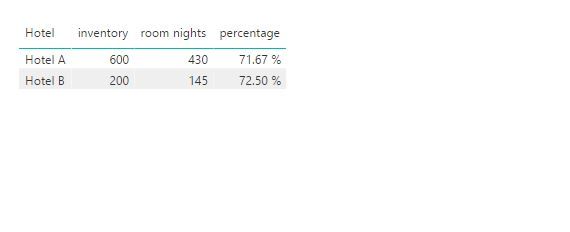
For your last requirement that "even if I remove the dates, Hotel A will be 71% on 1Dec and 2Dec aggregated (i.e. (80+100+50+50+120+30) / (300+300)", please firstly create new table using DAX below.
NewTable = SUMMARIZE(Table,Table[Hotel],Table[Date],"room nights",SUM(Table[Room Nights]),"inventory",MAX(Table[Inventory]))
Then create the following measure in the new table.
percentage = DIVIDE(SUM('NewTable'[room nights]),CALCULATE(SUM('NewTable'[inventory]),FILTER('NewTable','NewTable'[Date]<=MAX('NewTable'[Date]))))
Regards,
Lydia
@MalcolmLeong,
In your table, create the following measure.
Occupancy% = SUM(Table[Room Nights])/MAX(Table[Inventory])
For your last requirement that "even if I remove the dates, Hotel A will be 71% on 1Dec and 2Dec aggregated (i.e. (80+100+50+50+120+30) / (300+300)", please firstly create new table using DAX below.
NewTable = SUMMARIZE(Table,Table[Hotel],Table[Date],"room nights",SUM(Table[Room Nights]),"inventory",MAX(Table[Inventory]))
Then create the following measure in the new table.
percentage = DIVIDE(SUM('NewTable'[room nights]),CALCULATE(SUM('NewTable'[inventory]),FILTER('NewTable','NewTable'[Date]<=MAX('NewTable'[Date]))))
Regards,
Lydia
The Power BI Data Visualization World Championships is back! Get ahead of the game and start preparing now!
| User | Count |
|---|---|
| 41 | |
| 38 | |
| 36 | |
| 30 | |
| 28 |
| User | Count |
|---|---|
| 128 | |
| 88 | |
| 79 | |
| 67 | |
| 62 |