This time we’re going bigger than ever. Fabric, Power BI, SQL, AI and more. We're covering it all. You won't want to miss it.
Learn moreDid you hear? There's a new SQL AI Developer certification (DP-800). Start preparing now and be one of the first to get certified. Register now
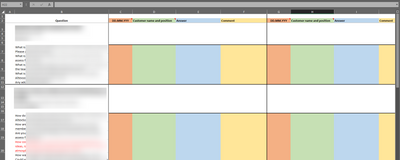
Hi, I have a list of excel files. Each of them contains the following data.
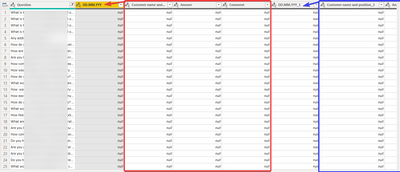
Questions are the same, but columns "Customer name", "Answer" and "Comment" are repeated, and they are related to the dd.mm.yyyy column.
All I want is to associate columns "Customer name", "Answer" and "Comment" with the dd.mm.yyyy columns. Right now I just have columns dd.mm.yyyy_1, customer name_1, ....
As a result, I want to remain only 3 columns, that are associated with the different dates.
Sorry if it is not understandable. I would be grateful if you could give me some direction.
Hi,
I hope you are using Folder as a data source where you are pointing the folder path.
In a easy way, maintain the name of the column is same acorss all the files.
Ref - https://sqlitybi.com/loading-multiple-excel-files-from-a-folder-in-power-bi/
Thanks
Hari
Thanks for your response. Yes, I'm using folders as a source.
I have lots of excel files, but the structure inside is the same. It looks like that:
But I want to gather all that data and create beautiful graphs in PowerBi. But I'm stuck with associating specific answers to specific dates..
Check out the April 2026 Power BI update to learn about new features.
Sign up to receive a private message when registration opens and key events begin.
If you have recently started exploring Fabric, we'd love to hear how it's going. Your feedback can help with product improvements.
| User | Count |
|---|---|
| 34 | |
| 31 | |
| 30 | |
| 21 | |
| 16 |
| User | Count |
|---|---|
| 60 | |
| 48 | |
| 29 | |
| 23 | |
| 23 |