cancel
Showing results for 
Search instead for 
Did you mean: 

We've captured the moments from FabCon & SQLCon that everyone is talking about, and we are bringing them to the community, live and on-demand. Starts on April 14th. Register now

Reply
Anonymous
Not applicable

How to align column widths

Hi everyone,


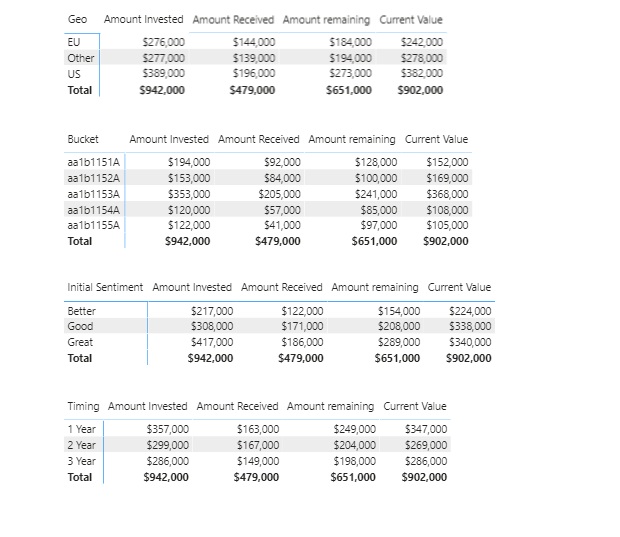
Suppose I have the screenshot at the bottom of this post:


A good looking report would mean that each of the tables are the same size, so the column widths of each table should all be in line. Is there a good way to do this besides just manually eyeballing and dragging the columns with my mouse? I'm aware you can format each visual's x and y position, which helps, but I couldn't find anything to accurately do column width. A fast, accurate way to do this is preferrable because even if I get the column widths to be pretty good, sometimes I need to adjust font sizes, add visuals off to the side and so I would need to adjust page size and re-center. This often times means the formatting could get messed up. 

In Excel, every thing is stored at the cell level where its intersected by a column and a row. I am able to accurately enter in a number to adjust column or row size.  Does PowerBI have anything useful like that?


I saw some other posts on this same topic, but they were from a couple years ago. I was wondering if a good way to do this has been discovered since then.


any help is appreciated, thanks!


1 ACCEPTED SOLUTION

Hi akutt,


This isn't available yet as you request, but here are a few ideas out there to do this.  You can vote on any (or all) of these that I found:

https://ideas.powerbi.com/forums/265200-power-bi-ideas/suggestions/32659126-column-width-size-issue-...


https://ideas.powerbi.com/forums/265200-power-bi-ideas/suggestions/34864783-guide-grid-for-table-col...


https://ideas.powerbi.com/forums/265200-power-bi-ideas/suggestions/34423198-set-column-widths


https://ideas.powerbi.com/forums/265200-power-bi-ideas/suggestions/18929665-ability-to-apply-width-t...


I would appreciate Kudos if my response was helpful. I would also appreciate it if you would mark this as a solution if it solved the problem. Thanks!


Did I answer your question? Mark my post as a solution!

Proud to be a Datanaut!
Private message me for consulting or training needs.


View solution in original post

5 REPLIES 5
Anonymous
Not applicable

Greg_Deckler
Community Champion
Community Champion

@Anonymous - I am not aware of anything for this.


Follow on LinkedIn
@ me in replies or I'll lose your thread!!!
Instead of a Kudo, please vote for this idea
Become an expert!: Enterprise DNA
External Tools: MSHGQM
YouTube Channel!: Microsoft Hates Greg
Latest book!:
DAX For Humans

DAX is easy, CALCULATE makes DAX hard...
Anonymous
Not applicable

Column Width.PNG

Hi akutt,


This isn't available yet as you request, but here are a few ideas out there to do this.  You can vote on any (or all) of these that I found:

https://ideas.powerbi.com/forums/265200-power-bi-ideas/suggestions/32659126-column-width-size-issue-...


https://ideas.powerbi.com/forums/265200-power-bi-ideas/suggestions/34864783-guide-grid-for-table-col...


https://ideas.powerbi.com/forums/265200-power-bi-ideas/suggestions/34423198-set-column-widths


https://ideas.powerbi.com/forums/265200-power-bi-ideas/suggestions/18929665-ability-to-apply-width-t...


I would appreciate Kudos if my response was helpful. I would also appreciate it if you would mark this as a solution if it solved the problem. Thanks!


Did I answer your question? Mark my post as a solution!

Proud to be a Datanaut!
Private message me for consulting or training needs.


Anonymous
Not applicable

Okay thank you guys for confirming.


And collinq, thank you for those posts. I voted for all of them. It's sad but this could be a potential reason that I can't use powerBI since I'm constrained to very specific standards when building reports.

Helpful resources

Announcements
New to Fabric survey Carousel

New to Fabric Survey

If you have recently started exploring Fabric, we'd love to hear how it's going. Your feedback can help with product improvements.

Power BI DataViz World Championships carousel

Power BI DataViz World Championships - June 2026

A new Power BI DataViz World Championship is coming this June! Don't miss out on submitting your entry.

Join our Fabric User Panel

Join our Fabric User Panel

Share feedback directly with Fabric product managers, participate in targeted research studies and influence the Fabric roadmap.

March Power BI Update Carousel

Power BI Community Update - March 2026

Check out the March 2026 Power BI update to learn about new features.