cancel
Showing results for 
Search instead for 
Did you mean: 

The Power BI Data Visualization World Championships is back! Get ahead of the game and start preparing now! Learn more

Reply
Syndicate_Admin
Administrator
Administrator

How to add a custom fixed diagonal line to a chart

Good!

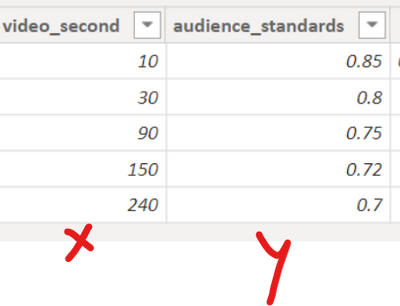
I want to use this audience target table to draw a fixed line in my graphs.

Gabri_X73_0-1669646591871.png

To do this, I created a table manually in Power BI, but I don't know how to add the line to my charts.

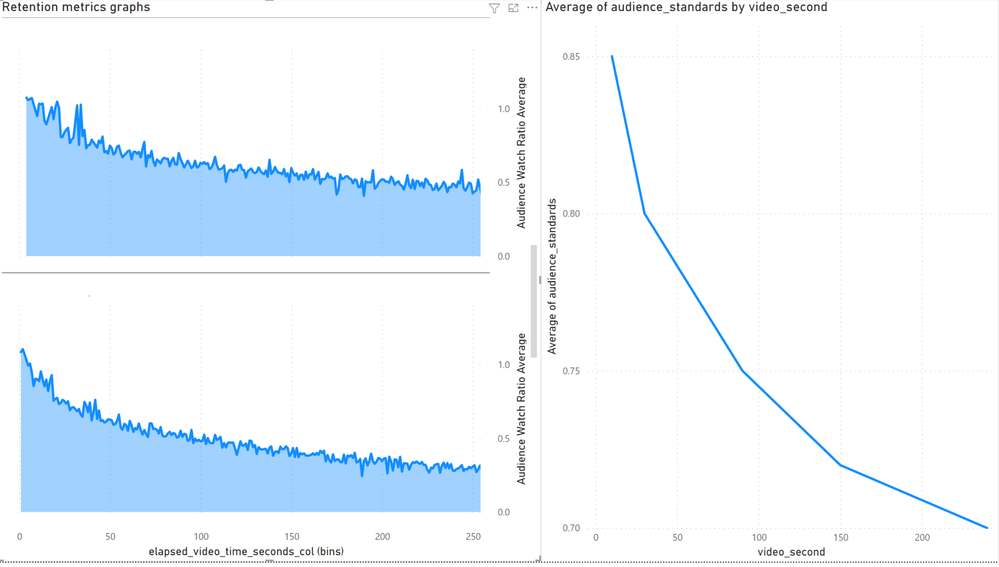
Let's say I want to add as a fixed line the graph on the right to each of the ones on the left, which are divided by category:

Gabri_X73_1-1669646837613.png

Thanks a lot!

2 REPLIES 2
Anonymous
Not applicable

Hi @Syndicate_Admin ,

Please try below steps:

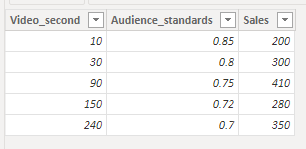
1. below is my test table

Table:

vbinbinyumsft_0-1669685706375.png

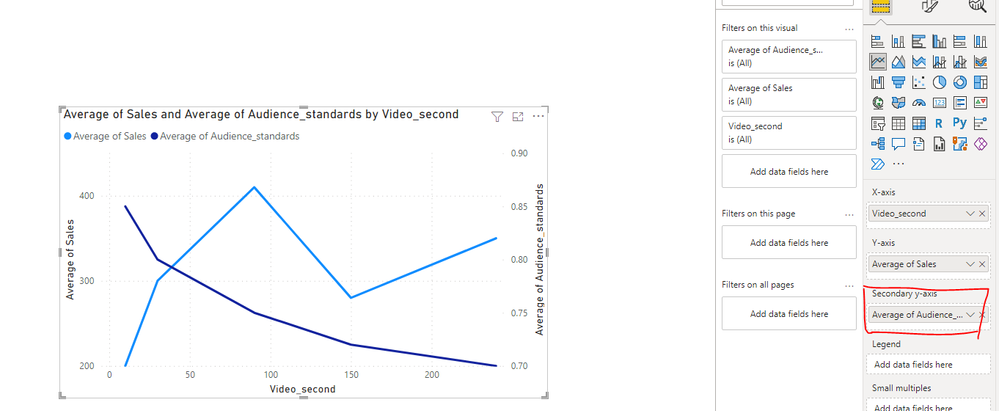
2. add a line chart with fields, please try to use "Secondary y-axis" in the line chart

vbinbinyumsft_1-1669685840361.png

Please refer the attached .pbix file.


Best regards,
Community Support Team_Binbin Yu
If this post helps, then please consider Accept it as the solution to help the other members find it more quickly.

Good! Thanks for the reply. My problem would come rather on the side of balancing the x-axis between the two data tables. One is the simple table I've laid out above and another is a large mass of data. I can not place in the same graph both by the x-axis mainly.

Helpful resources

Announcements
Power BI DataViz World Championships

Power BI Dataviz World Championships

The Power BI Data Visualization World Championships is back! Get ahead of the game and start preparing now!

November Power BI Update Carousel

Power BI Monthly Update - November 2025

Check out the November 2025 Power BI update to learn about new features.

FabCon Atlanta 2026 carousel

FabCon Atlanta 2026

Join us at FabCon Atlanta, March 16-20, for the ultimate Fabric, Power BI, AI and SQL community-led event. Save $200 with code FABCOMM.