cancel
Showing results for 
Search instead for 
Did you mean: 

Get Fabric Certified for FREE during Fabric Data Days. Don't miss your chance! Request now

Reply
ramshoney1225
Helper V
Helper V

How to add Braces to values with Actual value and Delta value In power BI Desktop

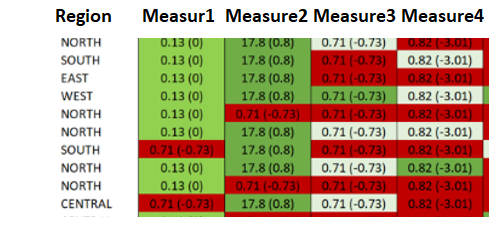
Hi I need to achive the below one, I have a dimension column values and its Measure values.

ex: Colum1, Column2, Column3, Column4 , Measure1 Measure2, Meaure3, Measure 4 as below.

here now i have inculded only one DImension value and remaining measures.


achivement.png


0.13 is actual value ans (0) --> 0 is delta value which both i have calucated and its available straigh away.

The color coding is same for both the values, which i can be taken care.

but the real problem here to me is how can i put both the values side by side  Actualvalue(Deltavalue)  in one column with "()" both the braces added ?


Thanks,

RamsK

1 ACCEPTED SOLUTION

Hi,


you will still be able to do a conditional formatting.

But you'll probably have to define it in a measure with a SWITCH() function
The bottom example on this link shows you how:
https://docs.microsoft.com/en-us/power-bi/desktop-conditional-table-formatting 

View solution in original post

5 REPLIES 5
RobbeVL
Impactful Individual

Hi there,

You will need to convert your value to text, in able to do this.
Concatenate will help you along 
https://docs.microsoft.com/en-us/dax/concatenate-function-dax 

Also using symbols as "&" will help you put values together in 1 field. (ex. [text1]&" "&[Text2] = text1 Text2 )


Hope this helps.


Robbe

Anonymous
Not applicable

hi @RobbeVL  - please could you share a sample data demo report showing how this works? I also need to concatenate 2 values in 1 field and have the 2nd value into brackets.


In my case, I have 2 values, both are to be shown as count.


For example:


Quarter   Region      Extra work done (0 - No, 1- Yes)

Q2 2024  APAC              0

Q3 2024  AMER             1

Q4 2024  EMEA             1

Q2 2024  APAC              1

Q3 2024  AMER             1 


so my final output should show as a pivot with Region on the rows and count of of work done by quarter on the right plus (extra work done). Appreciate any help on this please


Region        Q2 2024       Q3 2024         Q4 2024

APAC               0                1(2)                 0

EMEA              2(4)            3(1)                 2(1)

AMER              2(2)            7(4)                 3(0)

Hi Robbe,


Thanks for the prompt response, but if i do concatenate then it will become string / text.

so that i wont able to apply color coding to it right ? 😞 


Hi,


you will still be able to do a conditional formatting.

But you'll probably have to define it in a measure with a SWITCH() function
The bottom example on this link shows you how:
https://docs.microsoft.com/en-us/power-bi/desktop-conditional-table-formatting 

Anonymous
Not applicable

Thanks Robee, its worked everything .


Thanks for the information.

Helpful resources

Announcements
November Power BI Update Carousel

Power BI Monthly Update - November 2025

Check out the November 2025 Power BI update to learn about new features.

Fabric Data Days Carousel

Fabric Data Days

Advance your Data & AI career with 50 days of live learning, contests, hands-on challenges, study groups & certifications and more!

FabCon Atlanta 2026 carousel

FabCon Atlanta 2026

Join us at FabCon Atlanta, March 16-20, for the ultimate Fabric, Power BI, AI and SQL community-led event. Save $200 with code FABCOMM.

Top Solution Authors
Top Kudoed Authors