Join us at FabCon Atlanta from March 16 - 20, 2026, for the ultimate Fabric, Power BI, AI and SQL community-led event. Save $200 with code FABCOMM.
Register now!The Power BI Data Visualization World Championships is back! Get ahead of the game and start preparing now! Learn more
Hi,
I'm trying to access ssas instance of power BI desktop, I can access it using SSMS, can any one please help me with this.
Regards,
Saranraj Kumar
Hi @saranrajk ,
You can connect to SSAS in power bi desktop by these steps:
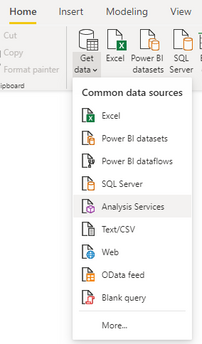
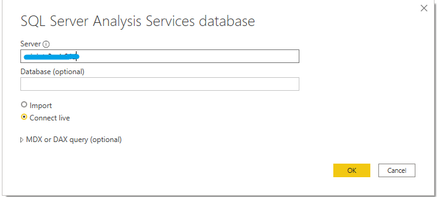
Home -> Get data -> Analysis Services -> enter your server name (database name is optional) -> choose Import or Connect Live mode -> OK.
About differences between import or connect live mode when connecting to SSAS in power bi desktop, please refer the following Microsoft case and document that could help you:
More details about SSAS in power bi desktop, please refer the following Microsoft documents that could help you:
Best Regards,
Yingjie Li
If this post helps then please consider Accept it as the solution to help the other members find it more quickly.
Hi ddin't mean to access to SSAS through power BI,
Power BI creates an SSAS instance once we open it and uses it, folder we like below
C:\Users\user\Microsoft\Power BI Desktop Store App\AnalysisServicesWorkspaces\AnalysisServicesWorkspace171096645\Data
I can it by using the port nnumber this instance using SSMS, can anyone tell me that how to access it programmatically.
The Power BI Data Visualization World Championships is back! Get ahead of the game and start preparing now!
| User | Count |
|---|---|
| 37 | |
| 36 | |
| 33 | |
| 31 | |
| 28 |
| User | Count |
|---|---|
| 129 | |
| 88 | |
| 79 | |
| 68 | |
| 63 |