
cancel
Showing results for 
Search instead for 
Did you mean: 

The Power BI Data Visualization World Championships is back! Get ahead of the game and start preparing now! Learn more

Reply
ahadi063
New Member

How to: Unstack Data

Hi everyone! 


I am new to BI and was wondering if someone would be kind enough to help with a problem I am facing. 


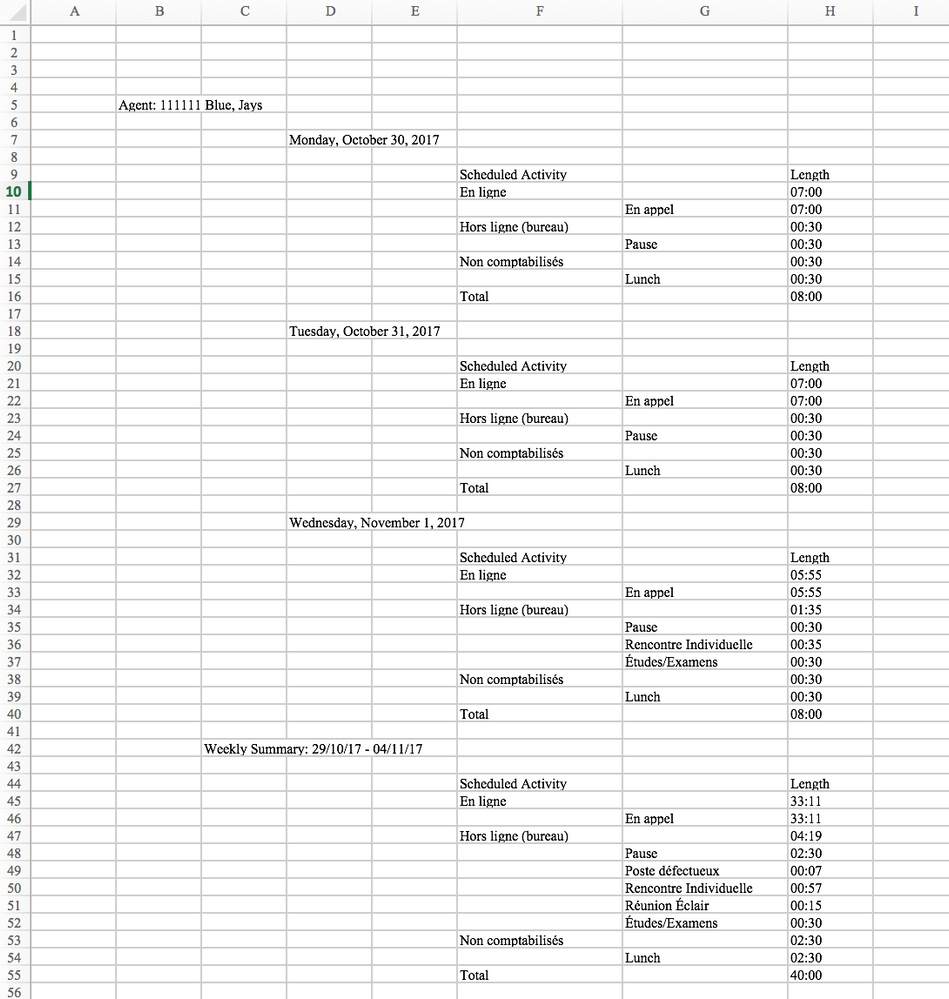
Please see attached the output format that I am getting from a reporting tool and I need it to transform it as how it is seen in "Desired look" tab. 


This is the following transformation that I need:


1. Be able to put all the variables to headers and transform it as columns. 

2. Be able to delete the all the rows associated with "Weekly Summary". 


If anyone can help that would be great!Output.pngDesired Look.png


1 ACCEPTED SOLUTION
v-chuncz-msft
Community Support
Community Support

@ahadi063,


You may directly Connect to data in Power BI Desktop and transform the data in The Query Editor.

Community Support Team _ Sam Zha
If this post helps, then please consider Accept it as the solution to help the other members find it more quickly.

View solution in original post

1 REPLY 1
v-chuncz-msft
Community Support
Community Support

@ahadi063,


You may directly Connect to data in Power BI Desktop and transform the data in The Query Editor.

Community Support Team _ Sam Zha
If this post helps, then please consider Accept it as the solution to help the other members find it more quickly.

Helpful resources

Announcements
Power BI DataViz World Championships

Power BI Dataviz World Championships

The Power BI Data Visualization World Championships is back! Get ahead of the game and start preparing now!

December 2025 Power BI Update Carousel

Power BI Monthly Update - December 2025

Check out the December 2025 Power BI Holiday Recap!

FabCon Atlanta 2026 carousel

FabCon Atlanta 2026

Join us at FabCon Atlanta, March 16-20, for the ultimate Fabric, Power BI, AI and SQL community-led event. Save $200 with code FABCOMM.