
Don't miss your chance to take the Fabric Data Engineer (DP-600) exam for FREE! Find out how by attending the DP-600 session on April 23rd (pacific time), live or on-demand.
Learn moreJoin the FabCon + SQLCon recap series. Up next: Power BI, Real-Time Intelligence, IQ and AI, and Data Factory take center stage. All sessions are available on-demand after the live show. Register now
Hello All,
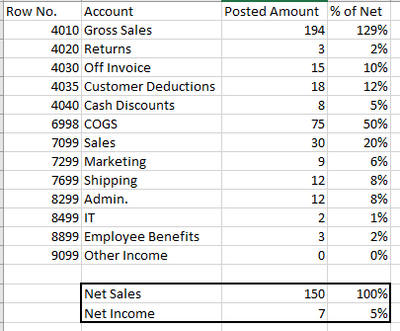
I am trying to create a column which compares all values to Net Sales. Our company calculates Net Sales as Gross Sales - Returns and Discounts. The picture below is what I'm trying to achieve: Net Sales are 150 and I'm trying to compare every other total to that value.
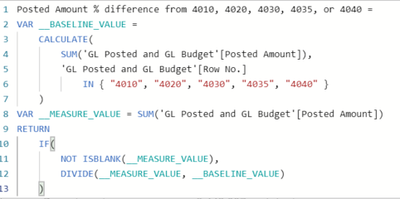
I'm sure there is a simple way to do this but every way I have tired does not give me the results I want. I have created two measures, the first one calculates Net Sales:
The next calculates the posted amount over the Net Sales measure:
I have also tried a different version of the above formulas:
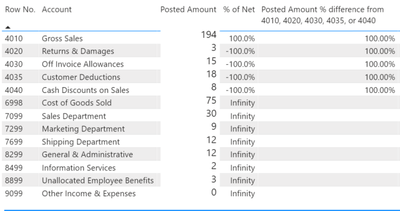
Below are the results I'm getting based off of the formulas above. As you can see it's not dividing by the total Net Sales and in the case of the lower rows, it's dividing by 0 because they aren't in the net sales calculation.
Any insight would be greatly appericated.
Thanks,
Calen
Solved! Go to Solution.
Hi @calen ,
You could use ALLSELECTED( 'Your table' ). Here is a measure for your reference.
Measure =
VAR a =
CALCULATE (
SUM ( 'Table'[Posted Amount] ),
FILTER (
ALLSELECTED ( 'Table' ),
'Table'[Row No.] IN { 4010, 4020, 4030, 4035, 4040 }
)
)
VAR b =
ABS ( SELECTEDVALUE ( 'Table'[Posted Amount] ) ) / a
RETURN
b
Here is the result:
Hi @calen ,
You could use ALLSELECTED( 'Your table' ). Here is a measure for your reference.
Measure =
VAR a =
CALCULATE (
SUM ( 'Table'[Posted Amount] ),
FILTER (
ALLSELECTED ( 'Table' ),
'Table'[Row No.] IN { 4010, 4020, 4030, 4035, 4040 }
)
)
VAR b =
ABS ( SELECTEDVALUE ( 'Table'[Posted Amount] ) ) / a
RETURN
b
Here is the result:
Thank you for your help!
Check out the April 2026 Power BI update to learn about new features.
If you have recently started exploring Fabric, we'd love to hear how it's going. Your feedback can help with product improvements.
A new Power BI DataViz World Championship is coming this June! Don't miss out on submitting your entry.
| User | Count |
|---|---|
| 48 | |
| 40 | |
| 37 | |
| 20 | |
| 16 |
| User | Count |
|---|---|
| 69 | |
| 67 | |
| 32 | |
| 27 | |
| 26 |