cancel
Showing results for 
Search instead for 
Did you mean: 

Learn from the best! Meet the four finalists headed to the FINALS of the Power BI Dataviz World Championships! Register now

Reply
Anonymous
Not applicable

How to Sort Columns in matrix visual?

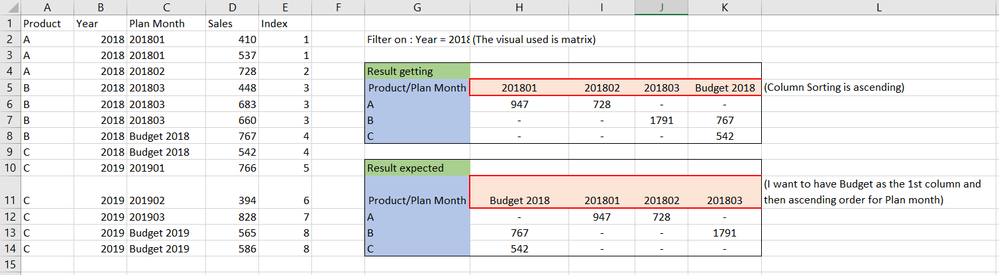
Below is the screenshot where left part is the data, and right part is the result.

I need to sort the columns descending (i.e Budget 2018 , 201801, 201802, 201803)

The visual used here is the matrix. (pivot table)


Capture.PNG

I have tried sorting with the index column, but still not able to get accurate result.


Any help is appreciated, 

Thanks in advance !!

1 ACCEPTED SOLUTION
v-chuncz-msft
Community Support
Community Support

@Anonymous ,


Change the Index of "Budget 2018" from 4 to 0.

Community Support Team _ Sam Zha
If this post helps, then please consider Accept it as the solution to help the other members find it more quickly.

View solution in original post

2 REPLIES 2
v-chuncz-msft
Community Support
Community Support

@Anonymous ,


Change the Index of "Budget 2018" from 4 to 0.

Community Support Team _ Sam Zha
If this post helps, then please consider Accept it as the solution to help the other members find it more quickly.
Anonymous
Not applicable

Thanks @v-chuncz-msft!! ,

It worked, but this is quick fix.

What if I receive data for "2020" and "budget 2020" again I need to put indexing and change the index manually.

Helpful resources

Announcements
Join our Fabric User Panel

Join our Fabric User Panel

Share feedback directly with Fabric product managers, participate in targeted research studies and influence the Fabric roadmap.

March Power BI Update Carousel

Power BI Community Update - March 2026

Check out the March 2026 Power BI update to learn about new features.