Join us at FabCon Atlanta from March 16 - 20, 2026, for the ultimate Fabric, Power BI, AI and SQL community-led event. Save $200 with code FABCOMM.
Register now!The Power BI Data Visualization World Championships is back! It's time to submit your entry. Live now!
I want to numerically rank an amount within a specific date. Say my data is this.
Person Sales Date Bob 10 January Jeff 20 January Steve 30 January Bob 50 February Jeff 40 February Steve 30 February Bob 20 March Jeff 30 March Steve 10 March
I want to be able to see their ranks with a month and also for the entire year. Like this.
Person Sales Date Month Rank Year Rank Bob 10 January 3 2 Jeff 20 January 2 1 Steve 30 January 1 3 Bob 50 February 1 2 Jeff 40 February 2 1 Steve 30 February 3 3 Bob 20 March 2 2 Jeff 30 March 1 1 Steve 10 March 3 3
I'm having difficulty getting the ranks within the months. It ranks each record individually so in this case it shows ranks 1-9.
Thanks!
Solved! Go to Solution.
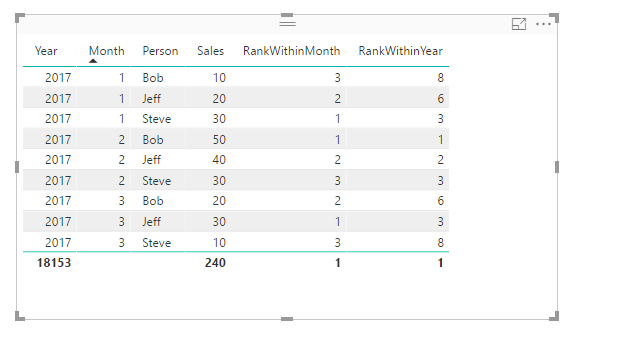
In this scenario, I assume you should also have a year column in your column.
Then you just need to create two measures:
RankWithinYear = RANKX(ALLEXCEPT('Table','Table'[Year]),CALCULATE(SUM('Table'[Sales])))
RankWithinMonth = RANKX(ALLEXCEPT('Table','Table'[Month],'Table'[Year]),CALCULATE(SUM('Table'[Sales])))
If you don't have that Year column in your source table, your measures will be like below:
RankWithinMonth = RANKX(ALLEXCEPT('Table','Table'[Month]),CALCULATE(SUM('Table'[Sales])))
Rank over entire table = RANKX(ALL('Table'),CALCULATE(SUM('Table'[Sales])))
Regards,
In this scenario, I assume you should also have a year column in your column.
Then you just need to create two measures:
RankWithinYear = RANKX(ALLEXCEPT('Table','Table'[Year]),CALCULATE(SUM('Table'[Sales])))
RankWithinMonth = RANKX(ALLEXCEPT('Table','Table'[Month],'Table'[Year]),CALCULATE(SUM('Table'[Sales])))
If you don't have that Year column in your source table, your measures will be like below:
RankWithinMonth = RANKX(ALLEXCEPT('Table','Table'[Month]),CALCULATE(SUM('Table'[Sales])))
Rank over entire table = RANKX(ALL('Table'),CALCULATE(SUM('Table'[Sales])))
Regards,
The Power BI Data Visualization World Championships is back! It's time to submit your entry.
Check out the January 2026 Power BI update to learn about new features.
| User | Count |
|---|---|
| 56 | |
| 42 | |
| 39 | |
| 23 | |
| 21 |
| User | Count |
|---|---|
| 144 | |
| 106 | |
| 63 | |
| 38 | |
| 31 |