FabCon is coming to Atlanta
Join us at FabCon Atlanta from March 16 - 20, 2026, for the ultimate Fabric, Power BI, AI and SQL community-led event. Save $200 with code FABCOMM.
Register now!- Power BI forums
- Get Help with Power BI
- Desktop
- Service
- Report Server
- Power Query
- Mobile Apps
- Developer
- DAX Commands and Tips
- Custom Visuals Development Discussion
- Health and Life Sciences
- Power BI Spanish forums
- Translated Spanish Desktop
- Training and Consulting
- Instructor Led Training
- Dashboard in a Day for Women, by Women
- Galleries
- Data Stories Gallery
- Themes Gallery
- Contests Gallery
- QuickViz Gallery
- Quick Measures Gallery
- Visual Calculations Gallery
- Notebook Gallery
- Translytical Task Flow Gallery
- TMDL Gallery
- R Script Showcase
- Webinars and Video Gallery
- Ideas
- Custom Visuals Ideas (read-only)
- Issues
- Issues
- Events
- Upcoming Events
The Power BI Data Visualization World Championships is back! It's time to submit your entry. Live now!
- Power BI forums
- Forums
- Get Help with Power BI
- Desktop
- How to Convert SQL Query to DAX query
- Subscribe to RSS Feed
- Mark Topic as New
- Mark Topic as Read
- Float this Topic for Current User
- Bookmark
- Subscribe
- Printer Friendly Page


- Mark as New
- Bookmark
- Subscribe
- Mute
- Subscribe to RSS Feed
- Permalink
- Report Inappropriate Content
How to Convert SQL Query to DAX query
Hi All,
I have a below requirement to Convert an Sql Query to DAX query (result can be a new column or new measure).
note: as i am bound to data protection policy so could not provide the actual sql query.
Background of Query:
1.there are two tables Table-A and Table-B, out of which Column1 is same for Both the tables and other columns are different.
2. I am looking to extract Column1 values by applying the below mentioned conditions.
select TABLE-A.Column1
from TABLE-A inner join TABLE-B
on TABLE-A.Column1 = TABLE-B.Column1
where TABLE-B.Column2 = 'XYZ'
and TABLE-A.Column3 = 'ABC' and TABLE-A.Column4 not like '%ASD%'
and TABLE-A.Column4 not like '%QWE%' and TABLE-A.Column4 not like '%JKLNM%'
As per my knowledge, i have used LookUp , FILTER , search options of Power Biindividually but could not able to figure out to use them in a combination
It would be a great help if anyone provides any solution to my request.
Thanks
Santosh
Solved! Go to Solution.


- Mark as New
- Bookmark
- Subscribe
- Mute
- Subscribe to RSS Feed
- Permalink
- Report Inappropriate Content
Hi @SantoshKumar ,
Kindly check the attachment whether help.
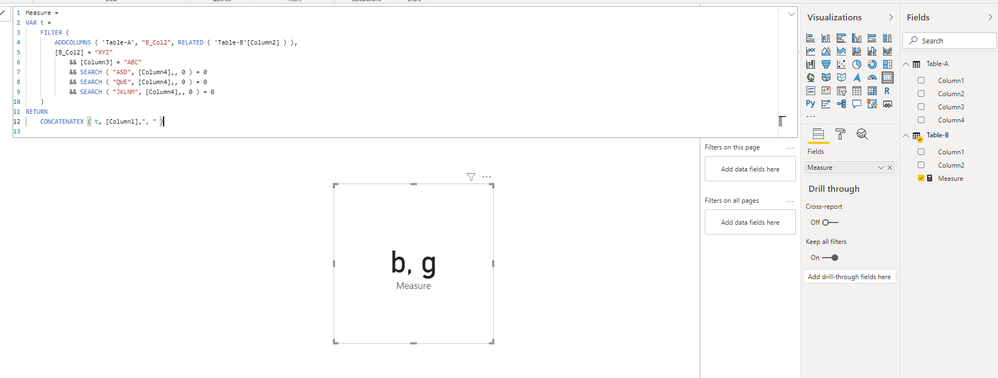
Measure =
VAR t =
    FILTER (
        ADDCOLUMNS ( 'Table-A', "B_Col2", RELATED ( 'Table-B'[Column2] ) ),
        [B_Col2] = "XYZ"
            && [Column3] = "ABC"
            && SEARCH ( "ASD", [Column4],, 0 ) = 0
            && SEARCH ( "QWE", [Column4],, 0 ) = 0
            && SEARCH ( "JKLNM", [Column4],, 0 ) = 0
    )
RETURN
    CONCATENATEX ( t, [Column1],", " )
Best Regards,
Icey
If this post helps, then please consider Accept it as the solution to help the other members find it more quickly.
- Mark as New
- Bookmark
- Subscribe
- Mute
- Subscribe to RSS Feed
- Permalink
- Report Inappropriate Content
Hi @SantoshKumar ,
Kindly check the attachment whether help.
Measure =
VAR t =
    FILTER (
        ADDCOLUMNS ( 'Table-A', "B_Col2", RELATED ( 'Table-B'[Column2] ) ),
        [B_Col2] = "XYZ"
            && [Column3] = "ABC"
            && SEARCH ( "ASD", [Column4],, 0 ) = 0
            && SEARCH ( "QWE", [Column4],, 0 ) = 0
            && SEARCH ( "JKLNM", [Column4],, 0 ) = 0
    )
RETURN
    CONCATENATEX ( t, [Column1],", " )
Best Regards,
Icey
If this post helps, then please consider Accept it as the solution to help the other members find it more quickly.
- Mark as New
- Bookmark
- Subscribe
- Mute
- Subscribe to RSS Feed
- Permalink
- Report Inappropriate Content
Thank you, Your Solution worked for me with small minor changes as per my requirement.
Regards
Santosh
- Mark as New
- Bookmark
- Subscribe
- Mute
- Subscribe to RSS Feed
- Permalink
- Report Inappropriate Content
@Icey
Sorry but i have not got the required solution from your response. i will update some data in your pbi file and try to explain my requirement again.


- Mark as New
- Bookmark
- Subscribe
- Mute
- Subscribe to RSS Feed
- Permalink
- Report Inappropriate Content
@SantoshKumar , you need to join both tables and column1 and then create a measure to count column1 and plot it with column1 un summarized
example
calculate(count(TABLE-A[Column1]),TABLE-B[Column2] = "XYZ" , TABLE-A[Column3] = "ABC" ,CONTAINSSTRING(TABLE-A[Column4],"ASD")
,not(CONTAINSSTRING(TABLE-A[Column4],"QWE")) ,not(CONTAINSSTRING(TABLE-A[Column4],"JKLNM")))
- Mark as New
- Bookmark
- Subscribe
- Mute
- Subscribe to RSS Feed
- Permalink
- Report Inappropriate Content
Hi Amit,
I got your point about joining the tables and when i tried to do so, it is making changing to my Table-A as per the conditions i applied.
Here Table-A is used to show so other details in my report and when i apply this conditons, i will loose some data which i dont want to.
is der any other options to get the job done?
Thanks
Santosh

Helpful resources

Power BI Monthly Update - December 2025
Check out the December 2025 Power BI Holiday Recap!

FabCon Atlanta 2026
Join us at FabCon Atlanta, March 16-20, for the ultimate Fabric, Power BI, AI and SQL community-led event. Save $200 with code FABCOMM.

| User | Count |
|---|---|
| 52 | |
| 40 | |
| 31 | |
| 24 | |
| 22 |


| User | Count |
|---|---|
| 133 | |
| 115 | |
| 56 | |
| 45 | |
| 40 |


