Hi All, I'm working on an expression that by default will show a YTD cumulation, but if/when a user selects years, then it will accumulate for all the years combined. I think I've got the formula working as intended; however, for the current YTD, the line chart begins at the start of the dataset and I want it to start at the beginning of this fiscal year, 10/1/19.
Here's my formula.
YTD or Cumulative Total Wins =
IF(ISFILTERED('RA_Daily_Calendar'[Fiscal_Year]),
CALCULATE([Total Wins],
FILTER(CALCULATETABLE(SUMMARIZE('RA_Daily_Calendar', 'RA_Daily_Calendar'[Fiscal_YearMonth]),
ALLSELECTED('RA_Daily_Calendar')),
ISONORAFTER('RA_Daily_Calendar'[Fiscal_YearMonth], MAX('RA_Daily_Calendar'[Fiscal_YearMonth]), DESC)
)),
(CALCULATE ([Total Wins],
FILTER (ALLSELECTED ( 'RA_Daily_Calendar' ),
AND ('RA_Daily_Calendar'[Date] <= MAX(RA_Daily_Calendar[Date]), RA_Daily_Calendar[Flag: Current Fiscal Year] = 1)
))))
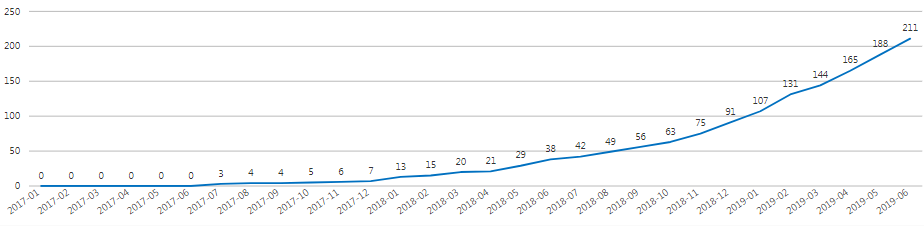
When fiscal year is filtered, it displays as I desire:
However, for the default view of current year to date, it draws like this:
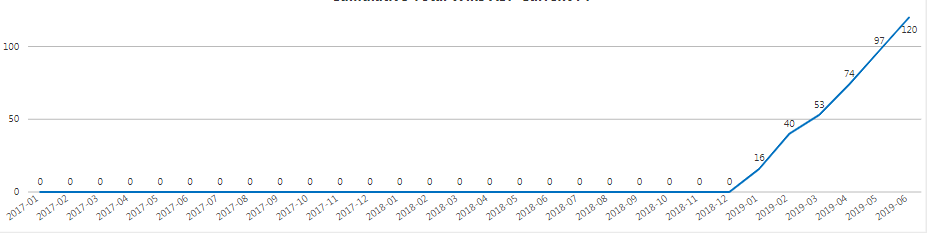
Whereas, I desire this: @Anonymous or Mike_Carlo Any ideas? Thanks in advance!


