Join us at FabCon Atlanta from March 16 - 20, 2026, for the ultimate Fabric, Power BI, AI and SQL community-led event. Save $200 with code FABCOMM.
Register now!The Power BI Data Visualization World Championships is back! It's time to submit your entry. Live now!
Hello,
Im trying to aggregate data as follow:
Current data format:
ID Name
1 A
1 B
1 C
2 D
2 E
3 F
Expected result:
ID Name
1 A;B;C
2 D;E
3 F
Do you know how to build this step in my query?
Best regards,
Solved! Go to Solution.
Hi @Klaimand,
Based on my test, you could refer to below formula:
Create a new table:
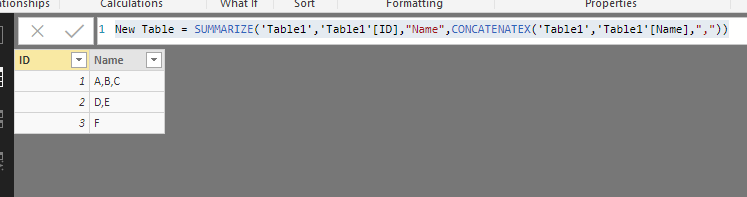
New Table = SUMMARIZE('Table1','Table1'[ID],"Name",CONCATENATEX('Table1','Table1'[Name],","))
Result:
You could also download the pbix file to have a view.
Regards,
Daniel He
Hi,
This M code works
let
Source = Excel.CurrentWorkbook(){[Name="Data"]}[Content],
#"Changed Type" = Table.TransformColumnTypes(Source,{{"ID", Int64.Type}, {"Name", type text}}),
Combine = Table.Group(#"Changed Type", {"ID"}, {{"All Names", each Text.Combine(List.Distinct([Name]), "; "), type text}})
in
Combine
Hi,
This M code works
let
Source = Excel.CurrentWorkbook(){[Name="Data"]}[Content],
#"Changed Type" = Table.TransformColumnTypes(Source,{{"ID", Int64.Type}, {"Name", type text}}),
Combine = Table.Group(#"Changed Type", {"ID"}, {{"All Names", each Text.Combine(List.Distinct([Name]), "; "), type text}})
in
Combine
Hi @Klaimand,
Based on my test, you could refer to below formula:
Create a new table:
New Table = SUMMARIZE('Table1','Table1'[ID],"Name",CONCATENATEX('Table1','Table1'[Name],","))
Result:
You could also download the pbix file to have a view.
Regards,
Daniel He
| User | Count |
|---|---|
| 53 | |
| 37 | |
| 31 | |
| 21 | |
| 19 |
| User | Count |
|---|---|
| 138 | |
| 102 | |
| 59 | |
| 36 | |
| 35 |