cancel
Showing results for 
Search instead for 
Did you mean: 

The Power BI Data Visualization World Championships is back! Get ahead of the game and start preparing now! Learn more

Reply
Analitika
Post Prodigy
Post Prodigy

How remove data labels from x axis in POwer BI?

Hi, 


I have line and clustured column chart visual. I need to remove data labels from x axis, keeping on y axis. How I could implement this?


4 REPLIES 4
Arul
Super User
Super User

@Analitika ,

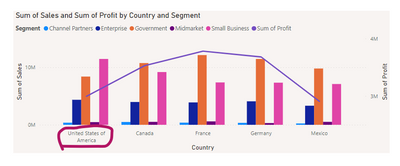
Data Labels in X-axis means, Do you want to remove the name of the X-axis label?(please see the image and confirm)

Arul_0-1682333816126.png

Thanks,

Arul


Did I answer your question? Mark my post as a solution!

Proud to be a Super User!


LinkedIn


HEllo,


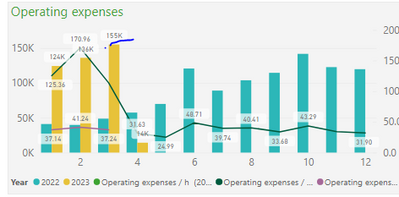
I need remove data labels from x axis columns 


Analitika_0-1682333921836.png

Data labels should be on line not columns.

@Analitika ,

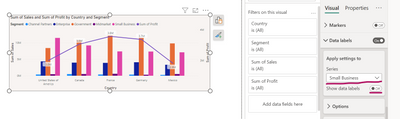
Under the data label option in the series select the bar metric and turn off show data labels. 

Arul_0-1682334293720.png

Thanks,

Arul


Did I answer your question? Mark my post as a solution!

Proud to be a Super User!


LinkedIn


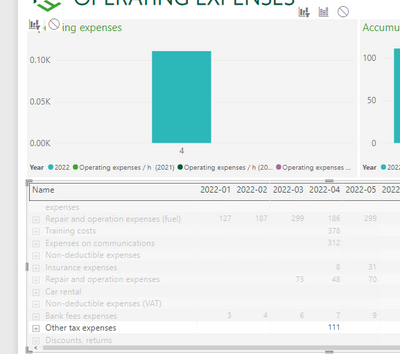
Ok thanks, that solved. But I have another issue. Whenever I select row in visual another visual doesn't show data 2022 years. For example, 

Analitika_0-1682334769724.png

I don't see no lines. Why after selecting some, lines dissapear?

Helpful resources

Announcements
November Power BI Update Carousel

Power BI Monthly Update - November 2025

Check out the November 2025 Power BI update to learn about new features.

Fabric Data Days Carousel

Fabric Data Days

Advance your Data & AI career with 50 days of live learning, contests, hands-on challenges, study groups & certifications and more!

FabCon Atlanta 2026 carousel

FabCon Atlanta 2026

Join us at FabCon Atlanta, March 16-20, for the ultimate Fabric, Power BI, AI and SQL community-led event. Save $200 with code FABCOMM.

Top Kudoed Authors