This time we’re going bigger than ever. Fabric, Power BI, SQL, AI and more. We're covering it all. You won't want to miss it.
Learn moreDid you hear? There's a new SQL AI Developer certification (DP-800). Start preparing now and be one of the first to get certified. Register now
Hello,
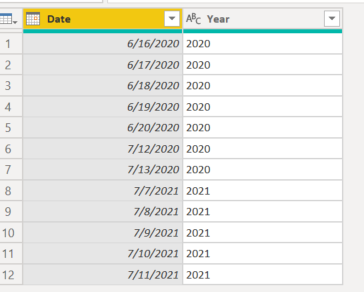
Need help on filtering the source data to the current year only. Basically I need dynamic filter to filter 2021 data into the report. Going forward 2022 data and so on. Below are the 2 date columns available in the source data.
Thanks in Advance.
Solved! Go to Solution.
Hi @Anonymous
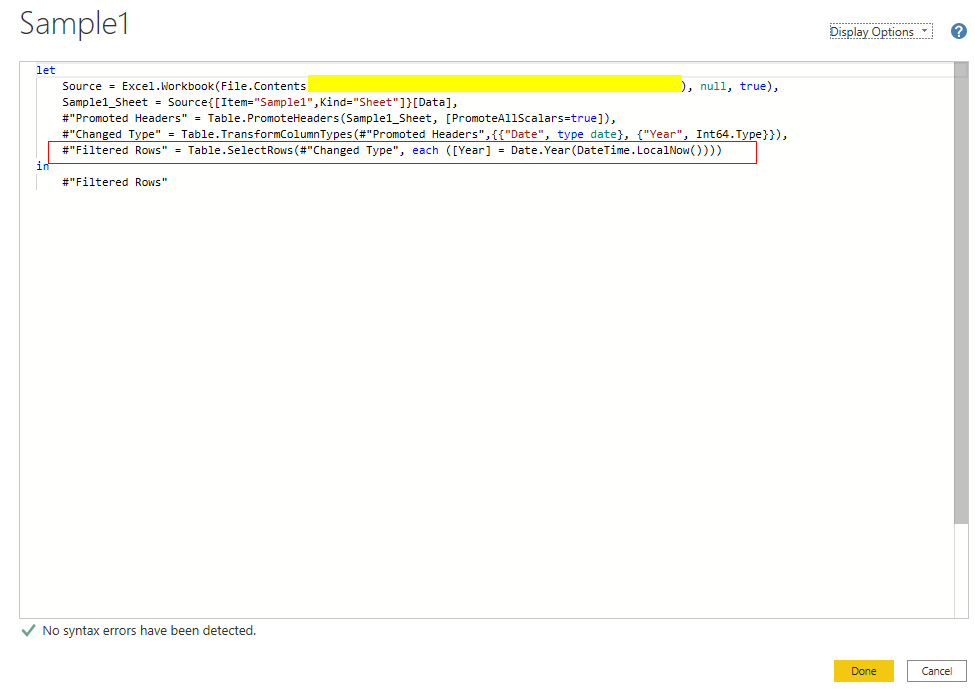
Add a Filter step in Power Query Editor to let your data model only show values in current year.
Code:
...
...
#"Filtered Rows" = Table.SelectRows(#"Changed Type", each ([Year] = Date.Year(DateTime.LocalNow())))
in
#"Filtered Rows"
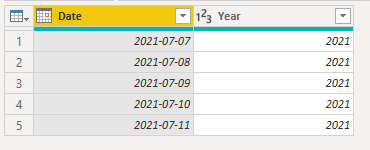
Result:
Best Regards,
Rico Zhou
If this post helps, then please consider Accept it as the solution to help the other members find it more quickly.
Hi @Anonymous
Add a Filter step in Power Query Editor to let your data model only show values in current year.
Code:
...
...
#"Filtered Rows" = Table.SelectRows(#"Changed Type", each ([Year] = Date.Year(DateTime.LocalNow())))
in
#"Filtered Rows"
Result:
Best Regards,
Rico Zhou
If this post helps, then please consider Accept it as the solution to help the other members find it more quickly.
Check out the April 2026 Power BI update to learn about new features.
Sign up to receive a private message when registration opens and key events begin.
If you have recently started exploring Fabric, we'd love to hear how it's going. Your feedback can help with product improvements.
| User | Count |
|---|---|
| 34 | |
| 31 | |
| 25 | |
| 20 | |
| 16 |
| User | Count |
|---|---|
| 61 | |
| 49 | |
| 28 | |
| 23 | |
| 23 |