Join us at FabCon Atlanta from March 16 - 20, 2026, for the ultimate Fabric, Power BI, AI and SQL community-led event. Save $200 with code FABCOMM.
Register now!Get Fabric Certified for FREE during Fabric Data Days. Don't miss your chance! Request now
Hello,
I am new here. I'm asking my first question so I'm a little excited 😊
My table has a column named "Source".
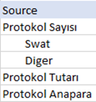
I want to center-align the "Swat" and "Other" cells in this column because these two values are sub-breakdowns of the "Protocol Number".
For this, I wrote a formula like this in Power query.
if
[Source] = "Swat" or
[Source] = "Diger"
then Text.PadStart([Source], 20)
else [Source]
Honestly, Column was what I wanted, but after I said close&apply, I realized that there was no change in power bi. Then I tried DAX
Example = IF(VALUES(Protocol[Source]) = "Swat", " Swat", 0)
but still no result... How do you think I can solve this problem? Thank you.
Solved! Go to Solution.
Hi, @v-zhangti
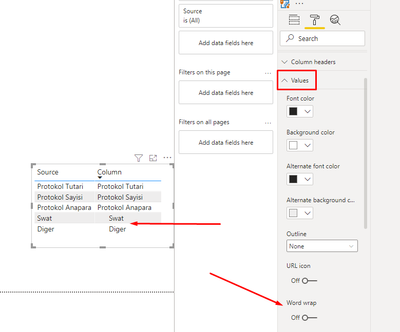
I found what caused the problem. If we disable the "Word Wrap" button in the Values section, the problem disappears.
So in the first method I tried, it actually happened, but it didn't happen because "Word wrap" was active. Example = IF(VALUES(Protocol[Source]) = "Swat", " Swat", 0)
thanks for everything 🙂
Hi, @Oguzhan0556
You can try the following methods.
Column = IF(OR([Source]="Swat",[Source]="Diger")," "&[Source],[Source])
Is this the result you expect?
Best Regards,
Community Support Team _Charlotte
If this post helps, then please consider Accept it as the solution to help the other members find it more quickly.
Hi @v-zhangti
I do what you did, but it doesn't work for me. By the way, if I don't use VALUES(), it doesn't recognize that column. How does he know you? The formula I wrote is as follows;
Thank you.
Hi, @Oguzhan0556
Please check the attachment to see if our source data is different.
Best Regards,
Community Support Team _Charlotte
If this post helps, then please consider Accept it as the solution to help the other members find it more quickly.
Hi, @v-zhangti
I found what caused the problem. If we disable the "Word Wrap" button in the Values section, the problem disappears.
So in the first method I tried, it actually happened, but it didn't happen because "Word wrap" was active. Example = IF(VALUES(Protocol[Source]) = "Swat", " Swat", 0)
thanks for everything 🙂
Hi,
I ran your report and it looks like the following. So the alignment hasn't changed. Does it look changed to you? Isn't that very interesting?
Thank you...
Check out the November 2025 Power BI update to learn about new features.
Advance your Data & AI career with 50 days of live learning, contests, hands-on challenges, study groups & certifications and more!