cancel
Showing results for 
Search instead for 
Did you mean: 

The Power BI Data Visualization World Championships is back! Get ahead of the game and start preparing now! Learn more

Reply
Anonymous
Not applicable

How do i get Inflow and Outflow count

Hi 

I have requirement that, in a table we have capturing requests made by user so in Request Id column ids will create and in status column status of the rquests like Assigned,pending,completed etc.,will store, my requirement is i want to create a column where i have to mention all the created requests(Even completed to be captured) as Inflow and the requests which are completed(Only completed out of all) as Outflow in new column.


Thanks in Advance

1 ACCEPTED SOLUTION
Anonymous
Not applicable

HI @Anonymous,


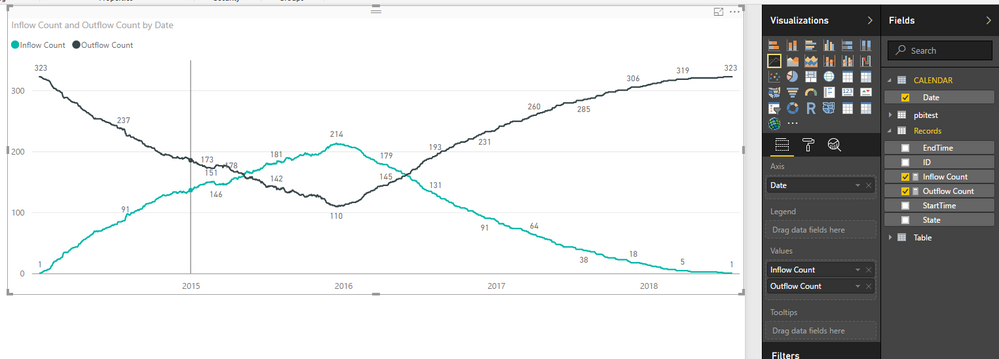
You can try to use below formula calculate the inflow and outflow count:


Prerequisite: you need a calendar table as the axis.


Inflow Count = COUNTX(FILTER(ALLSELECTED(Records),[SubmitDateTime]<=MAX('CALENDAR'[Date])&&[CompletedDateTime]>MAX('CALENDAR'[Date])),[ID])

Outflow Count = COUNTX(FILTER(ALLSELECTED(Records),[SubmitDateTime]>MAX('CALENDAR'[Date])||[CompletedDateTime]<MAX('CALENDAR'[Date])),[ID])


5.PNG


Regards,

Xiaoxin Sheng

View solution in original post

5 REPLIES 5
vanessafvg
Super User
Super User

@Anonymous its very difficult to read and easily understand what you are asking


please provide a table of the information with an example of what you want.


ta


If I took the time to answer your question and I came up with a solution, please mark my post as a solution and /or give kudos freely for the effort 🙂 Thank you!

Proud to be a Super User!


Anonymous
Not applicable

Hi vanessafvg


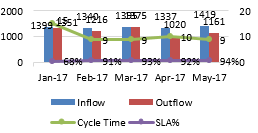
Below screenshot is my requirement and i have mentioned the Data link below.

            Capture.PNG

Data


Thanks

Anonymous
Not applicable

Hi @Anonymous,


Can you please share some sample date test? I have can't open your sharepoint link.


Regards,
Xiaoxin Sheng

Anonymous
Not applicable

Hi


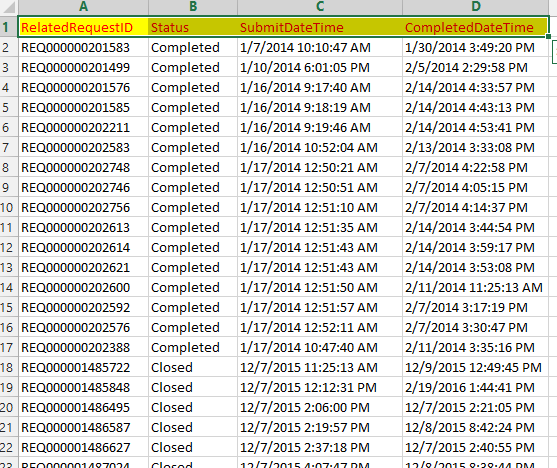
I can Able to load only screenshoot


Capture1.PNG

Anonymous
Not applicable

HI @Anonymous,


You can try to use below formula calculate the inflow and outflow count:


Prerequisite: you need a calendar table as the axis.


Inflow Count = COUNTX(FILTER(ALLSELECTED(Records),[SubmitDateTime]<=MAX('CALENDAR'[Date])&&[CompletedDateTime]>MAX('CALENDAR'[Date])),[ID])

Outflow Count = COUNTX(FILTER(ALLSELECTED(Records),[SubmitDateTime]>MAX('CALENDAR'[Date])||[CompletedDateTime]<MAX('CALENDAR'[Date])),[ID])


5.PNG


Regards,

Xiaoxin Sheng

Helpful resources

Announcements
November Power BI Update Carousel

Power BI Monthly Update - November 2025

Check out the November 2025 Power BI update to learn about new features.

Fabric Data Days Carousel

Fabric Data Days

Advance your Data & AI career with 50 days of live learning, contests, hands-on challenges, study groups & certifications and more!

FabCon Atlanta 2026 carousel

FabCon Atlanta 2026

Join us at FabCon Atlanta, March 16-20, for the ultimate Fabric, Power BI, AI and SQL community-led event. Save $200 with code FABCOMM.

Top Kudoed Authors