cancel
Showing results for 
Search instead for 
Did you mean: 

The Power BI Data Visualization World Championships is back! Get ahead of the game and start preparing now! Learn more

Reply
kaniggit
Frequent Visitor

How do I make my Group total match the sum of the subtotals?

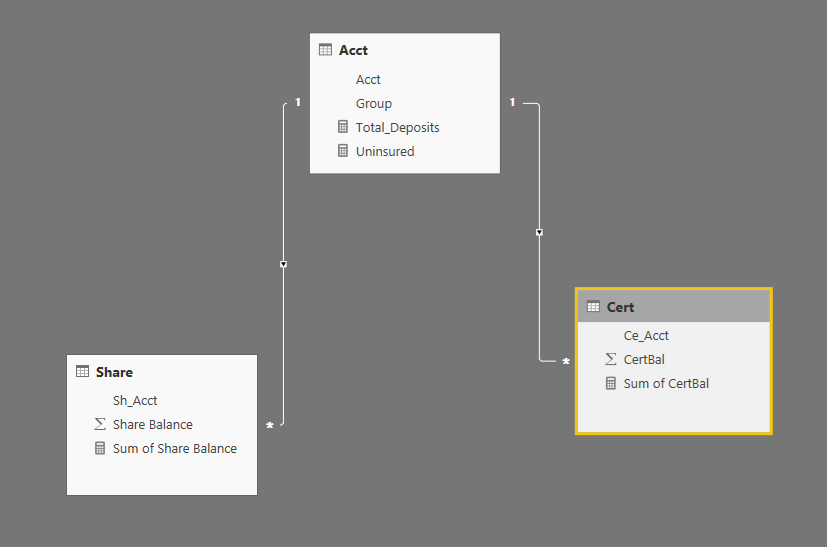
3 Tables - Acct, Shares, Certificates.


Total Deposits = sum(Share Balance) + sum(CertBal)

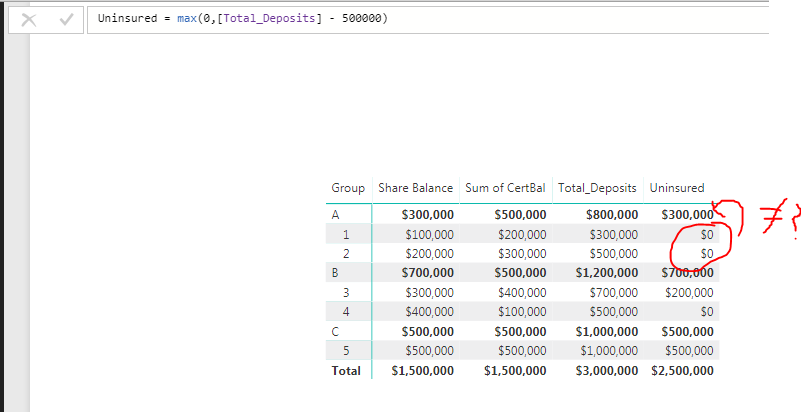
I want to display only those where "Total Deposits > 500,000" as "uninsured."  The problem is that the Total of the "accounts" doesn't match the total of the groups.  I have tried "calculate - filter" and various "sumx" but I have the same problem where the Total of the Group doesn't equal the group total.  😞


Capture.PNG

Capture2.PNG

2 ACCEPTED SOLUTIONS
Phil_Seamark
Microsoft Employee
Microsoft Employee

Hi @kaniggit


Something like this pattern will be close.  I have attached a PBIX file for you to have a play with.


Uninsured = 

    IF(
        ISFILTERED('Table1'[Sub Group]),
        -- Then --
        IF([Total Deposits]>=500,[Total Deposits],0),
        -- Else --
        SUMX(
            FILTER(
                ALL(Table1[Group],Table1[Sub Group]),
                'Table1'[Group] = MAX('Table1'[Group])
                ),
                IF([Total Deposits]>=500,[Total Deposits],0)
                )
    )

To learn more about DAX visit : aka.ms/practicalDAX

Proud to be a Datanaut!

View solution in original post

From Phil (above)

Uninsured = 
         SWITCH(TRUE() ,
                 -- Handle the Acct lines
                ISFILTERED('Acct'[Acct]) , IF([Total_Deposits]>500000,[Total_Deposits]-500000,0) ,
                -- Handle the Group
                sumx(
                        FILTER(
                                ALL(Acct[Group],Acct[Acct]),
                                Acct[Group] = MAX(Acct[Group])
                                ),
                        IF([Total_Deposits]>=500000,[Total_Deposits]-500000,0)
                )                      
          )


This worked for me!! 

View solution in original post

4 REPLIES 4
Phil_Seamark
Microsoft Employee
Microsoft Employee

Hi @kaniggit


Something like this pattern will be close.  I have attached a PBIX file for you to have a play with.


Uninsured = 

    IF(
        ISFILTERED('Table1'[Sub Group]),
        -- Then --
        IF([Total Deposits]>=500,[Total Deposits],0),
        -- Else --
        SUMX(
            FILTER(
                ALL(Table1[Group],Table1[Sub Group]),
                'Table1'[Group] = MAX('Table1'[Group])
                ),
                IF([Total Deposits]>=500,[Total Deposits],0)
                )
    )

To learn more about DAX visit : aka.ms/practicalDAX

Proud to be a Datanaut!

I did that, but it still doesn't quite seem to work.?  I think this has everything to do with "row context"? I'm still new to all of this.

Here is my formula and the result... The "Group A" total would be correct ($800-$500 = $300), but it is the sub-group (Account) totals that I want to "rollup" to the Group.  Maybe I screwed something up by using the "[Total Deposits]-500000"?

Capture.PNG

Also, the formula for "Total_Deposits" is:
Total_Deposits = calculate(sum(Share[Share Balance]) + sum(Cert[CertBal]))

Should I change that to some SUMX or something with "RELATEDTABLE"?

From Phil (above)

Uninsured = 
         SWITCH(TRUE() ,
                 -- Handle the Acct lines
                ISFILTERED('Acct'[Acct]) , IF([Total_Deposits]>500000,[Total_Deposits]-500000,0) ,
                -- Handle the Group
                sumx(
                        FILTER(
                                ALL(Acct[Group],Acct[Acct]),
                                Acct[Group] = MAX(Acct[Group])
                                ),
                        IF([Total_Deposits]>=500000,[Total_Deposits]-500000,0)
                )                      
          )


This worked for me!! 

Helpful resources

Announcements
Power BI DataViz World Championships

Power BI Dataviz World Championships

The Power BI Data Visualization World Championships is back! Get ahead of the game and start preparing now!

December 2025 Power BI Update Carousel

Power BI Monthly Update - December 2025

Check out the December 2025 Power BI Holiday Recap!

FabCon Atlanta 2026 carousel

FabCon Atlanta 2026

Join us at FabCon Atlanta, March 16-20, for the ultimate Fabric, Power BI, AI and SQL community-led event. Save $200 with code FABCOMM.