@PKOG12, try this:
Create measures below:
Customer Percentile 20% = CALCULATE ( PERCENTILE.INC ( Sales[Amount], .20 ), ALL ( Sales[Customer] ) )

Customer Percentile 40% = CALCULATE ( PERCENTILE.INC ( Sales[Amount], .40 ), ALL ( Sales[Customer] ) )

Customer Percentile 60% = CALCULATE ( PERCENTILE.INC ( Sales[Amount], .60 ), ALL ( Sales[Customer] ) )

Customer Percentile 80% = CALCULATE ( PERCENTILE.INC ( Sales[Amount], .80 ), ALL ( Sales[Customer] ) )

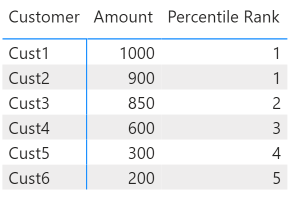
Percentile Rank =
VAR vAmount = SUM ( Sales[Amount] )
VAR vPct20 = [Customer Percentile 20%]
VAR vPct40 = [Customer Percentile 40%]
VAR vPct60 = [Customer Percentile 60%]
VAR vPct80 = [Customer Percentile 80%]
VAR vResult =
SWITCH ( TRUE(),
    vAmount >= vPct80, 1,
    vAmount >= vPct60 && vAmount < vPct80, 2,
    vAmount >= vPct40 && vAmount < vPct60, 3,
    vAmount >= vPct20 && vAmount < vPct40, 4,
    vAmount < vPct20, 5
)
RETURN
vResult
Result:
Did I answer your question? Mark my post as a solution!Proud to be a Super User!


