Join us at FabCon Atlanta from March 16 - 20, 2026, for the ultimate Fabric, Power BI, AI and SQL community-led event. Save $200 with code FABCOMM.
Register now!View all the Fabric Data Days sessions on demand. View schedule
How does one go about changing all data colors to one particular color? I'm building a scatter chart (Scatter Plot or scatterplot) and need the data labels on (so I placed them in the legend), but I want them all to be black and not clown colored. There are over 1000 data points, and I don't want to manually change them all individually. Any ideas?
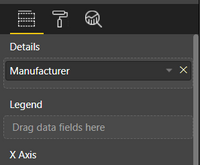
Can't you just have the field in Details?
Then have Category Labels selected On
Maybe I am missing it, but how does that affect color? All turning the category label on does, is displays the category next to the data dot.
When you don't have a legend the data points are assigned a single colour.
Having Category Labels turned on will solve your issue to have their labels next to them in the graph.
I agree with you. But if you don't have a legend, then the data points also don't have any values when you hover over them. Hence the reason why I specified having a legend.
Can you add them to the Tooltips?
Check out the November 2025 Power BI update to learn about new features.
Advance your Data & AI career with 50 days of live learning, contests, hands-on challenges, study groups & certifications and more!