Join us at FabCon Atlanta from March 16 - 20, 2026, for the ultimate Fabric, Power BI, AI and SQL community-led event. Save $200 with code FABCOMM.
Register now!The Power BI Data Visualization World Championships is back! Get ahead of the game and start preparing now! Learn more
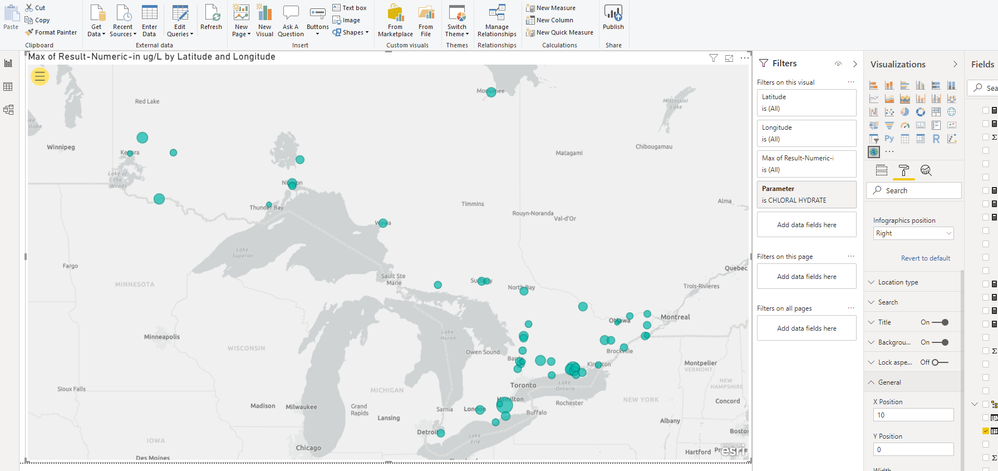
The following is a photo of the ArcGIS map visualization. How do I add a legend that shows the values corresponding to the different size symbols?
Solved! Go to Solution.
Hi @pmcinnis ,
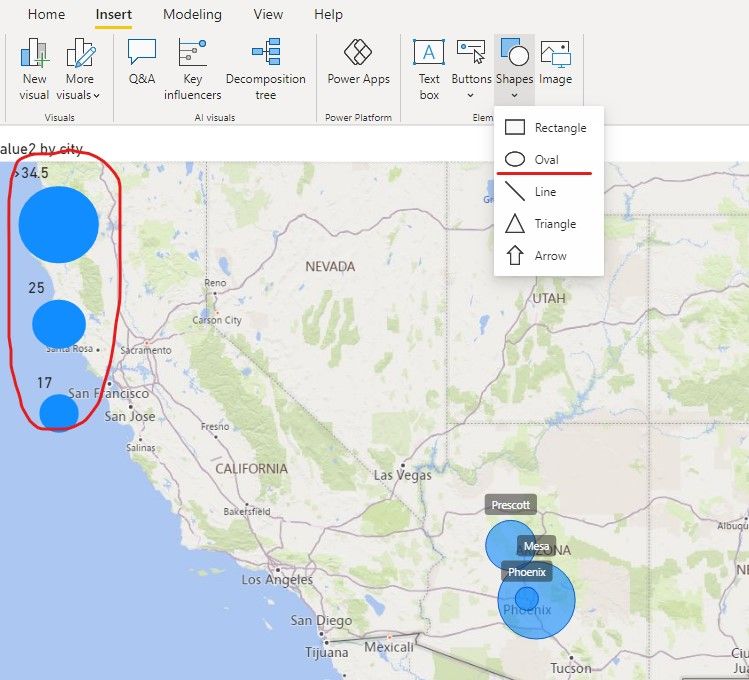
Sorry for that there is no good way to add the legend of Size to the map.
Maybe you can add some Oval shapes and add titles to them.
Or you can refer this video, hope it can inspire you.
https://www.youtube.com/watch?v=kLON1j2SUK0
Best regards,
Community Support Team _ zhenbw
If this post helps, then please consider Accept it as the solution to help the other members find it more quickly.
Is the legend functionality for circle size still missing? This is hard to believe. The 'solution' for this is a horrible workaround.
Hi @pmcinnis ,
Sorry for that there is no good way to add the legend of Size to the map.
Maybe you can add some Oval shapes and add titles to them.
Or you can refer this video, hope it can inspire you.
https://www.youtube.com/watch?v=kLON1j2SUK0
Best regards,
Community Support Team _ zhenbw
If this post helps, then please consider Accept it as the solution to help the other members find it more quickly.
The Power BI Data Visualization World Championships is back! Get ahead of the game and start preparing now!
| User | Count |
|---|---|
| 38 | |
| 38 | |
| 37 | |
| 28 | |
| 28 |
| User | Count |
|---|---|
| 124 | |
| 89 | |
| 73 | |
| 66 | |
| 65 |