cancel
Showing results for 
Search instead for 
Did you mean: 

Learn from the best! Meet the four finalists headed to the FINALS of the Power BI Dataviz World Championships! Register now

Reply
NoobBI
Regular Visitor

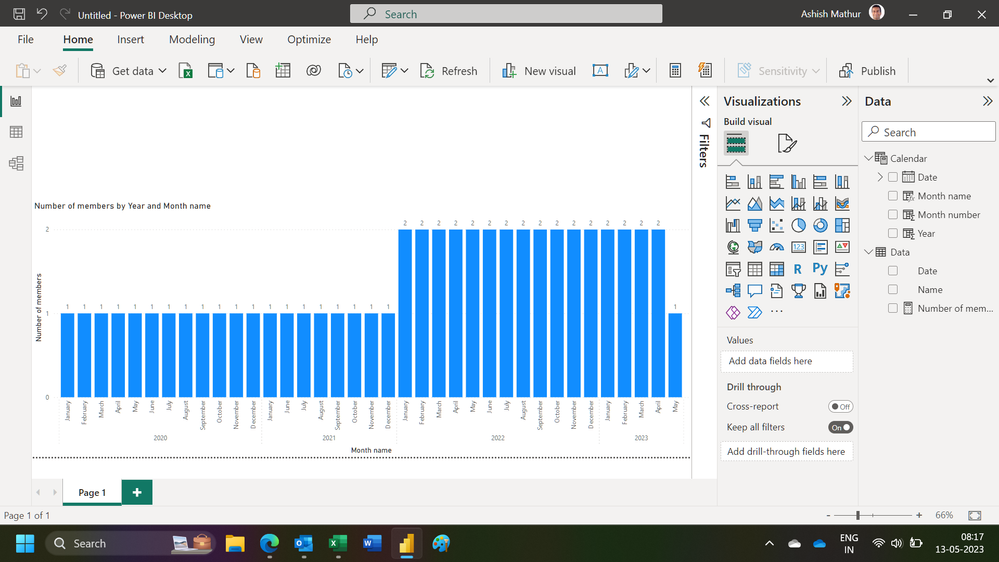
How can i display active members during a time period on a bar chart?

So I have this table:

Name | startdate |end date

J.Jones| 01/01/2020 | 01/01/2021

A.Adams | 01/01/2022 | blank

Mr. T | 01/06/2021 | 01/04/2023


I basically want to be able to produce a bar chart that displays the amount of active users we had month by month, for us to be able to identify trends easily. But i'm finding it very difficult and can't seem ti find what I need online. So any help is greatly appreciated!


1 ACCEPTED SOLUTION
Ashish_Mathur
Super User
Super User

Hi,

You may download my PBI file from here.

Hope this helps.

Untitled.png


Regards,
Ashish Mathur
http://www.ashishmathur.com
https://www.linkedin.com/in/excelenthusiasts/

View solution in original post

2 REPLIES 2
Ashish_Mathur
Super User
Super User

Hi,

You may download my PBI file from here.

Hope this helps.

Untitled.png


Regards,
Ashish Mathur
http://www.ashishmathur.com
https://www.linkedin.com/in/excelenthusiasts/
Greg_Deckler
Community Champion
Community Champion

@NoobBI See this approach here: Open Tickets - Microsoft Power BI Community


Follow on LinkedIn
@ me in replies or I'll lose your thread!!!
Instead of a Kudo, please vote for this idea
Become an expert!: Enterprise DNA
External Tools: MSHGQM
YouTube Channel!: Microsoft Hates Greg
Latest book!:
DAX For Humans

DAX is easy, CALCULATE makes DAX hard...

Helpful resources

Announcements
Join our Fabric User Panel

Join our Fabric User Panel

Share feedback directly with Fabric product managers, participate in targeted research studies and influence the Fabric roadmap.

February Power BI Update Carousel

Power BI Monthly Update - February 2026

Check out the February 2026 Power BI update to learn about new features.