cancel
Showing results for 
Search instead for 
Did you mean: 

The Power BI Data Visualization World Championships is back! Get ahead of the game and start preparing now! Learn more

Reply
MysticYogi
Regular Visitor

How can i create Matrix type of a table or columns from row items?


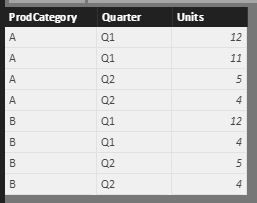
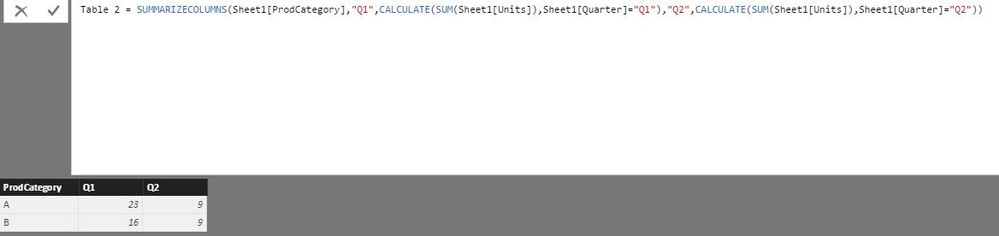
Below is simple form of raw data i have, consisting of  units sold by quarter.  As of now, i am creating a new Table -> Table 2 to get the total of units by quarter, manually useing calculate expression and making cols as per quarter. I also then have few additional cols that i add to this table calulating % etc...

My need is, when i have new data belonging to new quarter Q3, i'll have to go and edit the query and add a column extending the query. Is it possible, that depending on the values of the quarter coloumn, new cols gets added automatically when data for another quarter is available? Some thing like what matrix shows.

Table 1Table 1Table 2Table 2


6 REPLIES 6
Ashish_Mathur
Super User
Super User

Hi,


Simply build a matrix visual and write a calculated field formula to sum up the numeric column.


Regards,
Ashish Mathur
http://www.ashishmathur.com
https://www.linkedin.com/in/excelenthusiasts/

i want to create a table on which i would then create visualizations of bar charts. 

is it possible to create a table from matrix?

Hi,


I do not understand your question.


Regards,
Ashish Mathur
http://www.ashishmathur.com
https://www.linkedin.com/in/excelenthusiasts/

As mentioned in my query, i am creating table group by type of product, then creating cols with data available for each quarter. (see query screenshot). post this i create additonal cols to this table calulating percentage and other metrics. I then use this table as a source to charts. My question is when i have the data in the next quarter, i'll have to edit this query to incorporate new quarter col. Is there a way i can get this col automatically based on my raw data with whatever distinct quarters are present in quarter col in raw data. 

i hope i am able to rephrase my question.

Hi,


Yes.  This can be done using the Pivot feature of Power Query.  My suggestion is that you do not calculate percentages and other metrics in spare columns - instead you write DAX formulas to do so.


Regards,
Ashish Mathur
http://www.ashishmathur.com
https://www.linkedin.com/in/excelenthusiasts/
CahabaData
Memorable Member
Memorable Member

I believe the Matrix visual will do what you seek. 

www.CahabaData.com

Helpful resources

Announcements
Power BI DataViz World Championships

Power BI Dataviz World Championships

The Power BI Data Visualization World Championships is back! Get ahead of the game and start preparing now!

November Power BI Update Carousel

Power BI Monthly Update - November 2025

Check out the November 2025 Power BI update to learn about new features.

FabCon Atlanta 2026 carousel

FabCon Atlanta 2026

Join us at FabCon Atlanta, March 16-20, for the ultimate Fabric, Power BI, AI and SQL community-led event. Save $200 with code FABCOMM.