Get certified for free when you join Fabric Data Days 2026 and dive into Fabric, Power BI, SQL, AI, and other essential data skills.
Join nowData Days is here! Join us now for 60+ days of learning, challenges, and connection. Learn more
Good Day,
I am trying to provide something like MDX Set behaviour in DAX, (my appologies I am quite new to DAX).
Please consider the following:
Dim_Simulation
id, name
1, Simulation 1
2, Simulation 2
3, Simulation 3
Dim_Start_Simulation
id, name
1, Simulation 1
2, Simulation 2
3, Simulation 3
Dim_End_Simulation
id, name
1, Simulation 1
2, Simulation 2
3, Simulation 3
where:
- Dim_Simulation is related to the fact table on the id column.
- Dim_Start_Simulation and Dim_End_Simulation are used in DAX variance calculations.
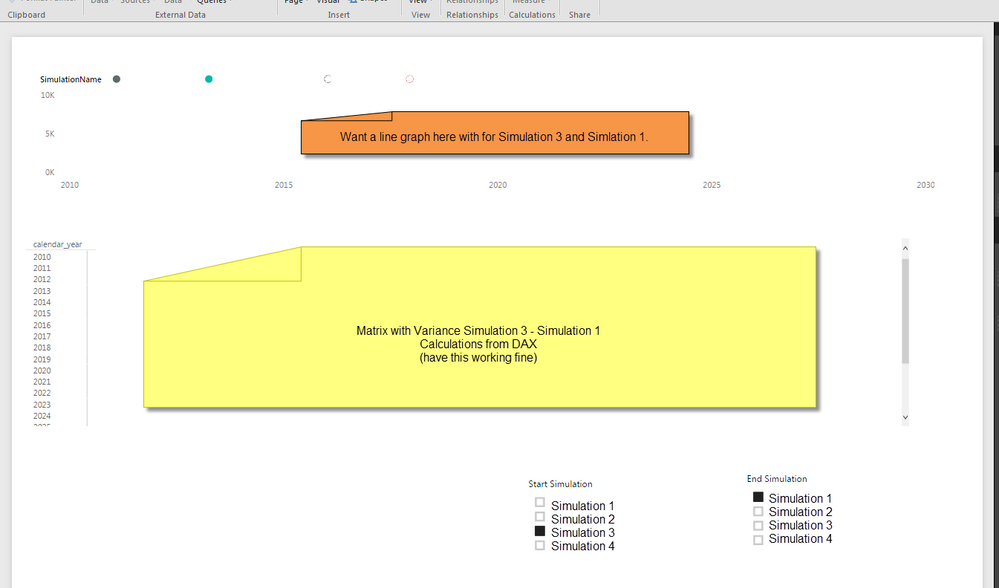
Now I would like to make a graph at the top (orange area in image) of my Power BI Page which has the two (assuming distinct) simulations selected in slicers from Start Simulation and End Simlation as members from Dim_Simulation...
My question is how does one go about this?
In your canvas, if you select Simulation1 for Start_Simulation slicer and Simulation2 for End_Simulation slicer at the same time, no line graph will be displayed. Because there is no Sales (I assume it’s sales here) corresponding to Simulation1 as well as Simulation3. Each sales always belongs to one id.
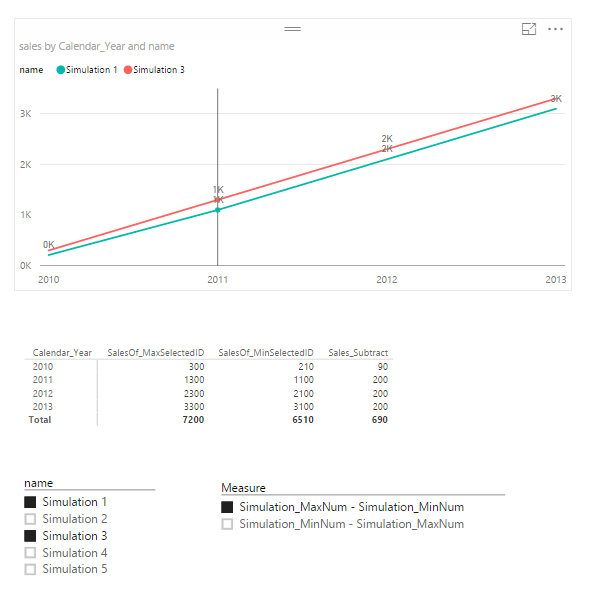
However, you can get the expected result by changing your slicers. Use name in Dim_Simulation as the first slicer, and use another “measure slicer” to decide who is the start simulation. This should work when you only have two simulations selected in the slicer. There is no need to use Dim_Start_Simulation and Dim_End_Simulation anymore. Please refer to following steps:
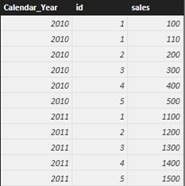
I assume that your fact table is like below
SalesOf_MaxSelectedID =
CALCULATE (
SUM ( Fact_Table[sales] ),
FILTER ( Fact_Table, Fact_Table[id] = MAX ( Fact_Table[id] ) ),
ALLEXCEPT ( Dim_Simulation, Dim_Simulation[name] ),
ALLEXCEPT ( Fact_Table, Fact_Table[Calendar_Year] )
)
SalesOf_MinSelectedID =
CALCULATE (
SUM ( Fact_Table[sales] ),
FILTER ( Fact_Table, Fact_Table[id] = MIN ( Fact_Table[id] ) ),
ALLEXCEPT ( Dim_Simulation, Dim_Simulation[name] ),
ALLEXCEPT ( Fact_Table, Fact_Table[Calendar_Year] )
)
Sales_Subtract =
IF (
HASONEVALUE ( Subtract_Measure[Measure] ),
SWITCH (
FIRSTNONBLANK ( Subtract_Measure[Measure], Subtract_Measure[Measure] ),
"Simulation_MaxNum - Simulation_MinNum", [SalesOf_MaxSelectedID] - [SalesOf_MinSelectedID],
"Simulation_MinNum - Simulation_MaxNum", [SalesOf_MinSelectedID] - [SalesOf_MaxSelectedID]
),
BLANK ()
)
Don't miss out on Data Days, June 15 through August 7. Learn Fabric, Power BI, SQL, AI and more.
Check out the May 2026 Power BI update to learn about new features.
| User | Count |
|---|---|
| 23 | |
| 23 | |
| 20 | |
| 18 | |
| 14 |
| User | Count |
|---|---|
| 58 | |
| 52 | |
| 42 | |
| 30 | |
| 24 |