Get certified for free when you join Fabric Data Days 2026 and dive into Fabric, Power BI, SQL, AI, and other essential data skills.
Join nowData Days is here! Join us now for 60+ days of learning, challenges, and connection. Learn more
Hello,
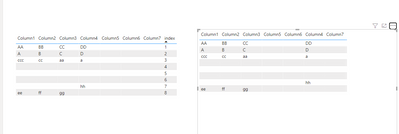
I've been having issues getting this table to sort the way I want it to. With the way the data needs to be displayed, nothing can be sorted alphabetically and the empty cells need to stay the way they are. Is there any way at all I can get this data to display the proper way without the use of an index column showing in the visual?
Solved! Go to Solution.
Hi @SM_1997_ ๏ผ
See the below ,is this what you want?
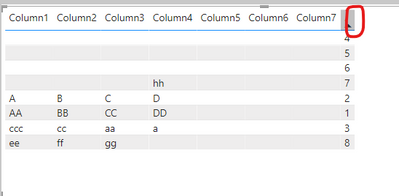
Unfortunately, though, if you want to sort in the visuals, you have to have something to base it on, so you have to add index to the visuals. But we can perform some operations to hide the columns until they are invisible.
double click index,raname the column name".":
Click and hold on the red line below and move to the left to hide the column๏ผ
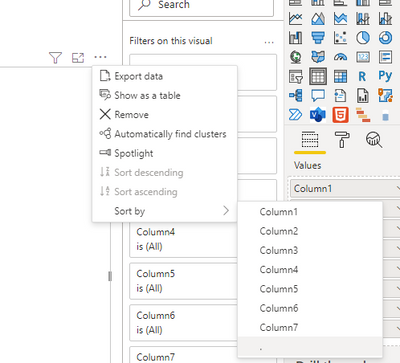
And then sort by "."
Did I answer your question? Mark my post as a solution!
Best Regards
Lucien
Hi @SM_1997_ ๏ผ
See the below ,is this what you want?
Unfortunately, though, if you want to sort in the visuals, you have to have something to base it on, so you have to add index to the visuals. But we can perform some operations to hide the columns until they are invisible.
double click index,raname the column name".":
Click and hold on the red line below and move to the left to hide the column๏ผ
And then sort by "."
Did I answer your question? Mark my post as a solution!
Best Regards
Lucien
Another good way I could sum up my question is to ask if there's any way I can bypass the sorting for the table visual?
Don't miss out on Data Days, June 15 through August 7. Learn Fabric, Power BI, SQL, AI and more.
Check out the May 2026 Power BI update to learn about new features.
| User | Count |
|---|---|
| 23 | |
| 23 | |
| 21 | |
| 20 | |
| 15 |
| User | Count |
|---|---|
| 58 | |
| 53 | |
| 42 | |
| 30 | |
| 24 |