Join us at FabCon Atlanta from March 16 - 20, 2026, for the ultimate Fabric, Power BI, AI and SQL community-led event. Save $200 with code FABCOMM.
Register now!The Power BI Data Visualization World Championships is back! Get ahead of the game and start preparing now! Learn more
Hello everyone,
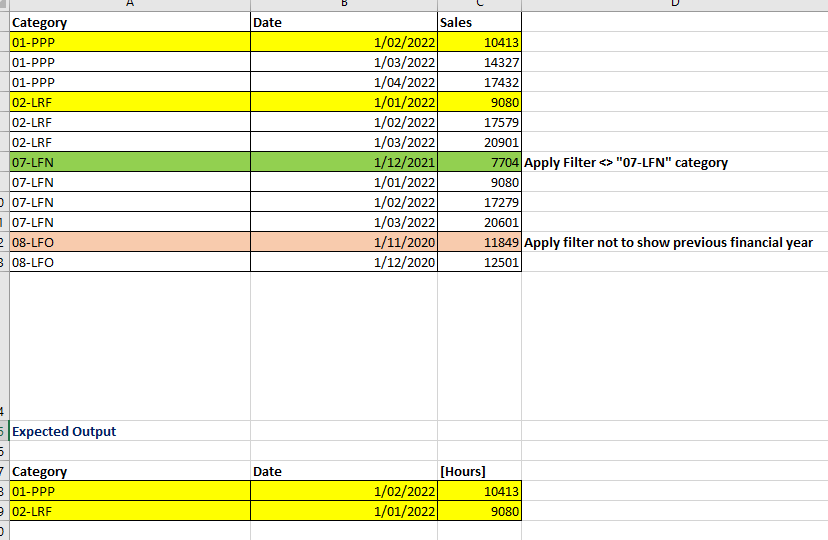
I would like to get the Minimum date of each category and it's sales.
Conditions for calculation:
1) Get Minimum date for each category and it's Sales
2) Exclude where Category = "07-LFN"
3) Show only current financial year records where financial year starts from July to June.
Thanks in advance
Dee
Solved! Go to Solution.
Hi @Anonymous ,
If you want it in Power Query , please try
let
Source = Table.FromRows(Json.Document(Binary.Decompress(Binary.FromText("bc5RCoAwCIDhu+y5kbqV2wV6ihq9Rve/RjoJYvgmfOjvfQfA2FoLUyAgmnEGkhkhYwrP5HBSzonY56zM4sYU92v7McpcoYCvPc0LV59Tn6sc6cxx3w5jFEbdZpYPRnXKo1qZvvLIVl6/chE+jUHLehux5OpzP06Lbj8v", BinaryEncoding.Base64), Compression.Deflate)), let _t = ((type nullable text) meta [Serialized.Text = true]) in type table [Category = _t, Date = _t, Sales = _t]),
#"Changed Type" = Table.TransformColumnTypes(Source,{{"Category", type text}, {"Date", type date}, {"Sales", Int64.Type}}),
#"Filtered Rows"= Table.SelectRows(#"Changed Type", each [Category]<>"07-LFN" and Date.Year([Date])=Date.Year(DateTime.LocalNow()) ),
#"Grouped Rows" = Table.Group(#"Filtered Rows", {"Category"}, {{"Count", each _, Value.Type(#"Filtered Rows")}, {"Minimum Date", each List.Min([Date]) }}),
#"Expanded Count" = Table.ExpandTableColumn(#"Grouped Rows", "Count", {"Date", "Sales"}, {"Date", "Sales"}),
#"Filtered"=Table.SelectRows(#"Expanded Count", each [Date]=[Minimum Date]),
#"Removed Columns" = Table.RemoveColumns(Filtered,{"Minimum Date"})
in
#"Removed Columns"
Output:
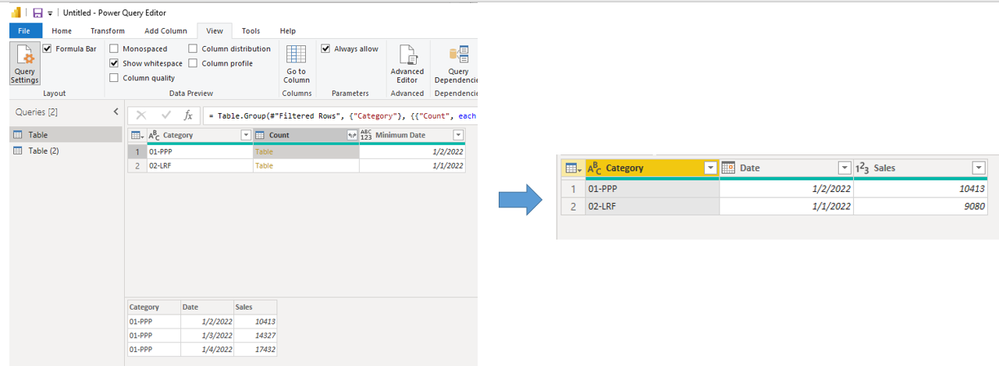
Or:
let
Source = Table.FromRows(Json.Document(Binary.Decompress(Binary.FromText("bc5RCoAwCIDhu+y5kbqV2wV6ihq9Rve/RjoJYvgmfOjvfQfA2FoLUyAgmnEGkhkhYwrP5HBSzonY56zM4sYU92v7McpcoYCvPc0LV59Tn6sc6cxx3w5jFEbdZpYPRnXKo1qZvvLIVl6/chE+jUHLehux5OpzP06Lbj8v", BinaryEncoding.Base64), Compression.Deflate)), let _t = ((type nullable text) meta [Serialized.Text = true]) in type table [Category = _t, Date = _t, Sales = _t]),
#"Changed Type" = Table.TransformColumnTypes(Source,{{"Category", type text}, {"Date", type date}, {"Sales", Int64.Type}}),
#"Filtered Rows"= Table.SelectRows(#"Changed Type", each [Category]<>"07-LFN" and Date.Year([Date])=Date.Year(DateTime.LocalNow()) ),
#"Grouped Rows" = Table.Group(#"Filtered Rows", {"Category"}, {{"Count", each _, type table [Category=nullable text, Date=nullable date, Sales=nullable number]}}),
#"Added Custom" = Table.AddColumn(#"Grouped Rows", "Custom", each Table.Min([Count],"Date")),
#"Removed Columns" = Table.RemoveColumns(#"Added Custom",{"Count"}),
#"Expanded Custom" = Table.ExpandRecordColumn(#"Removed Columns", "Custom", {"Date", "Sales"}, {"Date", "Sales"}),
#"Changed Type1" = Table.TransformColumnTypes(#"Expanded Custom",{{"Category", type text}, {"Date", type date}, {"Sales", Int64.Type}})
in
#"Changed Type1"
Output:
Best Regards,
Eyelyn Qin
If this post helps, then please consider Accept it as the solution to help the other members find it more quickly.
Hi @Anonymous ,
If you want it in Power Query , please try
let
Source = Table.FromRows(Json.Document(Binary.Decompress(Binary.FromText("bc5RCoAwCIDhu+y5kbqV2wV6ihq9Rve/RjoJYvgmfOjvfQfA2FoLUyAgmnEGkhkhYwrP5HBSzonY56zM4sYU92v7McpcoYCvPc0LV59Tn6sc6cxx3w5jFEbdZpYPRnXKo1qZvvLIVl6/chE+jUHLehux5OpzP06Lbj8v", BinaryEncoding.Base64), Compression.Deflate)), let _t = ((type nullable text) meta [Serialized.Text = true]) in type table [Category = _t, Date = _t, Sales = _t]),
#"Changed Type" = Table.TransformColumnTypes(Source,{{"Category", type text}, {"Date", type date}, {"Sales", Int64.Type}}),
#"Filtered Rows"= Table.SelectRows(#"Changed Type", each [Category]<>"07-LFN" and Date.Year([Date])=Date.Year(DateTime.LocalNow()) ),
#"Grouped Rows" = Table.Group(#"Filtered Rows", {"Category"}, {{"Count", each _, Value.Type(#"Filtered Rows")}, {"Minimum Date", each List.Min([Date]) }}),
#"Expanded Count" = Table.ExpandTableColumn(#"Grouped Rows", "Count", {"Date", "Sales"}, {"Date", "Sales"}),
#"Filtered"=Table.SelectRows(#"Expanded Count", each [Date]=[Minimum Date]),
#"Removed Columns" = Table.RemoveColumns(Filtered,{"Minimum Date"})
in
#"Removed Columns"
Output:
Or:
let
Source = Table.FromRows(Json.Document(Binary.Decompress(Binary.FromText("bc5RCoAwCIDhu+y5kbqV2wV6ihq9Rve/RjoJYvgmfOjvfQfA2FoLUyAgmnEGkhkhYwrP5HBSzonY56zM4sYU92v7McpcoYCvPc0LV59Tn6sc6cxx3w5jFEbdZpYPRnXKo1qZvvLIVl6/chE+jUHLehux5OpzP06Lbj8v", BinaryEncoding.Base64), Compression.Deflate)), let _t = ((type nullable text) meta [Serialized.Text = true]) in type table [Category = _t, Date = _t, Sales = _t]),
#"Changed Type" = Table.TransformColumnTypes(Source,{{"Category", type text}, {"Date", type date}, {"Sales", Int64.Type}}),
#"Filtered Rows"= Table.SelectRows(#"Changed Type", each [Category]<>"07-LFN" and Date.Year([Date])=Date.Year(DateTime.LocalNow()) ),
#"Grouped Rows" = Table.Group(#"Filtered Rows", {"Category"}, {{"Count", each _, type table [Category=nullable text, Date=nullable date, Sales=nullable number]}}),
#"Added Custom" = Table.AddColumn(#"Grouped Rows", "Custom", each Table.Min([Count],"Date")),
#"Removed Columns" = Table.RemoveColumns(#"Added Custom",{"Count"}),
#"Expanded Custom" = Table.ExpandRecordColumn(#"Removed Columns", "Custom", {"Date", "Sales"}, {"Date", "Sales"}),
#"Changed Type1" = Table.TransformColumnTypes(#"Expanded Custom",{{"Category", type text}, {"Date", type date}, {"Sales", Int64.Type}})
in
#"Changed Type1"
Output:
Best Regards,
Eyelyn Qin
If this post helps, then please consider Accept it as the solution to help the other members find it more quickly.
Hey @Anonymous ,
consider to re-create the sample data in a way that can be easily used in Power BI. As you are using dates consider creating a Power BI file, upload the pbix to onedrive or dropbox and share the link.
Regards,
Tom
The Power BI Data Visualization World Championships is back! Get ahead of the game and start preparing now!
Check out the November 2025 Power BI update to learn about new features.
| User | Count |
|---|---|
| 59 | |
| 43 | |
| 42 | |
| 23 | |
| 17 |
| User | Count |
|---|---|
| 190 | |
| 122 | |
| 96 | |
| 66 | |
| 47 |