cancel
Showing results for 
Search instead for 
Did you mean: 

Get Fabric Certified for FREE during Fabric Data Days. Don't miss your chance! Request now

Reply
speedramps
Super User
Super User

How can I force a carriage return between the Month and Year on the x-axis please?

How can I force a carriage return between the Month and Year on the x-axis please?


I want the x-axis on my graph to look like this

Jan          Feb        Mar       Apr        May     Jun
2020      2020      2020      2020     2020    2020


But it looks like this

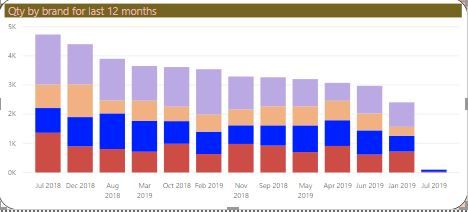
Jan          Feb 2002        Mar       Apr        May 2020     Jun 
2020                             2020      2020                           2020


I have tried using “cr” in the power query.    For example mmmcryyyy =   [month]   &   “#(cr)”  &  Text.From [year]

Which works ok in the power query table, but does not enforce the carriage return on the graph x-axis.


I sometimes use UNICHAR(10) in DAX for page headings, but can't use a DAX measure for a X-axis. 


How can I force a carriage return between the Month and Year on the x-axis please?

Many thanks for sharing your ideas.


3 REPLIES 3
v-easonf-msft
Community Support
Community Support

Hi , @speedramps 

Based on my research, it is not supported yet currently. You can vote for this idea and add your comments there to make this feature coming sooner. 

https://ideas.powerbi.com/forums/265200-power-bi-ideas/suggestions/14528184-format-date-on-visuals-x... 


Best Regards,
Community Support Team _ Eason
If this post helps, then please consider Accept it as the solution to help the other members find it more quickly.

amitchandak
Super User
Super User

try unichar(10)  or newline

month year = month & unichar(10)  & year


https://blog.crossjoin.co.uk/2017/04/11/the-dax-unichar-function-and-how-to-use-it-in-measures-for-d...


Appreciate your Kudos. In case, this is the solution you are looking for, mark it as the Solution.
In case it does not help, please provide additional information and mark me with @

Thanks. My Recent Blogs -Decoding Direct Query - Time Intelligence, Winner Coloring on MAP, HR Analytics, Power BI Working with Non-Standard TimeAnd Comparing Data Across Date Ranges
Connect on Linkedin

Share with Power BI Enthusiasts: Full Power BI Video (20 Hours) YouTube
Microsoft Fabric Series 60+ Videos YouTube
Microsoft Fabric Hindi End to End YouTube

Thank you for trying to help but CR and UNICHAR(10) does not insert a carriage return in a graph x-axis. Does it?


You can create a Power Query column in M
For example mmmcryyyy = [month] & “#(cr)” & Text.From [year]

Or a calculated column using dax
For example mmmcryyyy = [month] & UNICHAR(10) & Text.From [year]

Both will insert a carriage return in a table or card visual.

For example

       Sep

       2018


But they will not insert a carriage return in a graph x-axis.
For example Sep 2018


If the width of the graph is adjuted then some of the months warp and other dont. 
So you get this awful mixture on the x-axis.

Capture.JPG

Helpful resources

Announcements
November Power BI Update Carousel

Power BI Monthly Update - November 2025

Check out the November 2025 Power BI update to learn about new features.

Fabric Data Days Carousel

Fabric Data Days

Advance your Data & AI career with 50 days of live learning, contests, hands-on challenges, study groups & certifications and more!

FabCon Atlanta 2026 carousel

FabCon Atlanta 2026

Join us at FabCon Atlanta, March 16-20, for the ultimate Fabric, Power BI, AI and SQL community-led event. Save $200 with code FABCOMM.

Top Solution Authors
Top Kudoed Authors