Hi everyone,
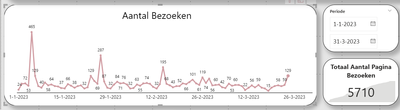
I'm working on a line chart in Power BI that shows the number of visits to our website over time, with the chart currently set up to display visits by day in 2023. I'm using a measure called "Unique Visits" to calculate the distinct count of visit IDs from our website data source.
I'd like to compare the visits from the same time period in the previous year (i.e. January 2022 through December 2022) to the visits this year, but I'm having trouble getting the visits from last year to display in the chart. I've tried creating a new measure using the DATEADD function to subtract a year from the date, but this hasn't worked.
Here's the formula I used for the new measure:
Unique Visits Last Year = CALCULATE( DISTINCTCOUNT('Website Data'[Visit ID]), DATEADD('Website Data'[Date], -1, YEAR) )
Can anyone help me figure out why the visits from last year aren't displaying in the chart?
P.s. I also have a filter on the page that has selected the period of first quarter of 2023.
See picture below: