cancel
Showing results for 
Search instead for 
Did you mean: 

Vote for your favorite vizzies from the Power BI Dataviz World Championship submissions. Vote now!

Reply
Anonymous
Not applicable

How can I count how many times does a count of repeted values repeats in a visual?

Hi all,


I hava a problem which I can´t solve. Does any of you have a solution?


Let me describe the case:


I have a table in which there are 2 columns, one with a "SoftwareID" and the other with "HardwareID". What I need is to identify how many "HardwareIDs" have 2 SoftwareIDs installed, 3 softwareIDs isntalled and so on.


Any sugestion?


Thank you

1 ACCEPTED SOLUTION

@Anonymous ,


Please create a calculated table as follows:

Software Count = GENERATESERIES(1,100,1)

Rename the column of the calculated table as 'Value of N'.

And then create the measure as follows:

Hardware with N SoftwareIDs =
VAR SummarizedTable =
    SUMMARIZE (
        'Table',
        'Table'[HardwareID],
        "TotalSoftwareIDs", COUNT ( 'Table'[SoftwareID] )
    )
VAR With2SIDs =
    COUNTX (
        FILTER (
            SummarizedTable,
            [TotalSoftwareIDs] = SELECTEDVALUE ( 'Software Count'[Value of N] )
        ),
        'Table'[HardwareID]
    )
RETURN
    With2SIDs + 0


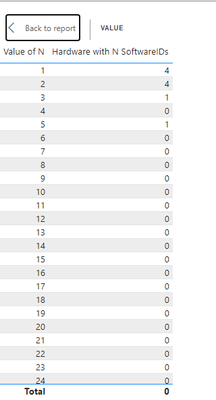
The result will be as follows:

rajulshah_0-1654776516636.png


Please let me know if this doesn't work.


View solution in original post

5 REPLIES 5
rajulshah
Resident Rockstar
Resident Rockstar

Hello @Anonymous ,


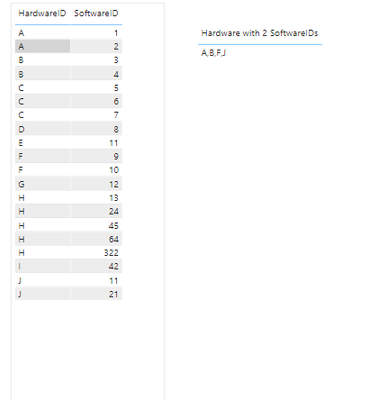
You can create a measure as follows. For your reference, I have just created the measure for 2 SoftwareIDs.

Hardware with 2 SoftwareIDs = 
VAR SummarizedTable = SUMMARIZE('Table','Table'[HardwareID],"TotalSoftwareIDs",COUNT('Table'[SoftwareID]))
VAR With2SIDs = CONCATENATEX(FILTER(SummarizedTable,[TotalSoftwareIDs]=2),'Table'[HardwareID],",")
RETURN
    With2SIDs

rajulshah_0-1654772048433.png


 Please let me know if this isn't working for you.

Anonymous
Not applicable

Hi @rajulshah tahnk you for your answer.


This is near what I want, thanks, but te result I would like to have is another board not only for HardwareIDs with two softwares, I need to have all the cases someting like:

Hardware with 1 sw - 150
Hardware with 2 sw - 100
Hardware with 3 sw - 95
(...)
Hardware with N sw - 2

Is this possible? Thank you very much

@Anonymous ,


Please create a calculated table as follows:

Software Count = GENERATESERIES(1,100,1)

Rename the column of the calculated table as 'Value of N'.

And then create the measure as follows:

Hardware with N SoftwareIDs =
VAR SummarizedTable =
    SUMMARIZE (
        'Table',
        'Table'[HardwareID],
        "TotalSoftwareIDs", COUNT ( 'Table'[SoftwareID] )
    )
VAR With2SIDs =
    COUNTX (
        FILTER (
            SummarizedTable,
            [TotalSoftwareIDs] = SELECTEDVALUE ( 'Software Count'[Value of N] )
        ),
        'Table'[HardwareID]
    )
RETURN
    With2SIDs + 0


The result will be as follows:

rajulshah_0-1654776516636.png


Please let me know if this doesn't work.


Hi @Anonymous ,


If this is the data:

HardwareIDsSoftwareIDs
11
12
13
14
21
31
32
42


Then you can do it in power query:


let
    Source = Table.FromRows(Json.Document(Binary.Decompress(Binary.FromText("i45WMlTSAeJYHQjLCM4yhrNMwCwjuDpjFBZEhwmEFQsA", BinaryEncoding.Base64), Compression.Deflate)), let _t = ((type nullable text) meta [Serialized.Text = true]) in type table [HardwareIDs = _t, SoftwareIDs = _t]),
    #"Changed Type" = Table.TransformColumnTypes(Source,{{"HardwareIDs", Int64.Type}, {"SoftwareIDs", Int64.Type}}),
    #"Grouped Rows" = Table.Group(#"Changed Type", {"HardwareIDs"}, {{"Count", each _, type table [HardwareIDs=nullable number, SoftwareIDs=nullable number]}}),
    #"Added Custom" = Table.AddColumn(#"Grouped Rows", "Custom", each Table.RowCount([Count])),
    #"Renamed Columns" = Table.RenameColumns(#"Added Custom",{{"Custom", "No of Softwares"}}),
    #"Changed Type1" = Table.TransformColumnTypes(#"Renamed Columns",{{"No of Softwares", Int64.Type}, {"HardwareIDs", type text}}),
    #"Removed Columns" = Table.RemoveColumns(#"Changed Type1",{"Count"}),
    #"Grouped Rows1" = Table.Group(#"Removed Columns", {"No of Softwares"}, {{"Count", each Table.RowCount(_), Int64.Type}}),
    #"Renamed Columns1" = Table.RenameColumns(#"Grouped Rows1",{{"Count", "No of Hardware Count"}})
in
    #"Renamed Columns1"


Output is as below:
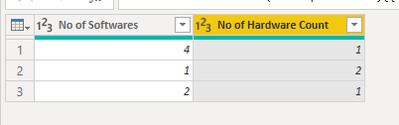
 

mahenkj2_0-1654776239847.png


Hope it helps.

rajulshah
Resident Rockstar
Resident Rockstar

Hello @Anonymous ,


So, what I understand here is that you want to count SoftwareIDs by HardwareIDs, right?

Helpful resources

Announcements
Power BI DataViz World Championships

Power BI Dataviz World Championships

Vote for your favorite vizzies from the Power BI World Championship submissions!

Sticker Challenge 2026 Carousel

Join our Community Sticker Challenge 2026

If you love stickers, then you will definitely want to check out our Community Sticker Challenge!

January Power BI Update Carousel

Power BI Monthly Update - January 2026

Check out the January 2026 Power BI update to learn about new features.

FabCon Atlanta 2026 carousel

FabCon Atlanta 2026

Join us at FabCon Atlanta, March 16-20, for the ultimate Fabric, Power BI, AI and SQL community-led event. Save $200 with code FABCOMM.