cancel
Showing results for 
Search instead for 
Did you mean: 

The Power BI Data Visualization World Championships is back! Get ahead of the game and start preparing now! Learn more

Reply
Anonymous
Not applicable

How can I change values in a column?

Hello,

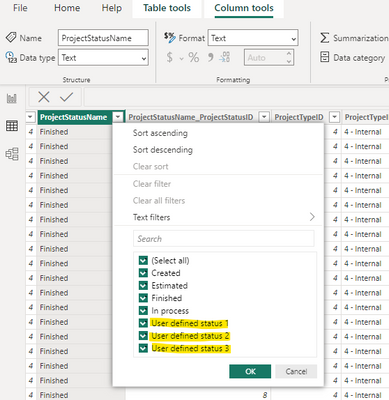
Using the screenshot below, I am wondering if there is a way to update the names of fields in a column. 


nfowler_PDR_0-1672843753923.png


For example, I would like to change the "User defined status 1" fields with "Inactive".


Is there a way to do this in Power BIDesktop?


Thank you for your time!

-Nat

1 ACCEPTED SOLUTION
Pragati11
Super User
Super User

HI @Anonymous ,


In POwer Query Editor, you can replace values.

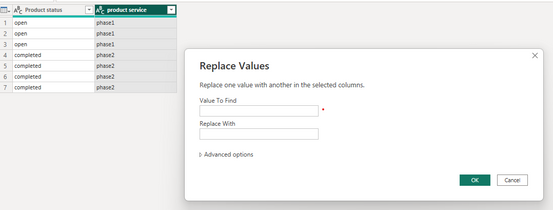
Right click on your column and use Replace values option as shown below:

Pragati11_0-1672844183199.png

A new window will appear:

Pragati11_1-1672844267584.png

Enter your old value and new value in there.


Best Regards,

Pragati Jain


MVP logo


LinkedIn | Twitter | Blog YouTube 

Did I answer your question? Mark my post as a solution! This will help others on the forum!

Appreciate your Kudos!!

Proud to be a Super User!!

View solution in original post

3 REPLIES 3
Pragati11
Super User
Super User

HI @Anonymous ,


In POwer Query Editor, you can replace values.

Right click on your column and use Replace values option as shown below:

Pragati11_0-1672844183199.png

A new window will appear:

Pragati11_1-1672844267584.png

Enter your old value and new value in there.


Best Regards,

Pragati Jain


MVP logo


LinkedIn | Twitter | Blog YouTube 

Did I answer your question? Mark my post as a solution! This will help others on the forum!

Appreciate your Kudos!!

Proud to be a Super User!!

Anonymous
Not applicable

Thank you for taking a look, @Pragati11!


Is there a way to get power query editor open through Power BI Desktop, or do I have to download and then open in Power Query editor? 


Thanks,

-Nat

HI @Anonymous ,

 I am assuming you have your pbix file which is Power BI Desktop.

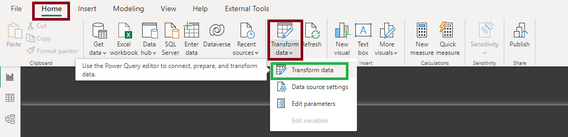
Open that file, then under Home --> Transform Data as shown below will open a new window which is Power BI Query |Editor:

Pragati11_0-1672846550483.png

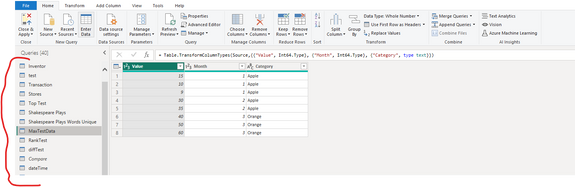
Power Query Editor window will show all the data tables that you currently have:

Pragati11_1-1672846610393.png

Then click on the data you want to apply the replace transformation.


Best Regards,

Pragati Jain


MVP logo


LinkedIn | Twitter | Blog YouTube 

Did I answer your question? Mark my post as a solution! This will help others on the forum!

Appreciate your Kudos!!

Proud to be a Super User!!

Helpful resources

Announcements
Power BI DataViz World Championships

Power BI Dataviz World Championships

The Power BI Data Visualization World Championships is back! Get ahead of the game and start preparing now!

December 2025 Power BI Update Carousel

Power BI Monthly Update - December 2025

Check out the December 2025 Power BI Holiday Recap!

FabCon Atlanta 2026 carousel

FabCon Atlanta 2026

Join us at FabCon Atlanta, March 16-20, for the ultimate Fabric, Power BI, AI and SQL community-led event. Save $200 with code FABCOMM.