FabCon is coming to Atlanta
Join us at FabCon Atlanta from March 16 - 20, 2026, for the ultimate Fabric, Power BI, AI and SQL community-led event. Save $200 with code FABCOMM.
Register now!- Power BI forums
- Get Help with Power BI
- Desktop
- Service
- Report Server
- Power Query
- Mobile Apps
- Developer
- DAX Commands and Tips
- Custom Visuals Development Discussion
- Health and Life Sciences
- Power BI Spanish forums
- Translated Spanish Desktop
- Training and Consulting
- Instructor Led Training
- Dashboard in a Day for Women, by Women
- Galleries
- Data Stories Gallery
- Themes Gallery
- Contests Gallery
- QuickViz Gallery
- Quick Measures Gallery
- Visual Calculations Gallery
- Notebook Gallery
- Translytical Task Flow Gallery
- TMDL Gallery
- R Script Showcase
- Webinars and Video Gallery
- Ideas
- Custom Visuals Ideas (read-only)
- Issues
- Issues
- Events
- Upcoming Events
The Power BI Data Visualization World Championships is back! Get ahead of the game and start preparing now! Learn more
- Power BI forums
- Forums
- Get Help with Power BI
- Desktop
- Re: How can I calcurate MTD based on accounting mo...
- Subscribe to RSS Feed
- Mark Topic as New
- Mark Topic as Read
- Float this Topic for Current User
- Bookmark
- Subscribe
- Printer Friendly Page

- Mark as New
- Bookmark
- Subscribe
- Mute
- Subscribe to RSS Feed
- Permalink
- Report Inappropriate Content
How can I calcurate MTD based on accounting month?
Hi, please let me know how to find correct figure of MTD.
What I want to find is..
- sales mtd during account period which does not start from 1st of month.
e.g. November : start from Mon, 28 Oct 2019, end on Sun 24 Nov 2019
- If possible I want someone to collect the measure I made, otherwise please let me know best way.
What I confuse is..
- I can't use TOTALMTD due to it dosen't start from 1st of month
- I made three measures named First_AMonth, LastDate_Amonth, Sales MTD.
First_AMonth and "LastDate_Amonth" work properly indivisually but doesn't work in Sales MTD.
Name of Table & Measure
-------------------------------------
Sales[Sales]
Sales_Calc[Sales MTD],[First_AMonth],[LastDate_Amonth]
Calendar_lookup

Measure
-------------------------------------
Sales MTD =
CALCULATE(
sum(Sales[Sales]),
FILTER(
All(Calendar_lookup),
Calendar_lookup[date] >= Sales_Calc[First_AMonth] && Calendar_lookup[Date] < Sales_Calc[LastDate_Amonth]
)
)
First_AMonth =
CALCULATE(
min(Calendar_lookup[Date]),
Filter(
ALL(Calendar_lookup),
Calendar_lookup[Accounting Month]= SELECTEDVALUE(Calendar_lookup[Accounting Month]) &&
Calendar_lookup[Accounting Year]= SELECTEDVALUE(Calendar_lookup[Year])
)
)
LastDate_Amonth =
CALCULATE(
Max(Calendar_lookup[Date]),
Filter(
ALL(Calendar_lookup),
Calendar_lookup[Year] = SELECTEDVALUE(Calendar_lookup[Year])
&& Calendar_lookup[Accounting Month] = SELECTEDVALUE(Calendar_lookup[Accounting Month])
&& Calendar_lookup[Week of Year]=SELECTEDVALUE(Calendar_lookup[Week of Year])
)
)
Report image

I hope your kind support.
Solved! Go to Solution.


- Mark as New
- Bookmark
- Subscribe
- Mute
- Subscribe to RSS Feed
- Permalink
- Report Inappropriate Content
Hi @Anonymous ,
It's better to have sample data, just a small part for testing. I think if First_AMonth and LastDate_Amonth work well, maybe you can try to use these two measures as variables in Sales MTD, similar to the following:
Sales MTD =
VAR _First_AMonth =
    CALCULATE (
        MIN ( Calendar_lookup[Date] ),
        FILTER (
            ALL ( Calendar_lookup ),
            Calendar_lookup[Accounting Month]
                = SELECTEDVALUE ( Calendar_lookup[Accounting Month] )
                && Calendar_lookup[Accounting Year] = SELECTEDVALUE ( Calendar_lookup[Year] )
        )
    )
VAR _LastDate_Amonth =
    CALCULATE (
        MAX ( Calendar_lookup[Date] ),
        FILTER (
            ALL ( Calendar_lookup ),
            Calendar_lookup[Year] = SELECTEDVALUE ( Calendar_lookup[Year] )
                && Calendar_lookup[Accounting Month]
                    = SELECTEDVALUE ( Calendar_lookup[Accounting Month] )
                && Calendar_lookup[Week of Year] = SELECTEDVALUE ( Calendar_lookup[Week of Year] )
        )
    )
RETURN
    CALCULATE (
        SUM ( Sales[Sales] ),
        FILTER (
            ALL ( Calendar_lookup ),
            Calendar_lookup[date] >= _First_AMonth
                && Calendar_lookup[Date] < _LastDate_Amonth
        )
    )
Best Regards,
Community Support Team _ Joey
If this post helps, then please consider Accept it as the solution to help the other members find it more quickly.


- Mark as New
- Bookmark
- Subscribe
- Mute
- Subscribe to RSS Feed
- Permalink
- Report Inappropriate Content
- Mark as New
- Bookmark
- Subscribe
- Mute
- Subscribe to RSS Feed
- Permalink
- Report Inappropriate Content
Hi @amitchandak, thank you for reply.
I am ready for data but unfortunately I can't share the file as I am not allowed to share via other sharing service and I can't attach this post neither. The data is simply made as below.
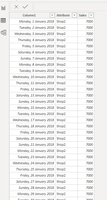
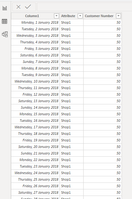
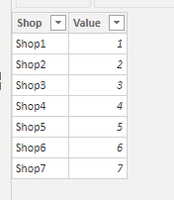
as result
Sales MTD shows wrong number;
In this case it should be shown 56000 on Sales MTD for shop1 as it is choosen first week by slicer.)

- Mark as New
- Bookmark
- Subscribe
- Mute
- Subscribe to RSS Feed
- Permalink
- Report Inappropriate Content
Hi @Anonymous ,
It's better to have sample data, just a small part for testing. I think if First_AMonth and LastDate_Amonth work well, maybe you can try to use these two measures as variables in Sales MTD, similar to the following:
Sales MTD =
VAR _First_AMonth =
    CALCULATE (
        MIN ( Calendar_lookup[Date] ),
        FILTER (
            ALL ( Calendar_lookup ),
            Calendar_lookup[Accounting Month]
                = SELECTEDVALUE ( Calendar_lookup[Accounting Month] )
                && Calendar_lookup[Accounting Year] = SELECTEDVALUE ( Calendar_lookup[Year] )
        )
    )
VAR _LastDate_Amonth =
    CALCULATE (
        MAX ( Calendar_lookup[Date] ),
        FILTER (
            ALL ( Calendar_lookup ),
            Calendar_lookup[Year] = SELECTEDVALUE ( Calendar_lookup[Year] )
                && Calendar_lookup[Accounting Month]
                    = SELECTEDVALUE ( Calendar_lookup[Accounting Month] )
                && Calendar_lookup[Week of Year] = SELECTEDVALUE ( Calendar_lookup[Week of Year] )
        )
    )
RETURN
    CALCULATE (
        SUM ( Sales[Sales] ),
        FILTER (
            ALL ( Calendar_lookup ),
            Calendar_lookup[date] >= _First_AMonth
                && Calendar_lookup[Date] < _LastDate_Amonth
        )
    )
Best Regards,
Community Support Team _ Joey
If this post helps, then please consider Accept it as the solution to help the other members find it more quickly.
- Mark as New
- Bookmark
- Subscribe
- Mute
- Subscribe to RSS Feed
- Permalink
- Report Inappropriate Content
Hi @v-joesh-msft,
Thank you for your detail explanation and now it works completely!!
I had been tried such lots of parturns and been failed to get correct figure due to filter interfering with each other.
Now it is sorted and I've learned so good knowledge from you!
Thanks again Joey!
- Mark as New
- Bookmark
- Subscribe
- Mute
- Subscribe to RSS Feed
- Permalink
- Report Inappropriate Content
Please find original data (image) of customer, sales as well.

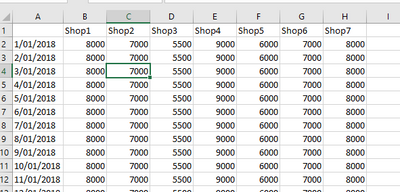
Helpful resources

Power BI Dataviz World Championships
The Power BI Data Visualization World Championships is back! Get ahead of the game and start preparing now!

Power BI Monthly Update - December 2025
Check out the December 2025 Power BI Holiday Recap!

FabCon Atlanta 2026
Join us at FabCon Atlanta, March 16-20, for the ultimate Fabric, Power BI, AI and SQL community-led event. Save $200 with code FABCOMM.

| User | Count |
|---|---|
| 41 | |
| 38 | |
| 36 | |
| 30 | |
| 28 |


| User | Count |
|---|---|
| 129 | |
| 88 | |
| 79 | |
| 68 | |
| 63 |


